

How file links work
When you upload a file to the HoopAI platform, the file is stored on CDN infrastructure and assigned a stable URL. That URL does not change when you rename the file, move it to a folder, or reorganize your library. This means any links you have already shared or embedded remain valid even after you make organizational changes. All media file URLs are publicly accessible by default. There is no private-file toggle or access control at the individual file level — anyone with the link can view or download the file.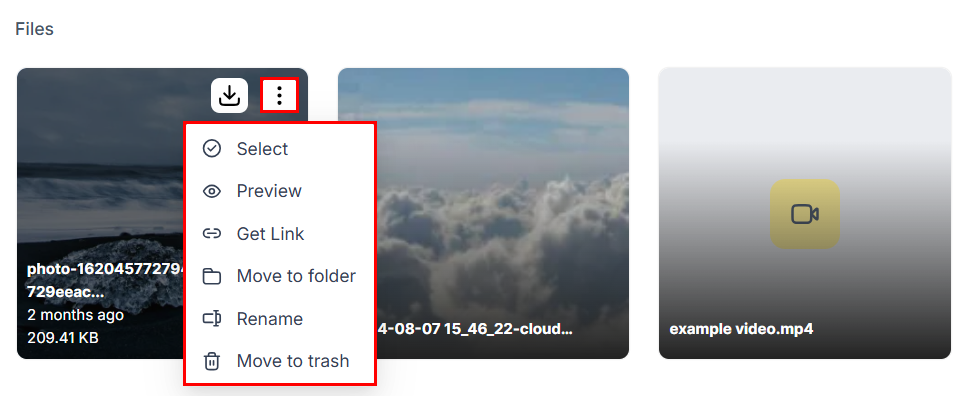
Use the three-dot action menu on any file to copy its shareable link
Copying a file link
There are two ways to get the direct URL for any file.From the three-dot action menu
- In Media Storage, locate the file you want to share
- Hover over it and click the three-dot icon that appears
- Click Get Link
- The URL is immediately copied to your clipboard — no dialog or confirmation step appears
From the file preview
- Click on any file to open its preview panel
- In the preview, locate the copy link icon (usually shown as a chain-link icon in the top-right area of the preview)
- Click it to copy the URL to your clipboard
Where to use file links
Once you have the URL on your clipboard, you can paste it into:- Image fields in funnel and website builders — paste the URL directly into the image source field to embed the file without re-uploading
- Email HTML editors — embed images in the raw HTML of an email template using a standard
<img src="...">tag - External platforms — any third-party tool that accepts a direct media URL (landing page builders, ad platforms, CMS systems, etc.)
- SMS and chat messages — paste the link into a message to share a downloadable file with a contact
- Workflow actions — reference the URL in automation steps that send emails, SMS messages, or webhooks
Embedding images vs. linking documents
For images, pasting the URL into an image element source field embeds the image visually. The CDN serves the image directly, so it loads fast and renders inline. For documents (PDFs, Word files, etc.), the link opens or prompts a download of the file in the recipient’s browser. You cannot preview a PDF inline using only a Media Storage link — use an embed element or a third-party PDF viewer if you need inline rendering. For videos, direct links open the raw video file in the browser or trigger a download, depending on the browser. To present a video with a player interface and controls, use the hosted video element within the funnel or website builder instead of pasting a raw link. See Video hosting for details.Sharing files with people outside HoopAI
Direct media links are publicly accessible without any authentication. You can share them with clients, customers, or collaborators by:- Pasting the link into an email or chat message
- Including the link in a document or presentation
- Using the link as the
hrefin a button or hyperlink on a funnel page
Link stability and file renaming
Renaming a file in Media Storage changes its display name in the library but does not change the underlying CDN URL. All existing embeds and shares remain functional after a rename.Bulk sharing
The media library does not generate a single link that bundles multiple files. To share multiple files, copy each file’s link individually. For use cases requiring a collection of files (e.g., a press kit, an asset bundle for a client), consider uploading the files as a ZIP archive — the ZIP receives a single direct link that recipients can download and extract.FAQs
Can I make a file private so only logged-in users can see it?
Can I make a file private so only logged-in users can see it?
Individual file-level privacy controls are not currently available. All files stored in Media Storage are publicly accessible via their direct URL. For gated content delivery (e.g., course materials only accessible after purchase), use the Memberships module to host and restrict access to the content rather than relying on Media Storage links alone.
Will the link break if I move the file to a different folder?
Will the link break if I move the file to a different folder?
No. Moving a file to a folder changes its position in the library interface but does not alter its CDN URL. Links copied before the move continue to work.
Can I track how many times a file link has been accessed?
Can I track how many times a file link has been accessed?
Media Storage does not provide link analytics or access tracking. If you need to track clicks or downloads, route the file link through a tracking URL or use a redirect link configured in the platform’s link tracking tools.
Is there an expiry date on file links?
Is there an expiry date on file links?
File links do not expire. They remain active for as long as the file exists in your Media Storage. The only way to deactivate a link is to permanently delete the file.