

Overview
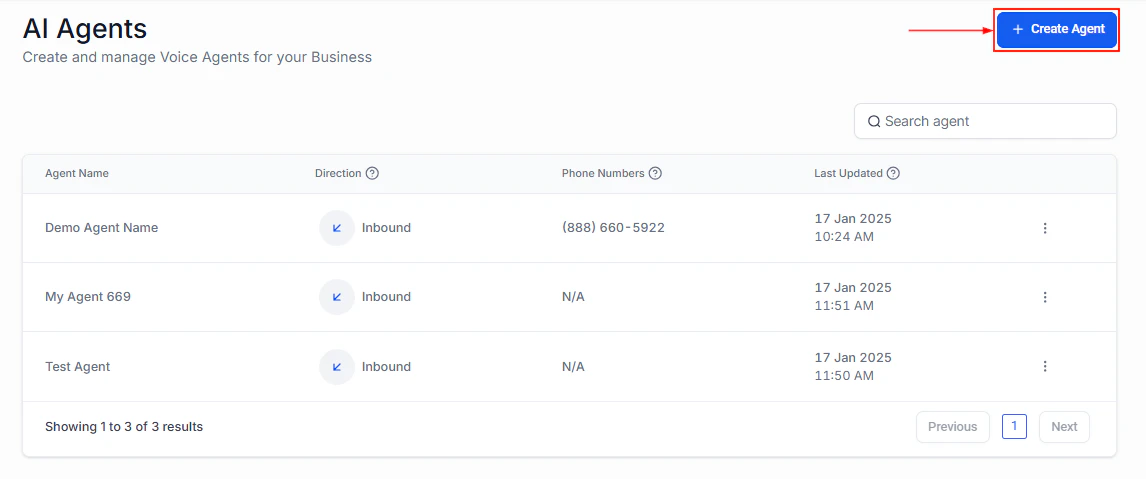
Voice AI agent setup for real estate with agent name, direction, and phone number
Architecture overview
The real estate AI assistant operates across the entire client journey:- Inquiry capture — A prospect reaches out about a listing via SMS, web chat, phone, or social media ad.
- Property information — The bot answers questions about the property using the knowledge base (price, bedrooms, square footage, neighborhood, etc.).
- Buyer/seller qualification — The bot asks qualifying questions to determine if the prospect is a serious buyer or seller.
- Showing scheduling — Qualified prospects are offered available showing times and booked onto the agent’s calendar.
- CRM update — The bot tags the contact, updates custom fields with qualification data, and moves them through the pipeline.
- Agent notification — The real estate agent receives an alert with the prospect’s details and showing information.
- Follow-up — Automated follow-up sequences nurture prospects who are not ready to buy or sell immediately.
Step-by-step build
1
Create real estate custom fields
Navigate to Settings > Custom Fields and create these fields on the Contact object:
2
Set up your CRM pipeline
Create a real estate pipeline with these stages:
- New inquiry — Just came in, not yet engaged
- Qualification in progress — Bot is qualifying
- Qualified buyer — Ready for showings
- Qualified seller — Ready for listing presentation
- Showing scheduled — Has an upcoming showing
- Post-showing follow-up — Attended showing, needs follow-up
- Offer stage — Actively making or receiving offers
- Under contract — Deal in progress
- Closed — Deal complete
- Nurture — Not ready now, follow up later
3
Build the property knowledge base
Navigate to AI Agents > Knowledge Base and add:Active listings (update regularly):
- Address, price, bedrooms, bathrooms, square footage
- Key features (pool, garage, updated kitchen, etc.)
- Neighborhood information (schools, restaurants, commute times)
- Open house dates and showing availability
- Photos description (the bot cannot show images but can describe them)
- Your service area and specializations
- The buying process (step by step for first-time buyers)
- The selling process (what to expect)
- Financing basics (types of loans, pre-approval process)
- Market conditions (average days on market, price trends)
- Your team bios and specializations
4
Configure the calendar for showings
Create a dedicated calendar for property showings:
- Availability: Set windows when you can do showings (e.g., 10 AM – 6 PM, Tuesday – Saturday)
- Duration: 30 minutes per showing (with 15-minute buffer for travel)
- Booking window: Allow bookings 1–14 days out
- Minimum notice: 4 hours (gives you time to prepare and confirm access)
5
Create the Conversation AI bot
Navigate to AI Agents > Conversation AI and create a bot:
- Name: “Real Estate Assistant”
- Type: Auto-pilot
- Channels: SMS, Web Chat, Facebook Messenger, Instagram
- Calendar: Assign your showings calendar
6
Create the Voice AI agent (optional)
For phone inquiries, create an inbound Voice AI agent:
- Name: “Property Hotline”
- Direction: Inbound
- Calendar: Same showings calendar
- Voice: Choose a warm, professional voice
7
Write the bot prompt
Paste the full prompt from the section below. The real estate prompt is more complex than other use cases because it handles multiple prospect types (buyers, sellers, investors) and needs property-specific knowledge.
8
Configure bot actions
Set up Conversation AI actions:
- Update custom fields: Map buyer/seller type, budget, timeline, pre-approval status
- Add tags: “buyer,” “seller,” “investor,” “showing-booked,” “pre-approved”
- Move opportunity: Advance through the real estate pipeline based on conversation outcome
- Book appointment: Connect to the showings calendar for scheduling
9
Build follow-up workflows
Create these workflows:Post-inquiry nurture (for prospects not ready to act):
- Day 1: Send a market report for their area of interest
- Day 7: Share a new listing that matches their criteria
- Day 14: Check in with a soft question about their timeline
- Day 30: Monthly market update
- Continue monthly until they re-engage or opt out
- 2 hours after showing: “What did you think of [ADDRESS]? I would love to hear your thoughts.”
- Day 2: If positive response, ask if they want to make an offer
- Day 2: If negative, ask what they are looking for instead and suggest alternatives
- Day 1: Send a comparative market analysis (CMA) for their property
- Day 3: Follow up asking if they reviewed the CMA
- Day 7: Offer a free listing consultation
Full prompt
Testing your real estate assistant
1
Property inquiry test
Ask about a specific active listing. Verify the bot provides accurate details from the knowledge base.
2
Buyer qualification test
Respond as a serious buyer (pre-approved, immediate timeline, specific budget). Verify the bot qualifies you and offers to schedule a showing.
3
Seller qualification test
Say you want to sell your home. Verify the bot asks the right questions and offers a CMA or listing consultation.
4
Showing booking test
Accept a showing invitation. Verify the bot checks calendar availability, books the slot, and sends confirmation.
5
Already-has-agent test
Say “I already have an agent.” Verify the bot handles it gracefully without being pushy.
6
Unknown property test
Ask about a property not in the knowledge base. Verify the bot admits it does not have the details and offers to connect you with the agent.
7
CRM verification
After each test, check the contact record for accurate custom fields, tags, and pipeline stage.
Optimization tips
- Update listings in the knowledge base weekly. Stale listings are the number one complaint from real estate prospects interacting with AI bots.
- Track which listings generate the most inquiries. Use tags to identify high-interest properties and allocate more marketing budget to them.
- Personalize follow-up sequences by property type. A condo buyer has different concerns than a single-family buyer. Segment your nurture sequences accordingly.
- Add neighborhood guides to the knowledge base. Buyers often ask about schools, restaurants, commute times, and safety. Rich neighborhood data makes your bot significantly more useful.
- Monitor buyer-to-showing conversion. If qualified buyers are not scheduling showings, your prompt may need a stronger call to action, or your available times may not match when buyers are free.
- Use the bot for open house follow-up. After an open house, trigger the bot to follow up with attendees who signed in, asking for their impressions and offering private showings.
KPIs to measure success
Next steps
Lead qualification
Apply advanced lead scoring techniques to your real estate pipeline.
Appointment scheduler
Enhance your showing scheduling with reminders and no-show follow-up.
After-hours support
Handle property inquiries that come in evenings and weekends.
Prompt engineering
Advanced prompt techniques for real estate-specific conversations.