

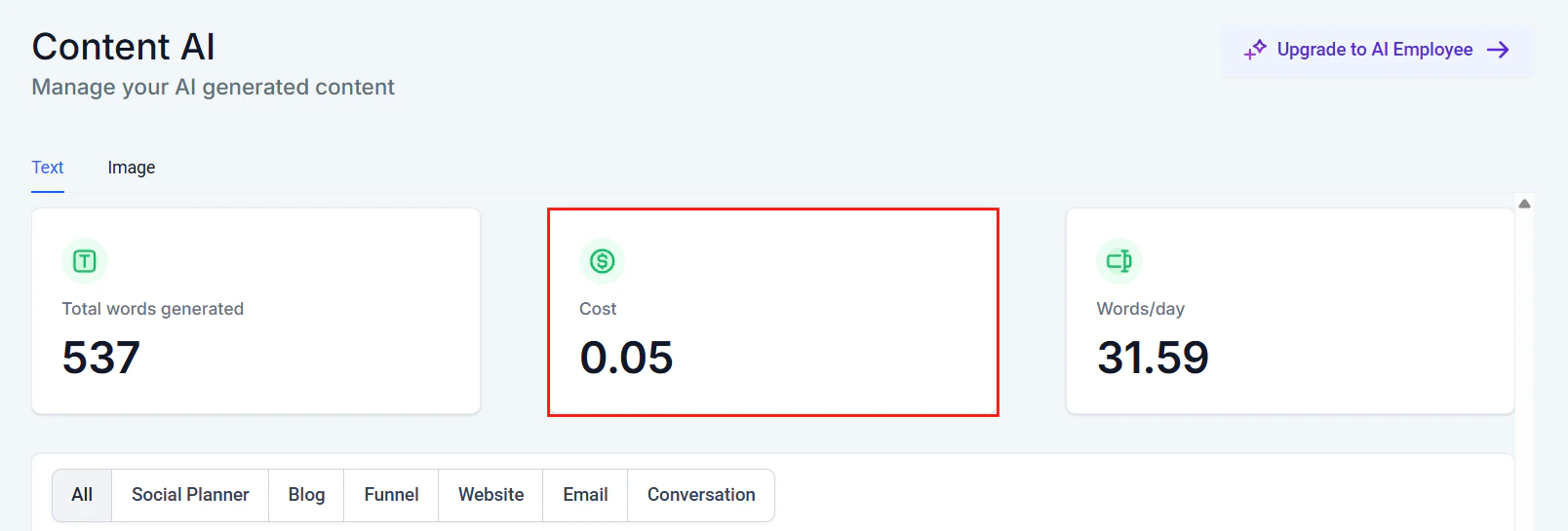
Content AI cost tracking dashboard showing total words, cost, and daily usage
Understanding AI usage costs
Every AI interaction in HoopAI consumes resources that translate to cost. Understanding what drives those costs is the first step toward optimizing them.What generates AI cost
Tokens
Text-based AI (Conversation AI, workflow AI actions) charges based on tokens — the units of text processed. Both input (your prompt + knowledge base + conversation history) and output (the bot’s response) count.
Minutes
Voice AI charges based on call duration. Longer calls with more back-and-forth consume more minutes.
Image generation
AI-generated images in workflows or content tools are charged per image generated.
Cost breakdown by feature
For current pricing details and your account’s usage tiers, see AI pricing.
Cost reduction strategies
Knowledge base efficiency
Your knowledge base content is included as context with every AI response. Inefficient knowledge bases inflate token usage on every single message. High-impact optimizations:- Remove redundancy. If five entries say roughly the same thing in different ways, consolidate them into one clear entry. The AI retrieves the top matches — duplicates waste retrieval slots.
- Use structured formats. A table with pricing tiers uses fewer tokens than the same information written as paragraphs.
- Eliminate filler content. Marketing language, repetitive disclaimers, and verbose introductions in knowledge base entries all consume tokens without improving answers.
- Limit retrieval count. If your bot is configured to retrieve many knowledge base chunks per query, consider reducing this. Three highly relevant chunks outperform eight mediocre ones and cost far less.
- Efficient entry
- Wasteful entry
Prompt efficiency
Your system prompt is processed with every message in a conversation. Even small reductions compound over thousands of interactions.1
Audit your current prompt
Copy your system prompt into a word counter. If it exceeds 300 words, look for opportunities to trim.
2
Remove redundant instructions
Statements like “Be helpful and professional” and “Always try to assist the user” say the same thing. Keep one.
3
Use shorthand for rules
Instead of “When a customer asks about refunds, you should always direct them to speak with a human agent by escalating the conversation,” write: “Escalate: refund requests.”
4
Eliminate examples from the prompt
If your prompt includes many example conversations, move them to the knowledge base instead. The AI will retrieve them when relevant rather than processing them every time.
5
Test after trimming
After each reduction, test your bot with common queries to ensure behavior has not degraded.
Smart escalation
Every message your AI agent handles costs tokens. But every unnecessary escalation costs human agent time, which is far more expensive. The goal is to find the right balance. Escalation rules that save money:- Escalate on intent, not confusion. Configure your bot to escalate when a contact explicitly requests a human, not just when the bot is uncertain. Uncertain bots can be taught with better knowledge base content.
- Use confidence thresholds. Set your bot to attempt an answer unless confidence is very low. A partially helpful answer followed by a clarifying question is cheaper than an immediate escalation.
- Handle complaints with AI first. Many complaints can be acknowledged and triaged by the bot before routing to a human, saving agent time on initial data collection.
- Automate data collection. Before escalating, have the bot collect name, issue description, and account details. This saves 2-3 minutes of human agent time per escalation.
A well-optimized escalation strategy typically results in AI handling 75-85% of conversations end-to-end, with only 15-25% requiring human intervention.
Channel optimization
Different channels have different cost profiles. Optimize your AI behavior for each.Workflow AI: batch vs real-time processing
When using AI actions within workflows, choose the right processing approach: Real-time AI processing — Triggers immediately when an event occurs. Best for:- Responding to incoming messages
- Qualifying leads as they come in
- Urgent routing decisions
- Summarizing daily conversations
- Generating reports
- Bulk content creation
- Review responses (once per day rather than immediately)
Usage monitoring and alerts
HoopAI provides tools to track your AI spending in real time.Where to monitor usage
- Settings > AI Configuration — View current month’s usage by feature type
- Billing section — See AI costs broken down by category on your invoice
- AI agent dashboard — Monitor per-bot usage to identify which agents consume the most resources
- Workflow logs — Track AI action costs within specific workflows
Setting up usage alerts
1
Navigate to Settings
Go to Settings > Company Billing in your HoopAI account.
2
Find AI usage section
Scroll to the AI usage area where current consumption is displayed.
3
Configure alerts
Set notification thresholds (e.g., alert at 80% of monthly budget). Notifications can be sent via email or in-app.
4
Review weekly
Make it a habit to check AI usage weekly. Catch unexpected spikes early before they become expensive.
Cost comparison across AI features
Understanding relative costs helps you allocate your AI budget effectively.These are estimates based on typical usage patterns. Your actual costs depend on prompt length, response length, knowledge base size, and AI model used. Check AI pricing for current rates.
ROI calculation framework
The true measure of AI cost optimization is not minimizing spend — it is maximizing return on that spend.Calculating AI ROI
Use this framework to determine whether your AI investment is paying off:Beyond direct cost savings
AI agents also deliver value that is harder to quantify:- 24/7 availability — No overtime or shift differentials
- Instant response — Higher conversion rates from immediate engagement
- Consistency — Every contact gets the same quality of service
- Scalability — Handle volume spikes without hiring
- Data capture — Every conversation is logged and searchable
ROI for sales bots
ROI for sales bots
Track: Appointments booked by AI, conversion rate of AI-booked vs manually booked appointments, revenue attributed to AI-initiated conversations.
ROI for support bots
ROI for support bots
Track: Tickets resolved without human intervention, average resolution time, customer satisfaction scores for AI vs human interactions.
ROI for Voice AI
ROI for Voice AI
Track: Calls handled without transfer, appointment show rates from AI calls, cost per call vs human receptionist cost.
Budget planning tips
For new AI deployments:- Start with a conservative budget and scale up as you optimize
- Begin with text-based AI before adding Voice AI (lower cost, easier to optimize)
- Set a 90-day optimization window before evaluating ROI
- Review costs monthly and benchmark against previous months
- Identify your top 3 cost drivers and focus optimization there
- Allocate 10-15% of AI budget for testing and experimentation
- Plan for higher volumes during your business’s peak seasons
- Pre-optimize knowledge bases and prompts before anticipated spikes
- Consider temporarily increasing escalation thresholds during ultra-high-volume periods to manage costs
Cost optimization checklist
- Knowledge base entries are concise and free of redundancy
- System prompt is under 300 words
- Channel-specific prompts are configured
- Escalation rules balance AI handling with human handoff
- Usage alerts are configured at 80% of monthly budget
- Weekly usage reviews are scheduled
- ROI is calculated and tracked monthly
- Batch processing is used for non-urgent AI workflows
- Common queries are handled by workflows instead of AI where possible
Next steps
AI pricing
Review current pricing tiers and understand your account’s AI cost structure.
Prompt optimization
Write leaner prompts that reduce token usage without sacrificing quality.
Performance optimization
Speed up your AI agents alongside reducing costs.
Knowledge base setup
Build an efficient knowledge base that minimizes token consumption.