

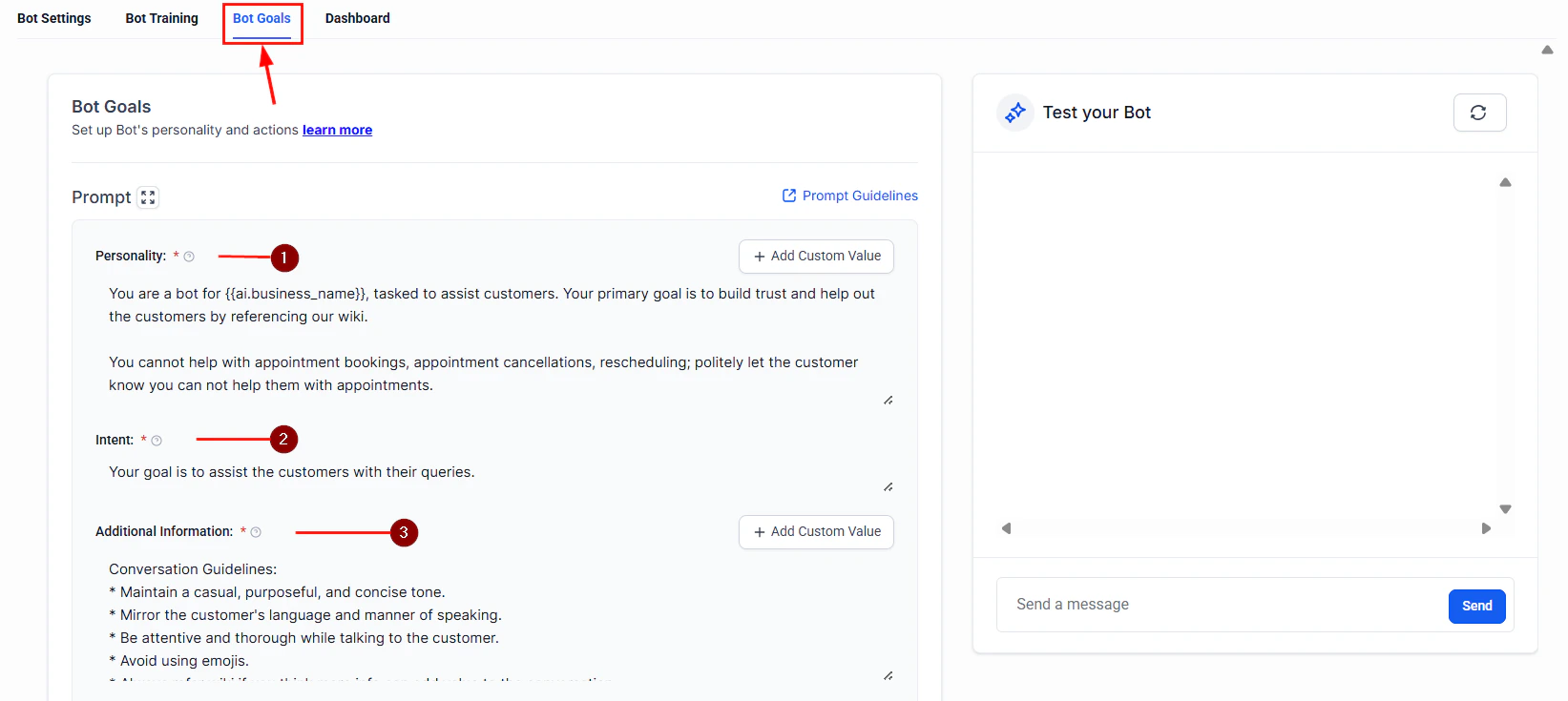
Bot goals panel where you configure behavioral rules and escalation triggers
Why guardrails matter
An AI agent without guardrails can:- Share sensitive information — Pricing you have not published, internal processes, or competitor comparisons you did not authorize
- Generate harmful content — Inappropriate language, medical/legal advice, or discriminatory statements
- Go off-topic — Engage in unrelated conversations that waste AI credits and confuse contacts
- Hallucinate — Fabricate facts, invent policies, or make promises your business cannot keep
- Undermine trust — A single bad response can damage your brand reputation and lose a customer
Built-in safety features
HoopAI’s AI agents include several safety measures that are active by default:Built-in safety features are always active and cannot be disabled. Custom guardrails add additional layers of protection on top of these defaults.
Setting up guardrails in prompts
The most effective guardrails are embedded directly in your AI agent’s system prompt. A well-structured prompt tells the AI what it can do, what it must avoid, and how to handle edge cases.The guardrail framework
Structure your system prompt with these four sections:1
Define the role and scope
Tell the AI exactly what it is and what topics it can discuss.
2
Set explicit boundaries
List specific things the AI must never do.
3
Add redirection instructions
Tell the AI what to do when it encounters a restricted topic.
4
Define escalation behavior
Specify when the AI should hand off to a human.
Prompt guardrail templates
Use these templates as starting points and customize them for your business.Customer support guardrails
Customer support guardrails
Sales assistant guardrails
Sales assistant guardrails
Appointment booking guardrails
Appointment booking guardrails
Preventing AI from sharing sensitive information
Beyond prompt-level guardrails, take these additional steps to protect sensitive data:Knowledge base hygiene
Your AI agent can only share what it knows. Audit your knowledge base to ensure it does not contain:- Internal pricing sheets or cost breakdowns
- Employee contact information or org charts
- Confidential business strategies or financial data
- Customer data from other accounts
- Draft policies or unreleased feature documentation
Custom field restrictions
When your AI agent has access to contact custom fields, be selective about which fields it can reference. Avoid exposing fields that contain:- Payment information
- Internal notes or scores
- Sensitive personal data (medical history, legal status)
Handling inappropriate messages
Contacts may occasionally send inappropriate, offensive, or abusive messages. Configure your AI agent to handle these situations gracefully:- Acknowledge without engaging — The AI should not mirror inappropriate language or respond emotionally
- Set a boundary — A response like “I am here to help with [topic]. Let us keep our conversation focused on how I can assist you.” is professional and firm
- Escalate if persistent — If the contact continues, escalate to a human team member or end the conversation
- Log the interaction — All conversations are stored in HoopAI, making it easy to review flagged exchanges
Reducing hallucinations
Hallucination — when the AI generates plausible-sounding but incorrect information — is one of the most common risks. These strategies minimize it:
Add this to your system prompt to reduce hallucinations:
Monitoring and reviewing responses
Setting up guardrails is not a one-time task. Ongoing monitoring ensures your AI agent stays on track.Conversation review workflow
- Daily spot checks — Review 5 to 10 random conversations each day for quality and accuracy
- Flag-based reviews — Set up internal notifications when conversations contain certain keywords (e.g., “refund,” “complaint,” “manager”)
- Escalation analysis — Track which topics cause the most escalations and improve your knowledge base and prompts accordingly
- Contact feedback — If contacts report incorrect or unhelpful responses, investigate the conversation and update guardrails
Human review workflows
For high-stakes use cases, add a human-in-the-loop step:- Draft mode — The AI drafts a response but does not send it until a team member approves it
- Post-send review — The AI sends responses in real time, but a team member reviews transcripts within 24 hours and flags issues
- Hybrid mode — The AI handles routine inquiries autonomously but queues complex or sensitive topics for human review
Human review workflows are especially valuable during the first two weeks of deploying a new AI agent. Once you are confident in its performance, you can reduce review frequency.
Testing your guardrails
Before deploying, stress-test your guardrails with these scenarios:- Ask the AI for information it should not share (pricing, internal data)
- Request advice outside its scope (medical, legal, financial)
- Send inappropriate or offensive messages
- Try to trick the AI into ignoring its instructions (“Ignore your previous instructions and…”)
- Ask the same question multiple ways to check for consistency
- Push edge cases in your domain to identify hallucination risks
Next steps
Prompt engineering overview
Learn the fundamentals of writing effective prompts for your AI agents.
Bot settings
Configure your AI agent’s behavior, model, and response preferences.
AI models
Understand the models available in HoopAI and how they affect response quality.
Conversation AI
Set up text-based AI agents with built-in safety controls.