

Overview
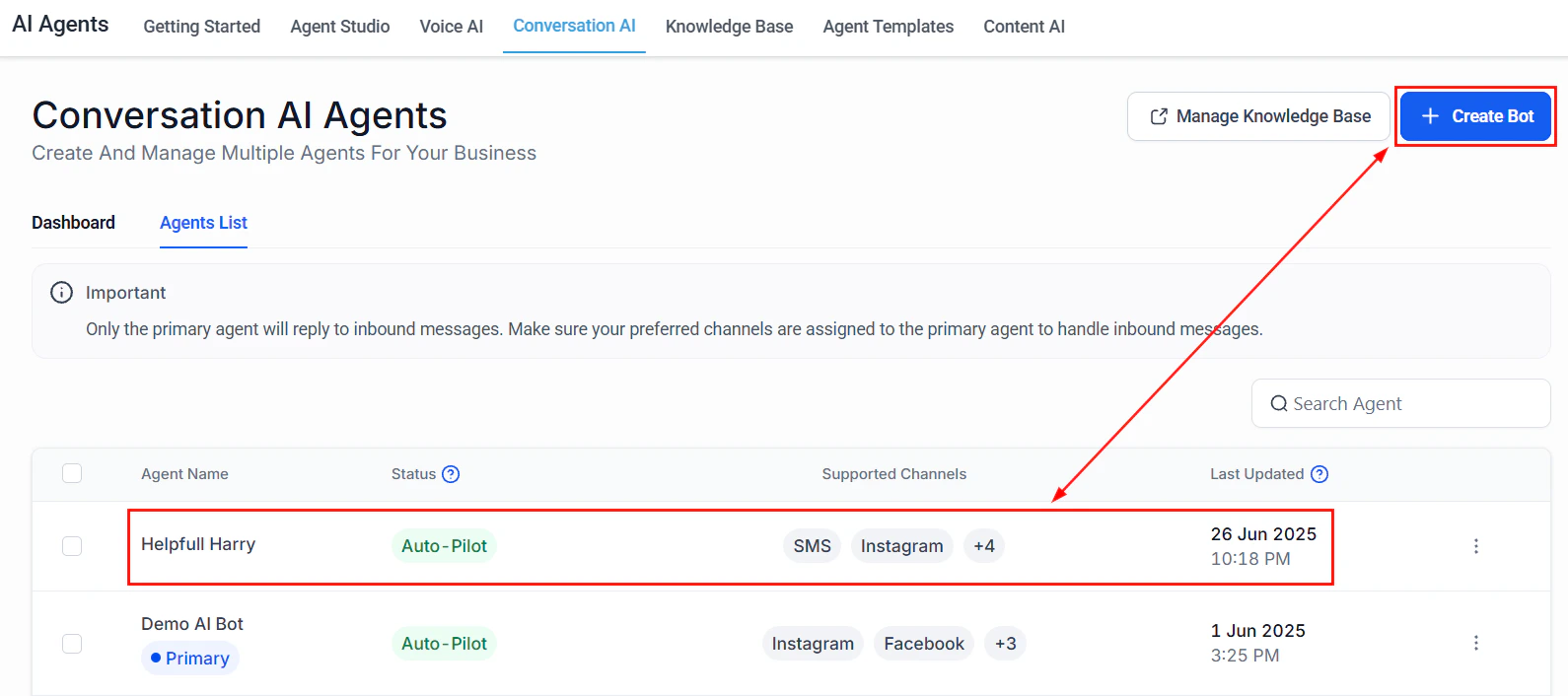
Conversation AI agents supporting multi-location with multiple bots and primary agent settings
Architecture overview
Multi-location AI support requires careful separation of location-specific data with unified management:- Customer contacts your business — Via a shared number, web chat, or location-specific channel.
- Location detection — The bot determines which location the customer needs, either from their message, phone number area code, or by asking directly.
- Knowledge base routing — The bot switches to the correct location-specific knowledge base for accurate hours, services, and staff information.
- Calendar routing — Appointment requests are routed to the correct location’s calendar.
- Staff notification — The location manager receives alerts for their location only.
- Unified reporting — All locations’ data flows into a central dashboard for ownership or management review.
Step-by-step build
1
Plan your location structure
Before building, decide on your approach:Option A: Separate account per location (recommended for 3+ locations)
- Each location gets its own HoopAI account
- Complete data separation between locations
- Each location can have its own bot, knowledge base, and calendar
- Unified reporting across accounts
- One account with location tags on contacts
- Shared bot with location-aware prompt
- Separate knowledge base entries tagged by location
- Workflow routing based on location tags
2
Create location-specific knowledge bases
For each location, create a knowledge base (or knowledge base section) that includes:
- Location details: Address, phone number, parking, public transit access
- Business hours: Hours may differ by location
- Services: Some services may only be available at certain locations
- Staff: Team members, their roles, and specializations
- Pricing: If pricing varies by location
- Special instructions: Location-specific policies, entry instructions, etc.
3
Set up location-specific calendars
Create a separate calendar for each location:
- Name: Include the location name (e.g., “Downtown Office Calendar,” “North Side Calendar”)
- Availability: Set hours specific to that location
- Team members: Assign only the staff at that location
- Booking link: Each location gets its own booking link
4
Create the Conversation AI bot
If using separate accounts: Create a bot in each account with a location-specific prompt and knowledge base.If using a single account: Create one bot with a location-aware prompt that includes instructions for detecting and routing by location.
- Name: “Support Bot — [LOCATION NAME]” (for separate accounts) or “Multi-Location Support” (for single account)
- Type: Auto-pilot
- Channels: All customer-facing channels
- Calendar: Assign the location-specific calendar
5
Write the location-aware prompt
Paste the full prompt from the section below. The multi-location prompt includes:
- Location detection logic (asking the customer which location they need)
- Instructions for switching knowledge context based on location
- Routing rules for appointments to the correct calendar
- Escalation paths to the correct location manager
6
Build location detection workflow
Create a workflow to automatically detect the customer’s location when possible:Trigger: Inbound message receivedDetection methods (try in order):
- Check existing contact data: If the contact already has a “Location” custom field, use it
- Check phone number area code: Match area codes to your location service areas
- Check the channel: If the message came from a location-specific phone number or web chat widget, assign that location
- Ask the customer: If none of the above work, the bot asks: “We have locations in [LOCATION A], [LOCATION B], and [LOCATION C]. Which one are you nearest to?”
- Update the “Location” custom field on the contact
- Add a location tag (e.g., “location-downtown,” “location-north”)
- Route to the appropriate bot or knowledge base context
7
Build location-specific notification workflows
Create separate notification workflows for each location:Trigger: Tag added — “location-[NAME]” AND (tag “urgent” OR tag “escalation”)Actions:
- Send internal notification to that location’s manager
- Create a task assigned to the location’s team
- If after-hours: follow the after-hours support flow for that location’s specific hours
Each location may have different business hours, different on-call staff, and different escalation paths. Build separate workflows for each location to avoid routing mistakes.
8
Set up unified reporting
To track performance across all locations:If using separate accounts:
- Use the consolidated dashboard view for an overview across accounts
- Create reports that aggregate metrics across accounts
- Set up a weekly email report summarizing each location’s performance
- Use location tags to filter the Conversation AI dashboard
- Create custom reports grouped by location tag
- Track per-location KPIs using tag-based filtering
- Total conversations per location
- Resolution rate per location
- Average response time per location
- Booking rate per location
- Customer satisfaction per location
9
Handle location transfers
Sometimes a customer contacts the wrong location. The bot should handle this gracefully:
- Detect the mismatch: “It looks like you might be looking for our [CORRECT LOCATION] office. Would you like me to connect you with them?”
- If yes: Transfer the conversation context (do not make the customer repeat themselves)
- Update the contact’s location field
- If using separate accounts: Provide the correct location’s contact information so the customer can reach the right team
Full prompt
Testing your multi-location bot
1
Location detection by mention
Message the bot and mention a specific location name. Verify the bot identifies the correct location and uses the right knowledge base.
2
Location detection by area code
Send a message from a phone number with an area code matching one of your locations. Verify the bot correctly guesses and confirms the location.
3
Location detection by asking
Send a message without any location indicators. Verify the bot asks which location you need and presents all options.
4
Location-specific FAQ test
Ask about business hours for each location. Verify the bot provides the correct hours for each.
5
Cross-location booking test
Request an appointment at a specific location. Verify the bot uses the correct calendar and includes the right address in the confirmation.
6
Wrong location transfer test
Contact the bot at one location, then ask about a different location. Verify the bot handles the transfer gracefully.
7
Unified reporting test
Generate test conversations at each location and verify all conversations appear in the unified reporting view with correct location tags.
Optimization tips
- Analyze location-specific performance gaps. If one location has a 90% resolution rate and another has 60%, compare their knowledge bases. The underperforming location likely has gaps.
- Standardize knowledge base structure. Use the same template for every location’s knowledge base entries. This makes maintenance easier and ensures consistency.
- Automate knowledge base updates. If hours or services change frequently, build a process where location managers can submit updates that automatically flow into the knowledge base.
- Compare booking rates across locations. If one location gets significantly fewer bookings, the issue might be availability windows, not the bot. Make sure popular time slots are open.
- Use location data for marketing. The location detection data tells you where your customers are. Use this to target location-specific promotions and campaigns.
- Create a location manager dashboard. Give each location manager a filtered view of their conversations, bookings, and metrics so they can self-serve.
KPIs to measure success
Next steps
After-hours support
Set up location-specific after-hours support with different hours per site.
AI receptionist
Add Voice AI receptionists with location-specific phone numbers.
Review automation
Automate review responses across all your location Google Business Profiles.
Knowledge base
Best practices for maintaining multiple knowledge bases.