Configure HoopAI AI agents to communicate in multiple languages and detect language automatically.
Businesses that serve diverse communities or operate across borders need AI agents that can communicate in their contacts’ preferred languages. HoopAI’s AI agents support multi-language interactions out of the box, but getting the best results requires thoughtful configuration. This guide covers language detection, knowledge base strategies, prompt design, and best practices for non-English deployments.
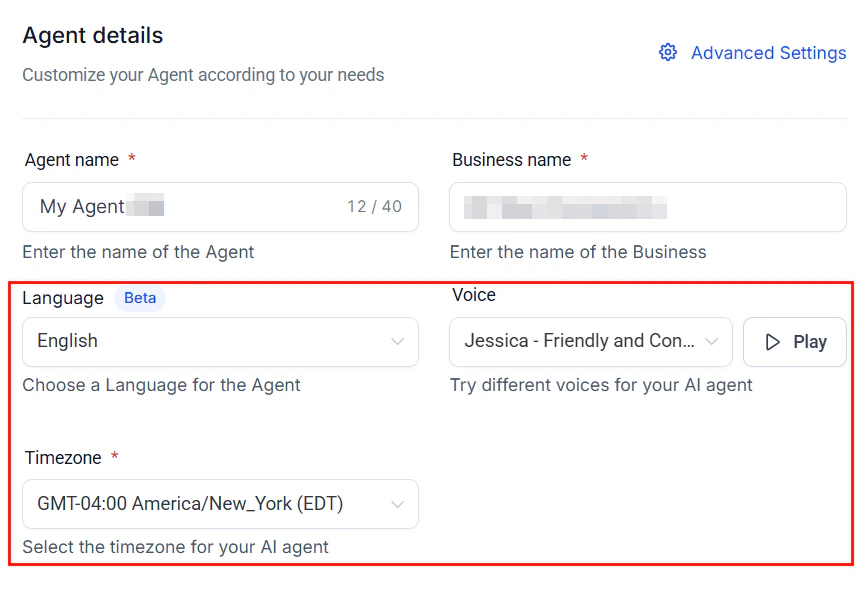
Voice AI agent language selection during agent creation
HoopAI’s AI agents are built on large language models that understand and generate text in dozens of languages. When a contact sends a message in Spanish, the AI can detect the language and respond in Spanish — even if your system prompt and knowledge base are in English.However, “can” and “will do reliably” are different things. Without proper configuration, multi-language bots may:
Respond in the wrong language
Mix languages within a single response
Retrieve irrelevant knowledge base entries
Lose nuance in translation
The rest of this guide ensures none of these issues affect your deployment.
These languages are functional but may require more prompt tuning and testing:
Swedish, Norwegian, Danish, Finnish
Czech, Romanian, Hungarian, Greek
Thai, Vietnamese, Indonesian, Malay
Hebrew, Ukrainian, Filipino
Language support depends on the AI model you select. Newer models generally offer better multilingual performance. See AI models for model comparisons.
HoopAI’s AI agents can detect the language of an incoming message and respond in the same language automatically. This is the simplest approach for businesses that serve multilingual audiences.
Navigate to AI Agents in your HoopAI account and select the agent you want to configure.
2
Set the primary language
In the agent’s language settings, select your primary language. This is the default language the agent uses when it cannot confidently detect the contact’s language.
3
Enable auto-detection
Toggle on Automatic Language Detection. When enabled, the agent analyzes the first message from each contact and matches its response language accordingly.
4
Add language detection to your prompt
Reinforce auto-detection with an explicit instruction in your system prompt:
LANGUAGE RULES:- Detect the language of the customer's message- Always respond in the same language the customer is using- If the customer switches languages mid-conversation, switch with them- Never mix two languages in a single response- When uncertain about the language, respond in English and ask the customer for their preferred language
Language detection works best when the contact’s first message contains at least a full sentence. Very short messages (one or two words) may be detected incorrectly if the words are shared across languages (e.g., “OK,” “hotel,” “taxi”).
Maintain your primary knowledge base in one language and add translated versions only for your most important content (FAQs, key policies, pricing).Pros:
Balances accuracy and maintainability
Critical content is translated natively; the rest relies on AI translation
Incremental — start small and expand as needed
Cons:
Inconsistent quality between natively translated and AI-translated content
Best for: Most businesses. Start here and expand to Strategy 2 if needed.
Regardless of your strategy, always test your AI agent in every supported language before going live. Have native speakers review the responses for accuracy, tone, and cultural appropriateness.
This is the most common approach — the AI mirrors the contact’s language:
You are a customer support assistant for [Business Name].LANGUAGE BEHAVIOR:- Detect the language of each customer message- Always respond in that same language- Maintain consistent language throughout the conversation- If the customer writes in a language you are uncertain about, respond in English and politely ask which language they prefer- Never translate your response into multiple languages unless the customer explicitly asksRESPONSE STYLE:- Use natural, conversational phrasing appropriate for the detected language- Adapt formality level to cultural norms (e.g., use "usted" in Spanish for business contexts, "tu" in French for casual)- Use local date formats, currency symbols, and measurement units when relevant
For use cases where you need to control which languages are offered:
You support customers in English, Spanish, and French ONLY.If a customer writes in any other language, respond in Englishwith: "I currently support English, Spanish, and French. Whichof these languages would you prefer?"Do not attempt to respond in unsupported languages.
For businesses that serve a primarily bilingual community:
GREETING: Start every conversation with a bilingual greeting:"Hello! / Hola!"Then ask: "Would you prefer English or Spanish? /Prefiere ingles o espanol?"Once the customer chooses, use only that language for therest of the conversation.
In your workflow, add a GPT-Powered AI Action step after the content generation step. Use a prompt that instructs the AI to translate the text into the contact’s preferred language while maintaining the original tone, meaning, and formatting.
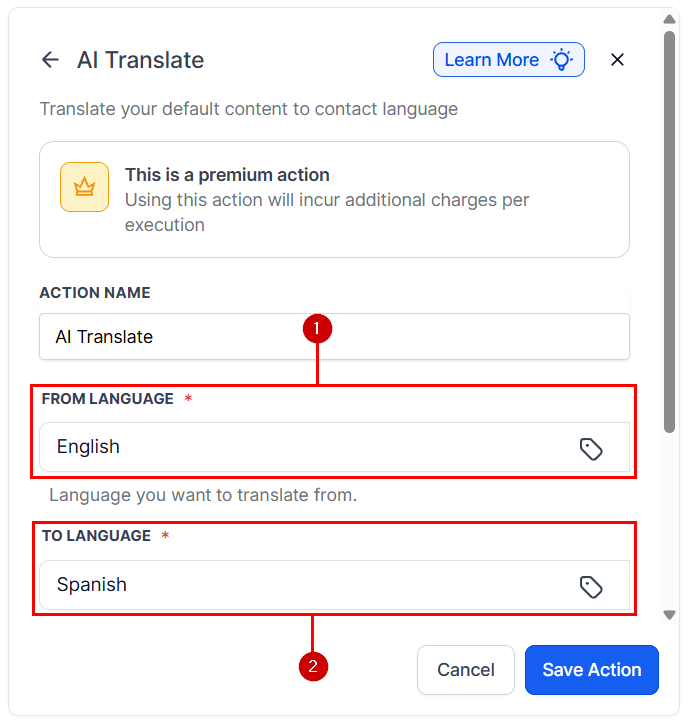
Selecting source and target languages for the AI Translate workflow action
2
Use the translated output
Store the translation in a variable (e.g., translated_message) and use it in the subsequent SMS, email, or chat action.
3
Set contact language preference
Use a custom field on the contact record (e.g., preferred_language) to store the contact’s language. Populate this field via form submissions, AI detection during the first interaction, or manual entry.
Translation workflows add a small delay (1 to 3 seconds) to response delivery. For real-time chat, use the prompt-based approach (language matching) instead of a separate translation step.
Send at least 10 test messages in each language your bot supports. Include simple greetings, common questions from your FAQ, complex multi-part questions, and edge cases (very short messages, mixed-language messages).
2
Get native speaker review
Have a native speaker review the AI’s responses for grammar and spelling accuracy, natural-sounding phrasing (not “robot translation”), cultural appropriateness, and correct use of formal/informal register.
3
Monitor ongoing conversations
After launch, regularly sample conversations in each language. Look for language mixing (responding in the wrong language), translation errors in key information (pricing, dates, policies), and contact feedback about language quality.
When enabled, the Voice AI agent detects the caller’s language within the first few seconds of the conversation and switches to that language automatically. To enable:
Open your Voice AI agent settings
In the Language section, toggle on Automatic Language Detection
Save the agent
The agent uses the first few sentences from the caller to determine the language. Once detected, it responds in that language for the remainder of the call.
Set a default fallback language — if detection is uncertain, the agent falls back to this language
Test with native speakers — have someone call your agent in each supported language to verify quality
Keep prompts language-agnostic — write your system prompt in your primary language; the AI translates its behavior automatically
Monitor call transcripts — review multilingual call transcripts regularly to catch translation issues early
Voice quality and naturalness vary by language. Tier 1 languages (English, Spanish, French, Portuguese, German, Italian, Dutch) offer the most natural-sounding voice output. Test thoroughly before deploying in other languages.
Cause: The AI defaulted to its primary language or misidentified the contact’s language.Fix: Add an explicit language-matching instruction to your system prompt. Make sure your primary language setting is correct. For very short initial messages, consider adding a language preference question to your greeting.
AI mixes languages in a single response
Cause: The knowledge base contains content in multiple languages, or the prompt has instructions in a different language than the response.Fix: Add “Never mix two languages in a single response” to your system prompt. If using separate knowledge bases per language, verify the AI is querying the correct one.
Responses sound unnatural or robotic
Cause: The AI is translating from English rather than generating native-language content.Fix: Add native-language knowledge base entries for your most common questions. Include a prompt instruction like “Respond naturally as a native speaker would — do not translate from English.”
Formal/informal register is wrong
Cause: The AI is using the wrong level of formality for the language and context.Fix: Add explicit formality instructions to your prompt: “In Spanish, use ‘usted’ for business contexts. In French, use ‘vous’ unless the contact uses ‘tu’ first.”
Dates and numbers are formatted incorrectly
Cause: The AI is using the format from its primary language instead of the contact’s language.Fix: Add “Use date, time, currency, and number formats appropriate for the customer’s language and region” to your system prompt.