

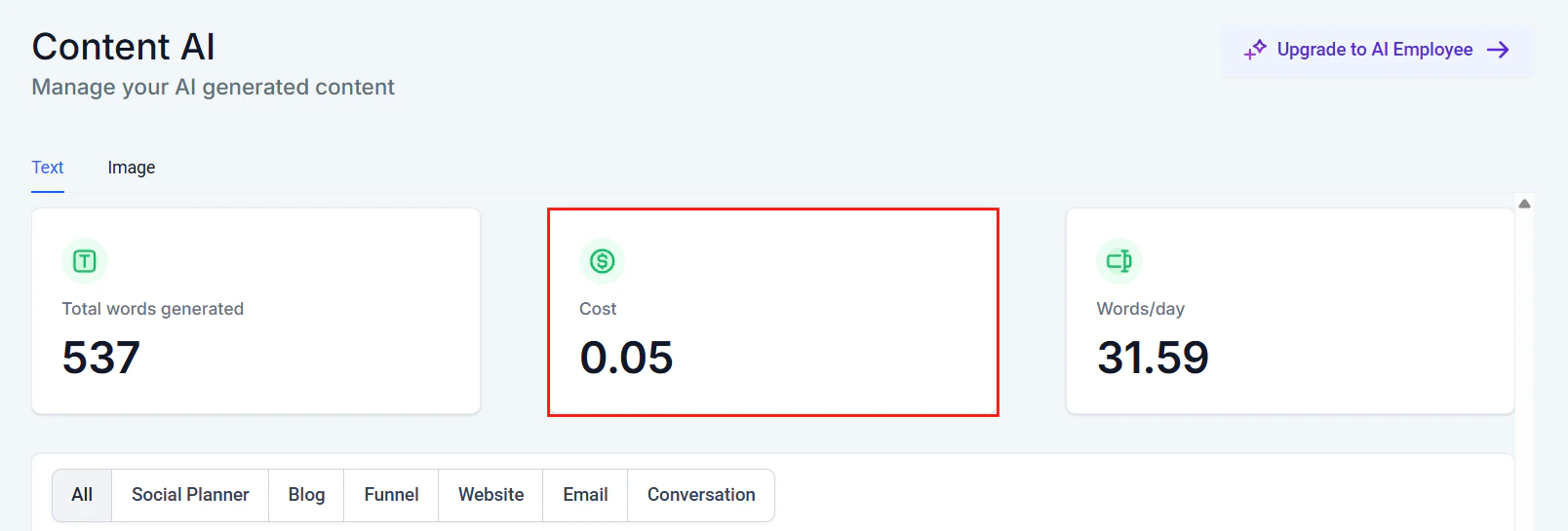
Content AI usage dashboard showing total words generated and cost tracking
How AI billing works
HoopAI uses a credit-based billing model for AI features. Every AI interaction — a chatbot message, a voice call minute, a content generation request — consumes a certain number of AI credits. Your plan includes a monthly allocation of credits, and additional usage is billed at published overage rates. Here is how the billing cycle works:1
Monthly credit allocation
At the start of each billing cycle, your account receives the AI credit allocation included with your plan tier. Credits are available immediately and can be used across any AI feature.
2
Usage consumption
As you use AI features throughout the month, credits are deducted in real time. Each feature has its own credit cost per unit (per message, per minute, per generation, etc.).
3
Usage alerts
HoopAI sends notifications when you reach 75% and 90% of your monthly allocation, giving you time to adjust usage or upgrade your plan before overage charges apply.
4
Overage billing
If you exceed your monthly allocation, additional usage is billed at the overage rate for your plan. Overage charges appear on your next invoice.
Credits are shared across all AI features. You are not locked into separate buckets for Conversation AI vs Voice AI vs Content AI. Use your credits wherever they provide the most value.
Per-feature cost breakdown
Each AI feature consumes credits at a different rate, reflecting the underlying model costs and computational requirements.Conversation AI
Voice AI
Voice AI tends to consume more credits per interaction than text-based features because it involves real-time speech-to-text, language model processing, and text-to-speech synthesis. For configuration guidance, see Creating Voice AI agents and Phone number setup.
Content AI
For more details on Content AI capabilities, see Content AI overview.
Reviews AI
Reviews AI is one of the most cost-effective features because review responses are typically short and well-scoped. Learn more at Reviews AI setup.
Workflow AI (GPT actions)
For setup instructions, see GPT actions in workflows.
Plan-level AI inclusions
The table below shows the monthly AI credit allocation for each HoopAI plan tier.The approximate volumes above assume exclusive use of a single feature. In practice, credits are shared across all AI features, so your actual capacity depends on your usage mix.
Enterprise and custom plans
If your business requires higher volumes or predictable flat-rate pricing, contact the HoopAI sales team to discuss custom AI credit packages and volume discounts.Usage tracking and dashboards
HoopAI provides real-time visibility into your AI consumption so you are never surprised by your bill.Where to find your usage data
- AI usage dashboard — Navigate to Settings > Billing > AI Usage to see a summary of credits consumed, credits remaining, and a day-by-day usage chart.
- Feature-level breakdown — The dashboard breaks down consumption by feature (Conversation AI, Voice AI, Content AI, Reviews AI, Workflow AI) so you can see exactly where credits are going.
- Per-agent metrics — For Conversation AI and Voice AI, drill into individual agent usage to identify your highest-consuming agents.
- Conversation AI dashboard — The dedicated Conversation AI dashboard includes AI-specific metrics alongside conversation volume and resolution rates.
Setting up usage alerts
1
Go to billing settings
Navigate to Settings > Billing > AI Usage in your HoopAI account.
2
Configure alert thresholds
Set custom notification thresholds (for example, 50%, 75%, and 90% of your monthly allocation). Default alerts are sent at 75% and 90%.
3
Choose notification channels
Select how you want to receive alerts — email, in-app notification, or both.
Cost optimization tips
Keeping your AI costs under control does not mean using AI less — it means using it smarter. Here are proven strategies.1. Write focused prompts
The most impactful optimization is writing concise, well-structured prompts. Vague prompts produce longer, less useful responses that consume more tokens. See Prompt engineering 101 for a complete guide.2. Use knowledge bases effectively
A well-organized knowledge base reduces hallucination and shortens response generation time. When the AI can retrieve facts directly, it produces faster, cheaper, more accurate responses.3. Set conversation guardrails
Configure your Conversation AI agents with clear escalation rules and conversation limits. An agent that knows when to hand off to a human avoids burning credits on conversations it cannot resolve.4. Optimize Voice AI call duration
For Voice AI, shorter calls mean lower costs. Design your voice agents to:- Greet callers efficiently
- Ask targeted questions instead of open-ended ones
- Confirm details and wrap up promptly
5. Use Workflow AI selectively
Not every workflow step needs AI. Reserve GPT actions for steps that genuinely require language understanding — such as summarizing notes, scoring leads, or generating personalized messages. Use standard workflow logic for simple conditional routing.6. Review usage regularly
Check your AI usage dashboard weekly during your first month to understand your consumption patterns. After you have a baseline, monthly reviews are usually sufficient.Billing FAQ
Do unused credits roll over to the next month?
Do unused credits roll over to the next month?
No. AI credits reset at the start of each billing cycle. Unused credits do not carry over. This keeps pricing simple and predictable.
What happens if I exceed my monthly allocation?
What happens if I exceed my monthly allocation?
Usage continues without interruption. Overage credits are billed at the overage rate for your plan tier and appear on your next invoice. You can set alerts to be notified before reaching your limit.
Can I set a hard spending cap?
Can I set a hard spending cap?
Yes. In Settings > Billing > AI Usage, you can enable a hard cap that pauses AI features once your credit allocation is exhausted. This prevents any overage charges but means AI features will be unavailable until your next billing cycle or until you purchase additional credits.
Are there per-feature spending limits?
Are there per-feature spending limits?
Yes. You can set individual credit limits for each AI feature so that, for example, Voice AI cannot consume more than 60% of your total allocation. This is configured in the AI usage settings.
How are Voice AI minutes rounded?
How are Voice AI minutes rounded?
Voice AI call time is rounded up to the nearest minute. A 2-minute-and-15-second call is billed as 3 minutes.
Do test messages and test calls consume credits?
Do test messages and test calls consume credits?
Yes. All AI interactions consume credits, including test messages and test calls. We recommend keeping testing focused to avoid unnecessary consumption. Use the preview mode in the flow builder when possible, as previews do not consume credits.
Can I purchase additional credits mid-cycle?
Can I purchase additional credits mid-cycle?
Yes. You can purchase credit top-ups at any time from Settings > Billing > AI Usage > Buy Credits. Top-up credits are available immediately and expire at the end of the current billing cycle.
How does pricing work for multi-channel deployments?
How does pricing work for multi-channel deployments?
The channel does not affect pricing. A Conversation AI message costs the same whether it is delivered via SMS, web chat, Facebook Messenger, or Instagram. See Multi-channel AI setup for deployment details.
Next steps
AI features at a glance
Compare every AI feature in one table and find setup links.
AI models and capabilities
Understand which models power each feature and their performance characteristics.
Prompt engineering 101
Write efficient prompts that reduce token usage and improve accuracy.
AI glossary
Look up AI terms used throughout HoopAI documentation.