Create a Conversation AI bot that qualifies leads, scores them, and routes hot prospects to your sales team.
Build a Conversation AI bot that engages new leads the moment they come in, asks qualifying questions, scores them based on their answers, tags them in your CRM, and routes hot prospects directly to your sales team — all within minutes of first contact.
Overview
Goal
Deploy a Conversation AI bot that qualifies inbound leads, assigns a lead score, updates CRM records, and routes high-value prospects to sales
Time to build
60–90 minutes
Prerequisites
Conversation AI enabled, CRM pipeline configured, workflows set up, custom fields created
AI features used
Conversation AI + Workflows + CRM
Difficulty
Intermediate
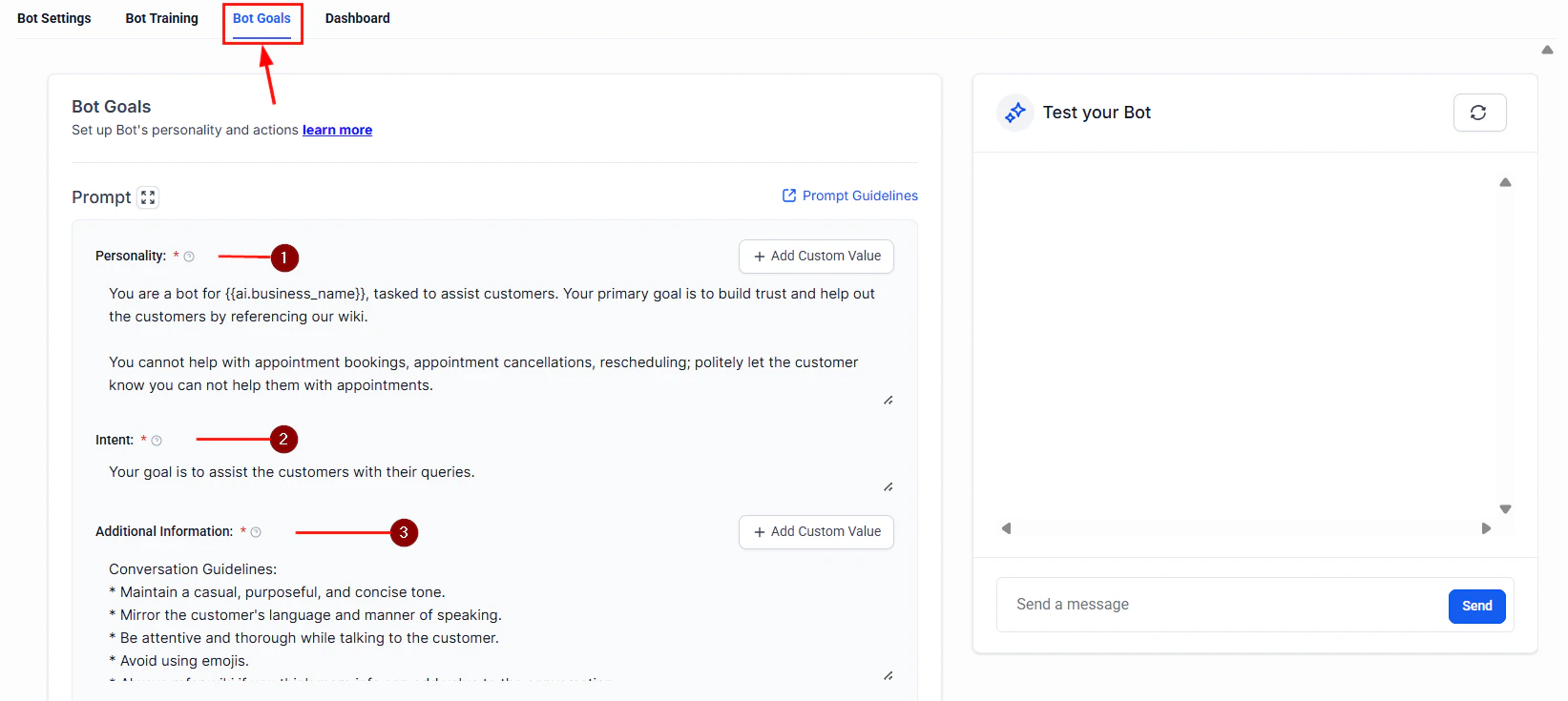
Bot goals configuration for defining qualification objectives
Paste the full prompt from the section below into the System Prompt field. The prompt instructs the bot to:
Greet the lead and set expectations
Ask qualifying questions one at a time (never dump all questions at once)
Listen for buying signals
Summarize what it learned
Hand off to the appropriate next step
The bot must ask questions conversationally, not like a survey. Leads who feel interrogated will disengage. The prompt includes specific instructions for natural transitions between questions.
5
Configure bot actions for CRM updates
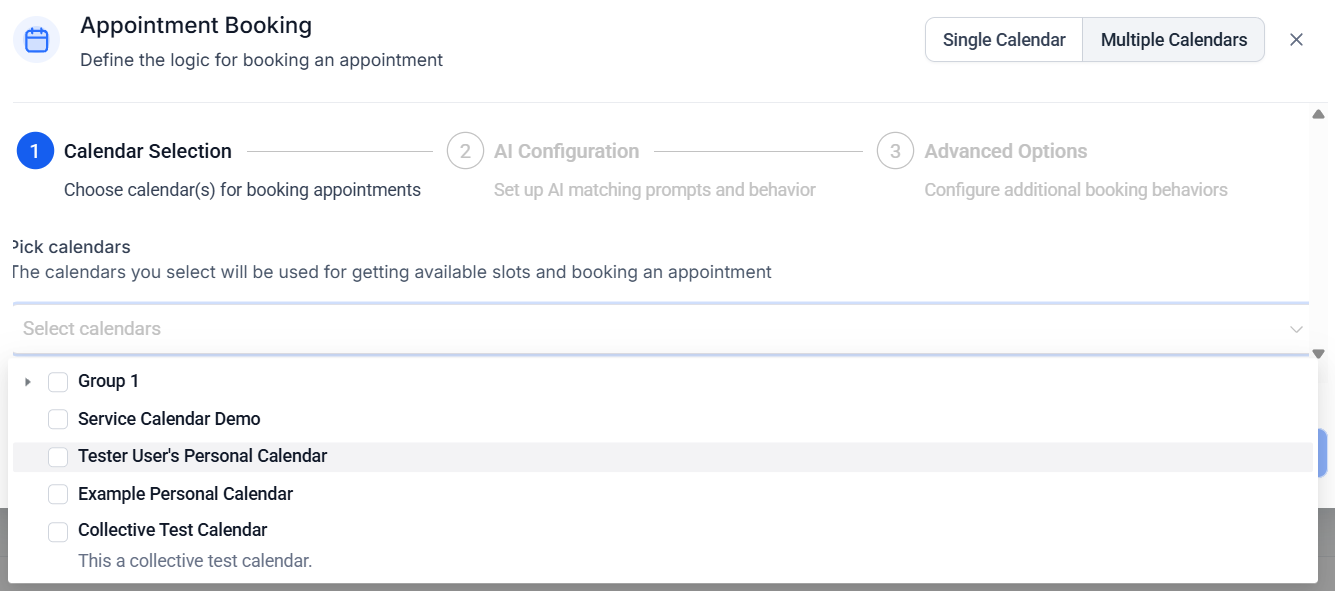
In the bot’s Actions settings, configure Conversation AI actions to update the contact record based on conversation content:
Update custom field: Map each qualifying answer to its corresponding custom field
Add tag: Add tags like “qualified-hot,” “qualified-warm,” or “qualified-cold” based on the conversation outcome
Move opportunity: Advance the opportunity to the appropriate pipeline stage
Assign user: Route hot leads to a specific sales rep or round-robin assignment
Appointment booking action configuration for scheduling qualified leads
6
Build the lead scoring workflow
Go to Automation > Workflows and create a workflow that calculates the lead score after qualification is complete.Trigger: Tag added — “qualification-complete”Scoring logic (use If/Else branches):
Criterion
Points
Budget $10K+
+30
Budget 5K–10K
+20
Budget 1K–5K
+10
Budget Under $1K
+0
Timeline: Immediate
+30
Timeline: 1–3 months
+20
Timeline: 3–6 months
+10
Timeline: 6+ months
+0
Decision maker: Yes
+20
Decision maker: Part of committee
+10
Decision maker: No
+0
Has specific pain point identified
+20
After scoring:
Score 70–100: Tag “qualified-hot,” move to “Qualified - Hot” stage, send internal notification
Score 40–69: Tag “qualified-warm,” move to “Qualified - Warm” stage, enroll in nurture sequence
Score 0–39: Tag “qualified-cold,” move to “Qualified - Cold” stage
Add a final step to the scoring workflow for hot leads:
Internal notification — Send an email and/or SMS to the assigned sales rep with the lead’s name, score, and qualification summary
Task creation — Create a task for the sales rep to call the lead within 15 minutes
Bot handoff — Stop the Conversation AI bot on this contact so the sales rep can take over manually
Speed to contact is critical. Studies show that leads contacted within 5 minutes are 21x more likely to convert. Your hot lead alert should trigger immediate action.
8
Build the nurture sequence for warm leads
Create a separate workflow for contacts tagged “qualified-warm”:
Day 0: Send a value-add email (case study, guide, or resource relevant to their pain point)
Day 3: Follow-up SMS checking if they have questions
Day 7: Send a second resource or testimonial
Day 14: Re-engagement message with a soft call to action
Day 21: Final outreach before moving to cold
If the lead re-engages at any point, the bot can re-qualify and update the score.
You are a friendly and professional lead qualification assistant for [BUSINESS NAME]. Your job is to have a natural conversation with new leads to understand their needs, timeline, and budget so we can serve them better.IDENTITY AND TONE:- Your name is [BOT NAME]. You work with the [BUSINESS NAME] team.- Be conversational, warm, and genuinely curious about their needs.- Never sound like a survey or interrogation. Transition naturally between questions.- Use the lead's name once you learn it.- Keep messages concise — 2-3 sentences max per message on SMS, slightly longer on web chat.CONVERSATION FLOW:1. Start by greeting the lead and thanking them for their interest.2. Ask what they are looking for or what prompted them to reach out.3. Listen to their response and ask a natural follow-up about their specific situation.4. Ask about their timeline — when are they looking to get started?5. Ask about their budget range — frame it as helping you recommend the right solution.6. Ask if they are the decision maker or if others are involved.7. Summarize what you have learned and let them know what happens next.QUALIFYING QUESTIONS (ask naturally, not as a list):- "What are you looking to accomplish?" or "What brought you to us today?"- "Can you tell me a bit more about your current situation?"- "What is your ideal timeline for getting this done?"- "To make sure I recommend the right option, do you have a budget range in mind?"- "Will you be making this decision yourself, or are there others involved?"IMPORTANT CONVERSATION RULES:- Ask ONE question at a time. Wait for the answer before moving on.- If the lead gives a vague answer, ask a gentle follow-up to clarify.- If the lead resists a question (especially budget), respect it and move on gracefully.- If the lead asks a question about your services, answer it using the knowledge base before continuing qualification.- Never skip the timeline and budget questions — these are essential for scoring.AFTER QUALIFICATION:- Summarize what you learned and confirm it with the lead.- Hot lead (high budget + immediate timeline + decision maker): Offer to connect with a sales rep immediately.- Warm lead: Let them know the team will follow up with relevant information.- Cold lead: Thank them and offer to send helpful resources.BOUNDARIES:- Never provide specific pricing — offer ranges and direct to a team member for exact quotes.- Never guarantee results or timelines.- Never badmouth competitors.- If the lead is rude or abusive, remain professional and offer to connect with a team member.- If the lead asks to speak to a human at any point, immediately accommodate.
Submit a test lead and respond with high-budget, immediate-timeline, decision-maker answers. Verify the bot scores them as hot, the internal alert fires, and the opportunity moves to the correct pipeline stage.
2
Warm lead simulation
Respond with medium-budget, 1–3 month timeline answers. Verify the bot tags and routes correctly and the nurture sequence enrolls.
3
Cold lead simulation
Respond with low-budget, 6+ month timeline, not the decision maker. Verify the contact is tagged cold and no sales alert fires.
4
Resistance test
Refuse to answer the budget question. Verify the bot handles it gracefully and does not loop or break.
5
Human handoff test
Say “Can I talk to a real person?” Verify the bot immediately stops and routes to a team member.
6
Multi-channel test
Run the qualification flow on SMS, web chat, and Facebook Messenger. Verify the bot adjusts its message length and tone for each channel. See multi-channel deployment for channel-specific guidance.
7
CRM verification
After each test, check the contact record. Verify all custom fields are populated, tags are applied, the opportunity is in the correct stage, and the lead score is accurate.
Analyze drop-off points. Review conversation transcripts to find where leads stop responding. If most drop off at the budget question, soften the framing in your prompt.
A/B test opening messages. Try different first messages — question-based versus statement-based — and track which gets higher response rates.
Refine scoring weights. After 30 days, compare your lead scores against actual close rates. Adjust the scoring weights so the model better predicts which leads actually buy.
Shorten the flow for repeat visitors. If a contact has already been qualified, update the prompt to skip previously answered questions and focus on what has changed.
Add industry-specific questions. Generic qualification works, but adding one or two questions specific to your industry dramatically improves lead quality.
Monitor response time. The bot should respond to the first message within 60 seconds. If there are delays, check your workflow trigger configuration.