

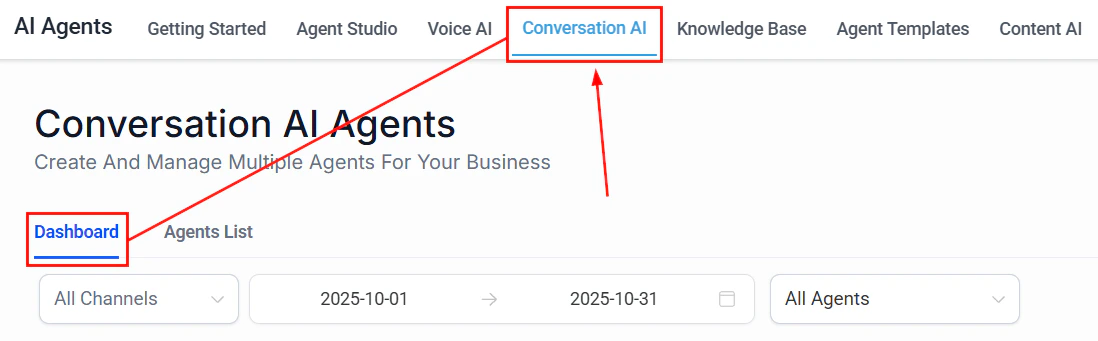
Conversation AI dashboard showing analytics to measure prompt effectiveness
Using HoopAI’s bot trial mode
Before sending your prompt to real customers, test it thoroughly using HoopAI’s built-in testing tools.How to access trial mode
1
Navigate to your bot
Go to AI Agents > Conversation AI and select the bot you want to test.
2
Open the testing panel
Look for the Bot Trial or Test option in your bot’s settings. This opens a chat window where you can interact with the bot as if you were a customer.
3
Run test conversations
Type messages as a customer would. Test greetings, questions, appointment requests, edge cases, and escalation triggers.
4
Review responses
Evaluate each response for accuracy, tone, helpfulness, and adherence to your prompt’s guidelines.
What to test in trial mode
Run through this checklist before going live:Suggestive mode: your safety net
Before switching to Auto-Pilot, run your bot in Suggestive mode for at least 48 hours. In this mode, the bot generates responses but waits for your team to approve, edit, or reject them before sending. This gives you:- Real-world data on how the bot handles actual customer messages
- A safety net — no bad responses reach customers
- Training examples — every edit you make teaches you what to improve in the prompt
Suggestive mode is available in Conversation AI settings. It is the recommended starting mode for any new or significantly updated prompt.
What to track during suggestive mode
Keep a simple log of:- Approved as-is — the response was perfect; no edits needed
- Edited before sending — the response needed changes; note what you changed
- Rejected — the response was wrong or unhelpful; note why
Systematic testing methodology
Once your bot is live, use a structured testing approach to identify and fix weaknesses.Create test scripts
Write a set of test conversations that cover your most important scenarios. Run these scripts after every prompt update to catch regressions.Test script example
Save your test scripts and run them after every prompt change. This prevents regressions — situations where fixing one problem accidentally creates another.
The test-measure-improve cycle
Follow this cycle continuously:1
Test
Run your test scripts and review 10-20 recent real conversations from the Conversation AI Dashboard.
2
Identify issues
Look for patterns:
- Which questions does the bot answer incorrectly?
- Where do customers seem confused or frustrated?
- Which conversations result in unnecessary handoffs?
- Where does the bot go off-script?
3
Update the prompt
Make targeted changes to address the specific issues you found. Change one thing at a time so you can measure the impact.
4
Re-test
Run your test scripts again to confirm the fix works and has not broken anything else.
5
Monitor
Watch the dashboard metrics for 3-5 days to see if the change improved performance in real conversations.
Measuring prompt quality
You cannot improve what you do not measure. Track these key metrics to understand how your prompt is performing.Resolution rate
The percentage of conversations the bot resolves without human intervention.- Target: 60-80% for most businesses
- How to measure: Check the Conversation AI Dashboard for conversations marked as resolved by the bot vs. handed off to a human
- If too low: Your prompt may be missing common scenarios, or your escalation rules may be too aggressive
- If too high: Make sure the bot is not answering questions it should be escalating (check accuracy)
Handoff rate
The percentage of conversations that are transferred to a human agent.- Target: 20-40% (some handoffs are expected and healthy)
- How to measure: Track handoff events in the dashboard
- If too high: The bot cannot handle enough scenarios — add more instructions and examples
- If too low: The bot may be over-confident — check if it is answering questions it should escalate
Response accuracy
How often the bot gives correct, helpful responses.- How to measure: Review a random sample of 20 conversations per week and rate each response as accurate, partially accurate, or inaccurate
- Target: 90%+ accuracy rate
- If below target: Check your Knowledge Base for missing or outdated information. Add knowledge boundaries to your prompt.
Customer satisfaction signals
Look for behavioral signals that indicate satisfaction or dissatisfaction:- Positive signals: Customer says “thank you,” continues the conversation, completes the desired action (books appointment, provides contact info)
- Negative signals: Customer repeats their question, says “never mind,” asks for a human, expresses frustration, abandons the conversation
Average conversation length
How many messages does a typical conversation take?- For appointment booking: 5-8 messages is typical
- For FAQ questions: 2-4 messages is ideal
- If too long: The bot may be asking unnecessary questions or not getting to the point
- If too short: The bot may be giving incomplete answers or rushing to close
Using the Conversation AI Dashboard
The Conversation AI Dashboard is your primary tool for monitoring prompt performance. Here is how to use it effectively.Daily review (5 minutes)
- Check total conversation volume
- Review handoff rate — any spikes?
- Scan recent conversations flagged as problematic
Weekly review (30 minutes)
- Read 15-20 random conversations end to end
- Identify the 3 most common questions the bot struggles with
- Note any new question types that are not covered by your prompt
- Check if knowledge base information is current and accurate
Monthly optimization (2 hours)
- Calculate your key metrics (resolution rate, handoff rate, accuracy)
- Compare to the previous month
- Identify the single biggest area for improvement
- Update the prompt with targeted changes
- Run your test scripts to validate the changes
- Document what you changed and why (prompt versioning)
A/B testing prompts
When you want to compare two different prompt approaches, set up an A/B test.How to A/B test with workflows
1
Create two bot versions
Duplicate your existing bot. Update the copy with the change you want to test (for example, a different greeting, a new escalation rule, or a different tone).
2
Set up a routing workflow
Create a workflow that alternates incoming conversations between the two bots. You can use contact-based routing (even/odd contact IDs) or random assignment.
3
Run the test
Let both versions handle conversations for at least 7 days to get a meaningful sample size. Aim for at least 50 conversations per version.
4
Compare results
Look at resolution rate, handoff rate, and customer satisfaction signals for each version. Which prompt performed better?
5
Promote the winner
Apply the winning prompt to your primary bot. Archive the losing version for reference.
What to A/B test
Good candidates for A/B testing:- Greeting style — formal vs. casual, long vs. short
- Response length — concise vs. detailed
- Escalation thresholds — aggressive (hand off early) vs. conservative (try harder)
- Information collection order — name first vs. need first
- Tone — professional vs. friendly vs. enthusiastic
- Example quantity — 2 examples vs. 5 examples in the prompt
The iterative improvement cycle
Prompt optimization is not a project with an end date — it is an ongoing practice. Here is a sustainable cadence:Next steps
Prompt engineering 101
Revisit the fundamentals if your metrics suggest foundational issues
Common prompt mistakes
Check your prompt against the top 10 mistakes before optimizing further
Advanced techniques
Apply conditional logic, multi-step prompting, and A/B testing patterns
Conversation AI dashboard
Access your bot’s performance metrics and conversation logs