

Review response templates are used when manually responding to reviews in Reputation > Reviews. For fully automated responses, see the Reviews AI agent.
Why use response templates
- Consistency — every team member responds with the same tone and messaging
- Speed — paste and lightly personalize rather than writing from scratch each time
- Coverage — have a ready reply for every scenario: 5-star praise, 1-star complaints, neutral feedback, and spam
- Professionalism — well-crafted templates prevent emotional or reactive responses to negative reviews
Responding to reviews manually
1
Open the Reviews tab
Navigate to Reputation > Reviews.
2
Find the review
Use filters (rating, source, date range) to locate the review you want to respond to.
3
Click the reply button
Click the reply icon on the review card to open the response field.
4
Apply or write your response
Type your response directly, or paste from your template library below. Personalize with the reviewer’s name and any specific detail from their review before sending.
5
Send
Click Send to post your response publicly on Google or Facebook.
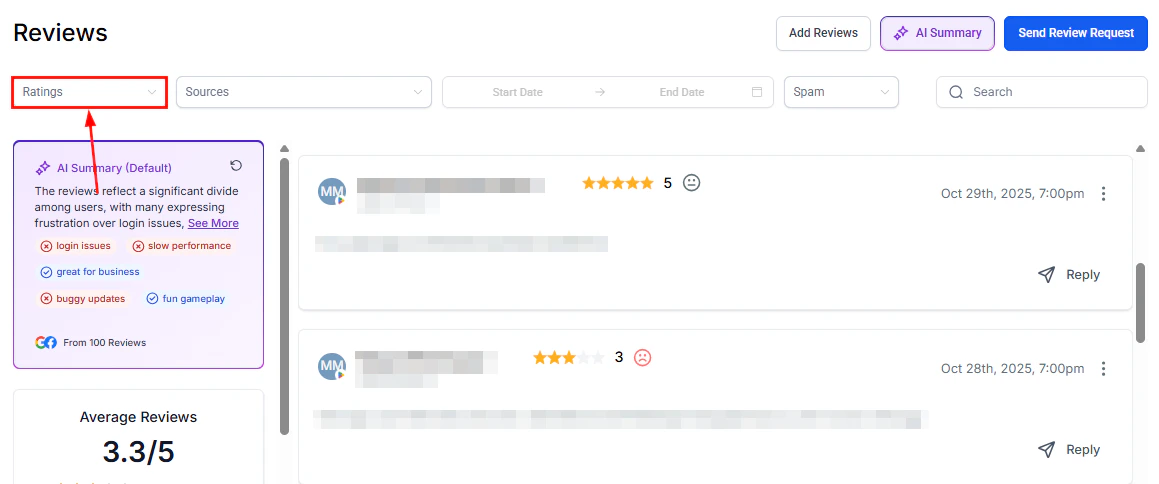
Ratings breakdown showing distribution across star levels
Template library by scenario
The following templates are starting points. Always personalize with the customer’s name and a specific detail from their review before sending.5-star reviews (positive)
Standard thank-you
Standard thank-you
Thank you so much, [Name]! We’re thrilled to hear you had such a great experience. Your kind words mean a lot to our team, and we look forward to serving you again soon.
Referral encouragement
Referral encouragement
Wow, thank you [Name]! Reviews like yours make our day. If you know anyone who could use [service], we’d love the referral. See you next time!
Team recognition
Team recognition
Thank you, [Name]! We’ll be sure to pass your kind words along to the team — they work hard to deliver this experience every time. We appreciate your support!
3- to 4-star reviews (mixed)
Acknowledging positives and areas for improvement
Acknowledging positives and areas for improvement
Thank you for taking the time to share your feedback, [Name]. We’re glad to hear [positive aspect], and we appreciate your honest comments about [area of concern]. We’re always looking to improve, and your feedback helps us do that. We hope to earn a 5-star experience on your next visit.
Inviting follow-up
Inviting follow-up
Hi [Name], thank you for your review. We’d love to learn more about how we can improve your experience. Please feel free to reach out to us at [phone/email] — we’d appreciate the opportunity to make things right.
1- to 2-star reviews (negative)
Empathetic and solution-focused
Empathetic and solution-focused
Hi [Name], thank you for bringing this to our attention. We’re sorry to hear that your experience did not meet our standards, and we sincerely apologize for the inconvenience. We take all feedback seriously and would like to make this right. Please contact us at [phone/email] so we can discuss this further.
Service recovery
Service recovery
We’re sorry to hear about your experience, [Name]. This is not the standard we hold ourselves to, and we want to do better. We’d appreciate the chance to speak with you directly — please reach out to our team at [phone/email] and we’ll do everything we can to resolve this.
When details are unclear
When details are unclear
Hi [Name], we’re sorry to hear you were disappointed. We’d like to understand more about what happened so we can address it properly. Could you reach out to us at [phone/email]? We want to make sure every customer has a positive experience.
No written comment (star-only reviews)
Positive star rating (4–5 stars)
Positive star rating (4–5 stars)
Thank you for the [X]-star rating, [Name]! We’re glad you had a positive experience and hope to see you again soon.
Low star rating (1–3 stars, no comment)
Low star rating (1–3 stars, no comment)
Hi [Name], thank you for your rating. We’re sorry to see we didn’t meet your expectations. We’d love to learn more — please contact us at [phone/email] so we can address your concerns.
Suspected spam or irrelevant reviews
Professional response before flagging
Professional response before flagging
Hi [Name], we don’t appear to have a record of your visit. We take all feedback seriously and want to ensure this is about the right business. Please feel free to contact us at [phone/email] so we can clarify. If you believe you’ve left this review in error, we’d appreciate you updating it.
Tips for personalizing templates
- Always use the reviewer’s name from their Google or Facebook profile
- Reference a specific detail from their review to show you read it carefully
- For negative reviews, never copy-paste identical responses — each one should feel individual
- Keep responses concise — aim for 2–4 sentences for positive reviews, 3–6 sentences for negative ones
- Avoid defensive language, excuses, or contradicting the reviewer publicly
FAQs
Do my review responses appear publicly?
Do my review responses appear publicly?
Yes. Responses posted from the Reviews tab are published directly to the connected Google Business Profile or Facebook Page and are visible to anyone who views the review.
Can I edit a response after posting it?
Can I edit a response after posting it?
On Google, you can edit or delete your response by visiting the review on Google Maps or Google Search directly. Responses cannot be edited from within the HoopAI platform after they have been posted.
Should I respond to every review?
Should I respond to every review?
Responding to all reviews — both positive and negative — demonstrates engagement and is recommended for local SEO. At minimum, respond to all negative reviews within 24–48 hours. For high review volumes, use the Reviews AI agent to automate responses for positive reviews.
What should I avoid in negative review responses?
What should I avoid in negative review responses?
Avoid arguing with the reviewer, sharing private customer details, using defensive language, or making promises you cannot keep. Always invite the conversation offline rather than airing details publicly.
How can I ensure my whole team uses the same response style?
How can I ensure my whole team uses the same response style?
Create a shared document with your approved template library and guidelines. For fully automated consistency, configure a Reviews AI agent with specific tone settings — the AI applies the same style to every qualifying review regardless of who is monitoring the account.