

This guide covers platform features that support compliance. It is not legal advice. You are responsible for ensuring your email practices comply with all applicable laws in the jurisdictions where you operate. Consult a qualified attorney for specific legal guidance.
Key regulations overview
CAN-SPAM (United States)
CAN-SPAM (United States)
The Controlling the Assault of Non-Solicited Pornography And Marketing Act applies to all commercial emails sent to US recipients. Key requirements:
- Accurate From name and email address
- Clear subject line that is not deceptive
- Physical postal address of the sender in every email
- A working unsubscribe mechanism
- Honor unsubscribe requests within 10 business days
- No sending to contacts after they opt out
GDPR (European Union and UK)
GDPR (European Union and UK)
The General Data Protection Regulation applies to any business marketing to individuals in the EU or UK, regardless of where the business is based. Key requirements:
- Lawful basis for processing personal data (typically explicit consent for marketing)
- Clear, unambiguous consent at the point of collection
- Easy mechanism to withdraw consent (unsubscribe)
- Data Subject Access Request (DSAR) process for contacts who request their data
- Record of when and how consent was obtained
CASL (Canada)
CASL (Canada)
Canada’s Anti-Spam Legislation requires express or implied consent before sending commercial electronic messages. Key requirements:
- Express consent obtained with a clear description of the message type
- Identification of the sender in every message
- Functioning unsubscribe mechanism
- Honor unsubscribes within 10 business days
Unsubscribe links
An unsubscribe link is legally required in every marketing email under CAN-SPAM, GDPR, and CASL. The HoopAI platform automatically includes an unsubscribe link in every marketing email footer. When a contact clicks the link, their email Do Not Disturb (DND) status is set to on, preventing all future email sends.Default unsubscribe link
To confirm the automatic unsubscribe link is active:- Go to Settings > Business Profile
- Scroll to the General section
- Verify that “Make email compliant by adding an unsubscribe link in your email” is toggled on
Custom unsubscribe links
For more control over how unsubscribe links look and where they appear:- Go to Settings > Business Profile > General and click Customize in the unsubscribe link settings
- Write the custom link text and add the unsubscribe merge tag at the position where the link should appear
- In the email builder, insert the unsubscribe tag directly into your template footer
Unsubscribe flows
Unsubscribe flows define what happens when a contact clicks the unsubscribe link. The HoopAI platform offers three options:One-step
The contact is unsubscribed immediately with a single click. Simple and low-friction — recommended for most lists.
Two-step
The contact must confirm their decision via a second step before being removed. Protects against accidental opt-outs for high-value contacts.
Dynamic (recommended)
One-step by default, but switches to two-step if the unsubscribe happens within 5 minutes of delivery or if the contact record is less than 1 hour old — protecting against bot clicks.
- Go to Marketing > Emails > Campaigns and click the gear icon
- Select the Unsubscribe tab
- Choose your preferred flow and click Save
List-unsubscribe header
The platform automatically adds aList-Unsubscribe header to all outgoing emails. This header instructs email clients such as Gmail and Outlook to display a prominent unsubscribe button at the top of the message, separate from the footer link.
Benefits:
- Reduces spam complaints by making it easy for recipients to opt out cleanly
- Signals to inbox providers that you are a compliant sender
- Cannot be disabled — it adheres to RFC standards and is required for bulk senders
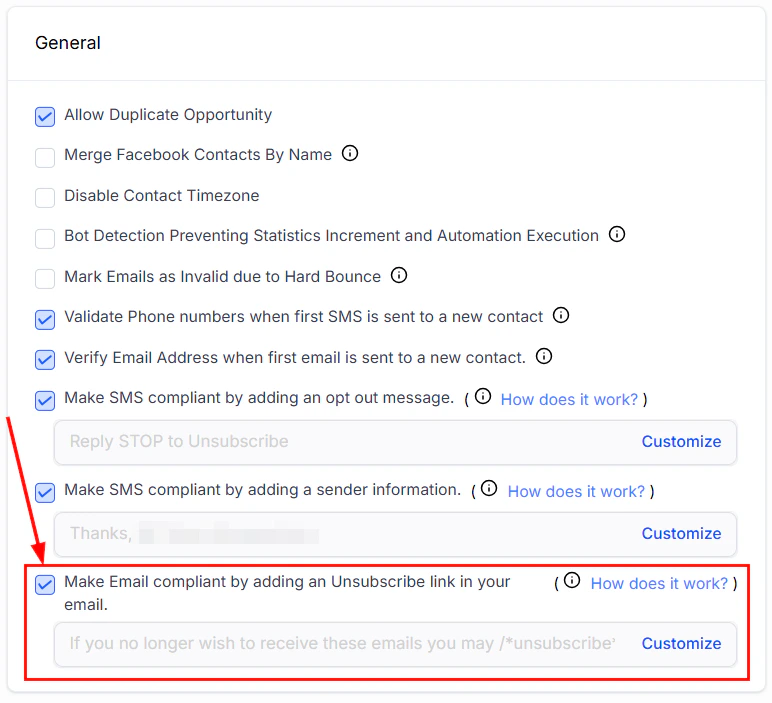
Email compliance settings showing unsubscribe flow options and footer configuration
Consent collection
Forms and surveys
Add consent checkboxes to forms and surveys to capture explicit opt-in from new contacts. The checkbox should clearly state what the contact is agreeing to receive. Recommended GDPR consent checkbox text:“I agree to receive email marketing from [Business Name]. I understand I can unsubscribe at any time.”Ensure the checkbox is unchecked by default — pre-ticked consent checkboxes do not meet GDPR requirements.
Double opt-in
Double opt-in adds a confirmation step after signup: the contact receives an automated email and must click a confirmation link before being added to your active list. This:- Confirms ownership of the email address
- Verifies intent to subscribe
- Eliminates bot signups and typos
- Provides a clear consent record
Physical address requirement
CAN-SPAM requires every marketing email to include a valid physical postal address for the sender. Add this to your email footer template:- A street address, P.O. box, or private mailbox registered under the Postal Service regulations
- The address must be current and valid for the purpose of receiving correspondence
Managing resubscription
If a contact who previously unsubscribed wants to receive emails again, they must actively re-opt in. Do not manually re-enable email DND without documented consent. Re-opt-in options:- Direct the contact to a new opt-in form
- Create a landing page with a re-subscription form
- Ask the contact to reply to a non-marketing email confirming their request, then document the consent before updating their DND status
Data subject requests (GDPR)
Under GDPR, contacts have the right to:- Access — receive a copy of all personal data you hold about them
- Erasure — request deletion of their data (“right to be forgotten”)
- Rectification — request corrections to their data
Preference management
Preference Management allows contacts to opt out of specific email categories (such as Newsletters or Promotions) rather than unsubscribing from all email. This can reduce global unsubscribe rates while still honoring contact preferences. See Email suppression and preferences for full setup details.Compliance checklist
Use this checklist before launching any email campaign:Sender identity
Sender identity
- From name is accurate and recognizable
- From email address is a real address associated with your business
- Reply-to address is monitored
Subject line
Subject line
- Subject line accurately reflects the email content
- No deceptive or misleading claims
Email body
Email body
- Physical postal address is in the footer
- Unsubscribe link is present and functional
- Content is consistent with what contacts opted in to receive
List and consent
List and consent
- All contacts on the list have opted in to receive marketing
- No purchased, scraped, or borrowed lists
- Opt-in date and source are recorded for GDPR contacts
- Unsubscribed contacts are excluded from the send
Frequently asked questions
Is an unsubscribe link required in every email?
Is an unsubscribe link required in every email?
Yes, under CAN-SPAM, GDPR, and CASL. The platform’s automatic unsubscribe link covers this requirement as long as it is enabled in Business Profile settings. Some transactional email types (receipts, appointment confirmations sent to existing customers) may be exempt, but when in doubt, include one.
How long do I have to honor an unsubscribe request?
How long do I have to honor an unsubscribe request?
Under CAN-SPAM, you must stop sending within 10 business days of a valid opt-out request. The HoopAI platform processes unsubscribes automatically when the contact clicks the link, so this happens immediately rather than requiring manual action.
What counts as valid consent under GDPR?
What counts as valid consent under GDPR?
Valid GDPR consent must be freely given, specific, informed, and unambiguous. It requires a positive opt-in action (not a pre-checked box). The consent must cover the specific type of marketing you intend to send.
Can I send email to contacts I collected at an in-person event?
Can I send email to contacts I collected at an in-person event?
Only if you have documented consent from them at the event. Collecting a business card does not imply consent to receive marketing. Have contacts sign up on a tablet form or use a QR code to a digital opt-in form during the event.
What happens if my account is suspended for spam complaints?
What happens if my account is suspended for spam complaints?
If your spam complaint rate or bounce rate exceeds platform thresholds, email sending may be temporarily suspended. To resolve it, pause all outgoing emails, clean your contact list, ensure unsubscribe links are working, document your opt-in source, and contact support to request reactivation.
Custom unsubscribe links
For advanced control over how unsubscribe links look, behave, and where they lead:Creating a custom unsubscribe link
1
Open compliance settings
Go to Settings > Business Profile > General and find the unsubscribe link settings.
2
Click Customize
Click Customize to open the custom unsubscribe configuration.
3
Write custom link text
Replace the default “Unsubscribe” text with your preferred wording (e.g., “Manage your preferences” or “Update your email settings”).
4
Insert the unsubscribe merge tag
Place the
{{unsubscribe_link}} merge tag in your custom text at the position where the clickable link should appear.5
Save
Click Save. The custom unsubscribe link will appear in all future marketing emails.
Preference management / unsubscription management
Instead of a blanket unsubscribe, offer contacts the ability to manage their email preferences:- Create an email preference page using a form or funnel page
- Include options for different email categories (newsletters, promotions, product updates)
- Link to this page from your custom unsubscribe text
- Use form submissions to update the contact’s preference tags or custom fields
- Segment your campaigns based on these preferences to respect opt-outs per category
List-unsubscribe header
TheList-Unsubscribe header is automatically added to every outgoing email. This header instructs email clients (Gmail, Outlook, Apple Mail) to display a prominent unsubscribe button in the email header area — separate from your footer link.
Why it helps deliverability:
- Gmail gives sender reputation credit for including this header
- Contacts who use the header button to unsubscribe are less likely to mark your email as spam
- It signals to inbox providers that you follow email best practices
- Required for bulk senders under Google and Yahoo’s 2024 sender requirements
Resubscribing after unsubscribe
When a contact has unsubscribed and later wants to receive emails again:- Do not manually remove their DND status without documented re-consent
- Direct them to a new opt-in form where they explicitly agree to receive emails again
- When they submit the form, update their DND status and log the re-consent date
- Send a confirmation email acknowledging their re-subscription
- Keep a record of the re-consent for compliance documentation