

Why negative reviews matter
A single negative review left without a response is often more damaging than the review itself. Studies consistently show that potential customers read owner responses before forming an opinion. A professional, empathetic reply signals that you care about customers even when things go wrong — and that signal can override the negative impression the original review creates. Goals for negative review management:- Respond within 24–48 hours to demonstrate responsiveness
- Move sensitive conversations offline and out of the public thread
- Flag and dispute genuinely fraudulent reviews through the appropriate channels
- Use patterns in negative feedback to improve service delivery
Identifying and triaging negative reviews
Navigate to Reputation > Reviews and filter by star rating to surface all 1–3 star reviews.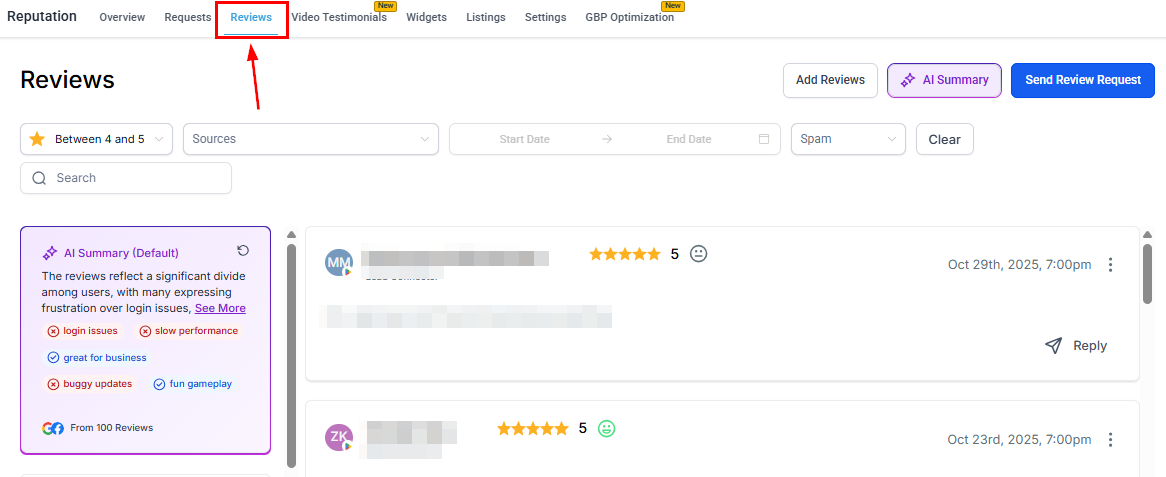
Reviews list filtered to show negative reviews for triage
- Reviewer name and platform (Google or Facebook)
- Star rating and date submitted
- Review text (if provided)
- Reply status (whether a response has been posted)
Responding to negative reviews
1
Open the review card
Click the reply button on the negative review card in Reputation > Reviews.
2
Acknowledge and empathize
Begin your response by acknowledging the customer’s experience. Avoid defending the business or contradicting the reviewer publicly — even if you believe the review is inaccurate.
3
Apologize and invite offline resolution
Offer a sincere apology where appropriate and include a direct contact method (phone number or email). This shows other readers you are committed to resolution while moving the sensitive details out of the public thread.
4
Keep it concise
Aim for 3–5 sentences. Long defensive responses rarely help — a brief, empathetic reply is more effective.
5
Post the response
Click Send to publish your reply directly to the connected Google Business Profile or Facebook Page.
Using the AI agent for negative reviews
The Reviews AI agent can be configured to automatically respond to reviews in any star rating range — including 1–3 star reviews. This is particularly useful for ensuring every negative review receives a timely reply outside business hours. Best practice: create a dedicated agent for low-star reviews with an empathetic, service-recovery tone that differs from your positive-review agent. Configure the agent to:- Use a tone such as Empathetic and Professional
- Include a footer that provides a direct contact method
- Apply a short response delay (15–30 minutes) so the reply feels considered rather than instant
Flagging suspected spam or fake reviews
If you believe a review was left by someone who was never a customer, or appears to be a coordinated attack, use the platform’s spam detection tools:1
Open the review
Locate the review in Reputation > Reviews.
2
Mark as spam
Hover over the three-dot icon on the review card and select Mark as spam.
3
Platform evaluation
The HoopAI platform’s spam detection algorithm evaluates the flagged review. Reviews marked as spam are held in a separate queue and will not receive automated AI responses.
4
Review the spam queue
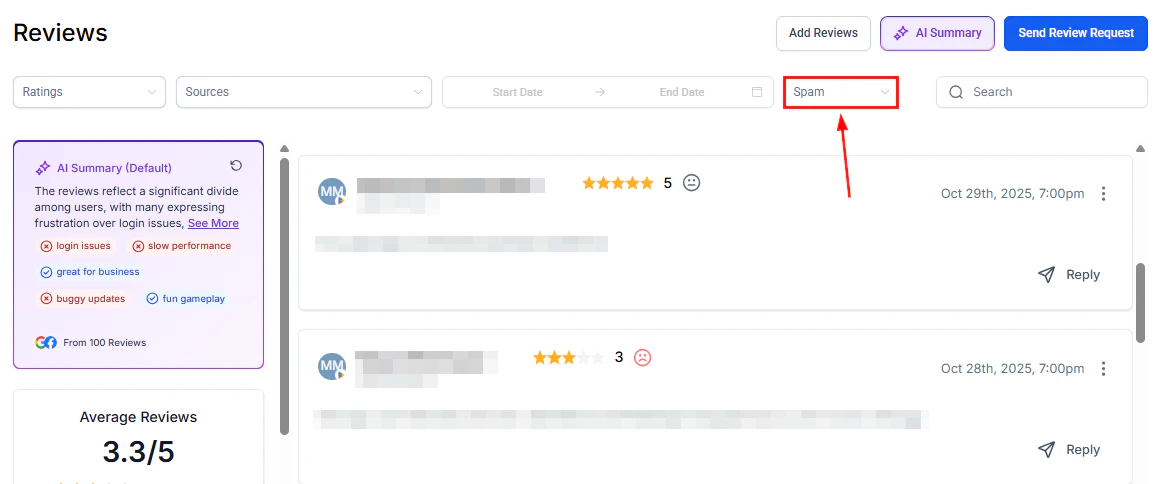
Spam filter in the Reviews tab for managing flagged reviews
Disputing reviews on Google
The HoopAI platform provides tools to manage and respond to Google reviews, but formal review removal requests must be submitted directly to Google. To dispute a review that violates Google’s policies:- Sign in to Google Business Profile using the account connected to your listing.
- Navigate to your reviews and locate the review you want to dispute.
- Click the flag icon next to the review to report it as violating Google’s content policies.
- Select the most applicable violation category (spam, fake, off-topic, conflict of interest, etc.).
- Submit the report.
Repeatedly reporting the same review does not accelerate the process. If Google declines to remove a review, the best course of action is a professional public response followed by continued efforts to generate new positive reviews that push the negative review lower in the display order.
Turning negative reviews into improvements
Negative reviews contain actionable intelligence. Build a habit of reviewing low-star feedback monthly to identify recurring themes:- Filter reviews by 1–3 stars in Reputation > Reviews
- Use the AI Summary feature to surface common topics and sentiment patterns across all negative reviews
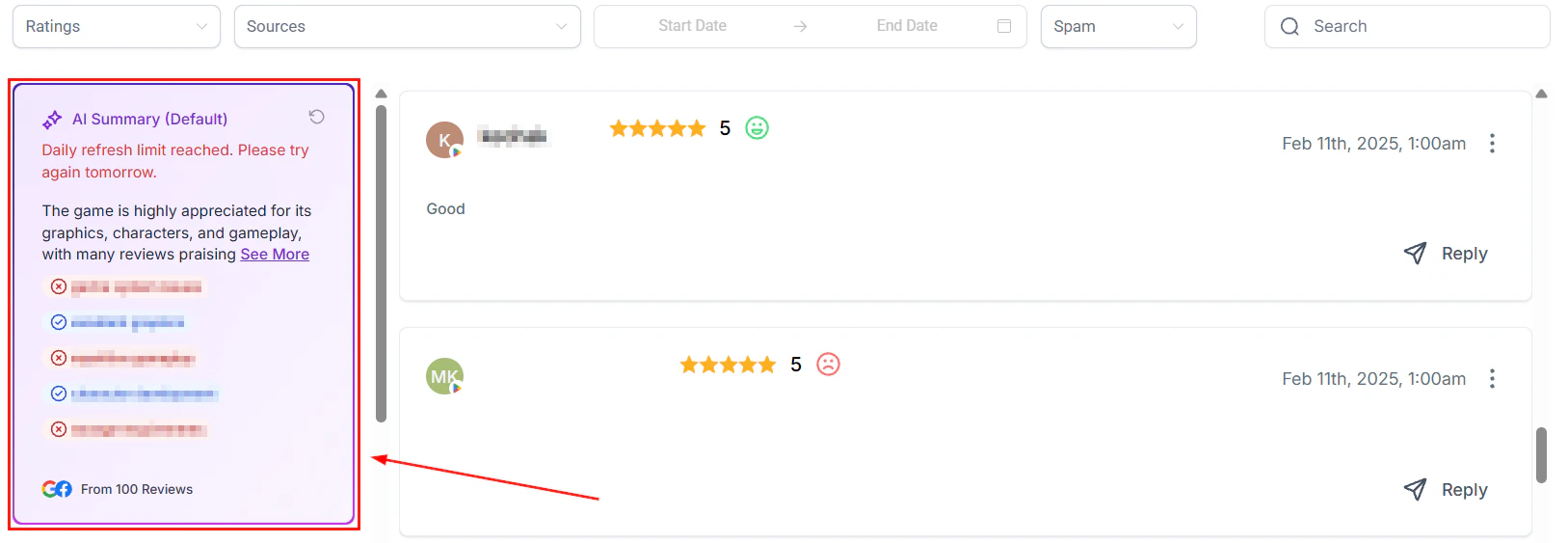
AI Summary highlighting common themes in customer reviews
- Bring recurring complaints to team meetings as operational improvement items
- Track whether the frequency of a specific complaint decreases after process changes
FAQs
Can HoopAI remove a negative Google review for me?
Can HoopAI remove a negative Google review for me?
No. Only Google can remove reviews from its platform, and only when a review violates its content policies. The HoopAI platform helps you flag suspicious reviews in your own system and respond professionally, but the formal dispute process must be completed through Google Business Profile directly.
Should I respond to every negative review?
Should I respond to every negative review?
Yes — responding to every negative review is strongly recommended. Even a brief, professional response signals to potential customers that you are attentive and care about the customer experience. Reviews left without a response often cause more reputational damage than the review itself.
What if the reviewer's complaint is factually wrong?
What if the reviewer's complaint is factually wrong?
Avoid contradicting the reviewer publicly, even if their account is inaccurate. Politely acknowledge their experience, clarify your standard process if relevant, and invite them to contact you directly to resolve the matter. Other readers will see your professional conduct regardless of the review’s accuracy.
How do I prevent negative reviews in the first place?
How do I prevent negative reviews in the first place?
The most effective prevention is proactive review collection. Businesses that consistently request reviews from satisfied customers build a larger positive base that dilutes the impact of occasional negative reviews. Use automated review requests in Automation > Workflows to maintain a steady flow of new positive feedback.
Can the AI agent respond to negative reviews in a different language?
Can the AI agent respond to negative reviews in a different language?
Yes. Enable dynamic language matching on your negative-review AI agent and it will automatically reply in the same language as the reviewer’s original comment.