

What Google Analytics widgets display
Once your GA4 property is connected, the following types of data can be displayed on your dashboard:- Sessions — the total number of website sessions within the selected date range
- Users — the number of unique users who visited your website
- New users — first-time visitors within the period
- Bounce rate — percentage of sessions where users left without interacting with a second page
- Average session duration — average time users spend on your site per session
- Goal completions — conversion events configured in GA4 (such as form submissions or phone clicks)
- Traffic source breakdown — distribution of sessions by source (organic search, paid, direct, social, referral)
- Page views — total number of pages viewed across all sessions
Prerequisites
To use Google Analytics widgets, your GA4 property must be connected to the HoopAI platform:- Navigate to Settings and open the Integrations section
- Locate the Google Analytics integration and click Connect
- Sign in with the Google account that has access to your GA4 property
- Select the GA4 property you want to connect
- Save the integration
Adding a Google Analytics widget
1
Enter edit mode
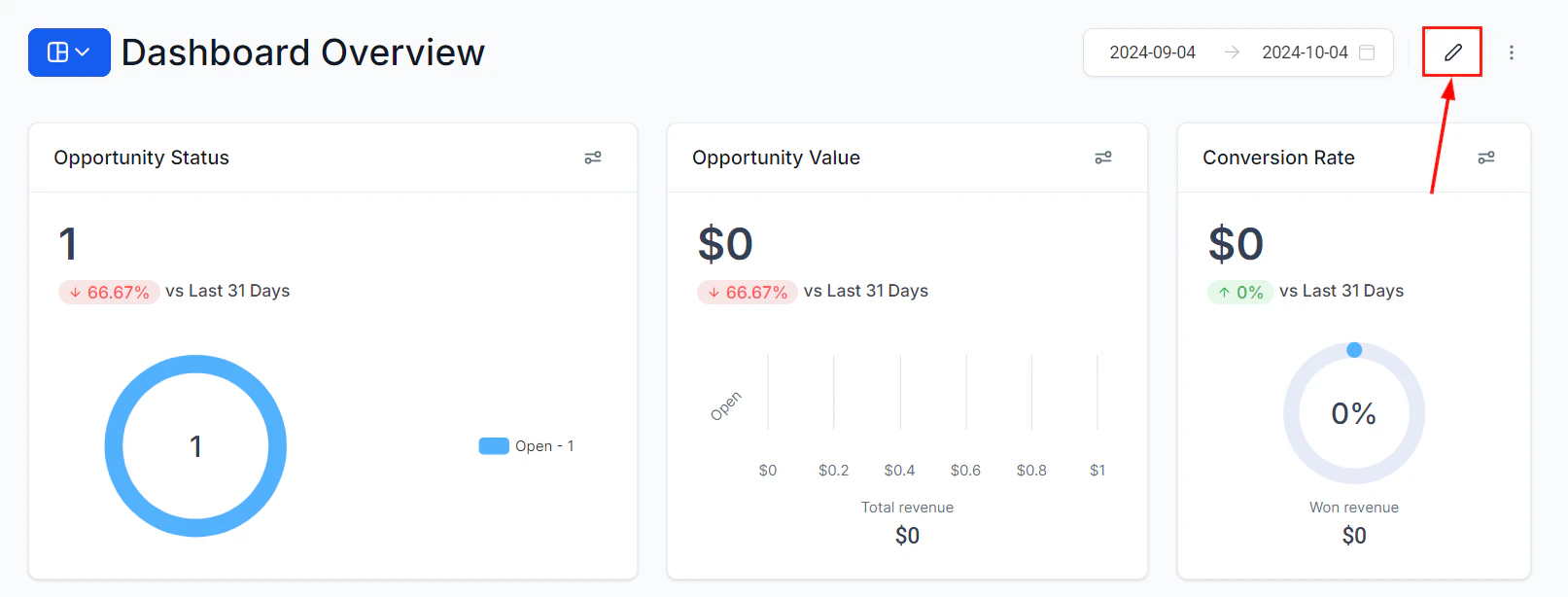
Click the pencil icon to enter dashboard edit mode
2
Open the widget panel
Click “Add Widget” to open the widget selection panel.
3
Select Google Analytics
Navigate to the Google Analytics category in the widget panel. You will see the available GA4 metric widgets listed.
4
Choose a widget
Click the metric widget you want to add — for example, Sessions or Goal Completions. The widget is placed on your dashboard.
5
Configure and save
Click the three dots on the widget and select Edit to open the configuration panel. Set the title, metric, chart type, and date range. Click Save, then Save Changes.
Configuring Google Analytics widgets
Selecting a metric
In the Configure tab, choose the specific GA4 metric to display. Metrics include Sessions, Users, New Users, Bounce Rate, Average Session Duration, and any custom events or conversions you have set up in your GA4 property.Date range
Google Analytics widgets respect the dashboard’s global time frame selector by default. Apply a Date Range Override to lock the widget to a specific period — for example, always showing the trailing 30 days of traffic data regardless of the global date setting.Chart type
Select the chart format that best represents your data:Breakdown / View by
For trend widgets, choose the breakdown interval — daily, weekly, or monthly — to control the granularity of the chart.Combining Google Analytics and CRM data
The real power of the Google Analytics widget becomes apparent when you display it alongside CRM metrics from the HoopAI platform. Suggested pairings:Supported dimensions
Beyond the standard metrics, Google Analytics widgets can display data broken down by dimensions such as:- Traffic source — organic, paid, direct, referral, social
- Device category — desktop, mobile, tablet
- Landing page — which pages users enter the site on
- Country or region — geographic distribution of visitors
Frequently asked questions
Which version of Google Analytics is supported?
Which version of Google Analytics is supported?
The HoopAI platform integrates with Google Analytics 4 (GA4). If your account is still using Universal Analytics, you will need to migrate your property to GA4 before the widget category becomes available.
Why is the Google Analytics widget category not appearing in my Add Widget panel?
Why is the Google Analytics widget category not appearing in my Add Widget panel?
The Google Analytics widget category only appears after a GA4 property is successfully connected in your account’s Integrations settings. Verify that the integration is active and that the correct GA4 property is selected.
How often does Google Analytics data refresh on the dashboard?
How often does Google Analytics data refresh on the dashboard?
GA4 data in the HoopAI platform dashboard syncs periodically. There is typically a delay of several hours between activity on your website and when it appears in the dashboard widgets, which is consistent with standard GA4 data processing timelines.
Can I display data from multiple GA4 properties on one dashboard?
Can I display data from multiple GA4 properties on one dashboard?
Each connected GA4 property feeds into the Google Analytics widget category. If you manage multiple websites, you can connect multiple GA4 properties and use conditions or separate widgets to display data from each. Contact support for guidance on multi-property configurations.
Can I see goal completion data in the widget?
Can I see goal completion data in the widget?
Yes, provided the goals or conversion events are configured in your GA4 property. The widget will reflect the conversion events you have defined in GA4, such as form submissions, phone number clicks, or purchase completions.