


The Conversations inbox — unified view across all communication channels
Inbox
Sending messages
Compose and send SMS, email, and social messages from a single message box within any conversation.
Filters and bulk actions
Organize your inbox with quick filters, sorting options, and bulk operations across multiple conversations.
Contact details panel
View and edit contact info, tags, tasks, and notes without leaving the conversation thread.
Activity cards
See appointment, invoice, and opportunity updates displayed inline within conversation threads.
Live chat
Respond to website visitors in real time through the web chat widget connected to your inbox.
Social messaging
Handle Instagram DMs, Facebook Messenger, and Google My Business messages in one place.
Email threads
Manage full email threads, including CC and BCC, directly from the conversations inbox.
WhatsApp messaging
Send and receive WhatsApp messages using your connected WhatsApp Business account.
SMS metrics
Track delivery rates, click-through rates, and opt-out data for SMS messages sent from conversations.
Do not disturb
Set quiet hours so automated messages are not sent to contacts outside of defined time windows.
Internal comments
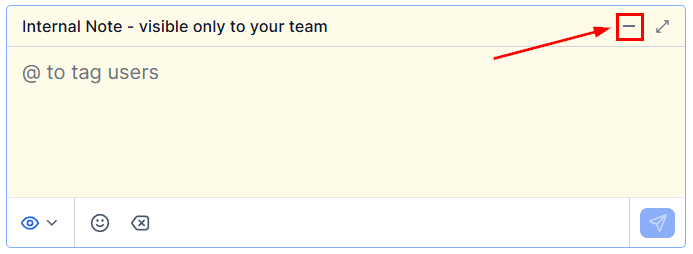
Leave private notes visible only to your team inside a conversation thread, without the contact seeing them.
Attachments
Send and receive files, images, and documents across supported messaging channels.
Call quality
Monitor and troubleshoot call audio quality for inbound and outbound calls made from the inbox.
Call recording
Enable call recording for inbound and outbound calls and review recordings from the conversation thread.
Bot status
Enable or disable the AI conversation bot per contact to control when automation handles replies.
Requesting payment
Send a secure payment link inside any conversation channel so contacts can pay without leaving the thread.
Voicemail
Configure voicemail greetings and access voicemail recordings left by contacts.
Conversation assignment
Assign conversations to specific team members or queues and track assignment history.
Conversation labels
Apply custom labels to conversations for categorization, filtering, and reporting.
Unread management
Mark conversations as read or unread to track follow-up status across your team.
Two-way SMS
Send and receive SMS messages with full two-way conversation support.
Scheduled messages
Schedule a message to be sent at a specific date and time from any conversation.
Templates
Use pre-built message templates for SMS and WhatsApp to send compliant and consistent replies.
Conversations settings
Configure SLAs, notification preferences, default views, and other inbox-level defaults.
Tools
Snippets
Save reusable text and email content as snippets for fast, consistent replies across channels.
Trigger links
Create trackable links that fire automation workflows when a contact clicks them.
Manual actions
Work through pending call and task queues assigned to you by workflow manual action steps.
Contact engagement score
See how actively a contact is engaging so you can prioritize who to follow up with first.

Inbox panel with filter, sort, and bulk action controls
Starting a new conversation — select a contact and channel
Getting started
1
Connect your communication channels
Go to Settings → Phone System to set up a phone number for SMS and calling. Connect social channels (Instagram, Facebook, Google My Business) under Settings → Integrations. Connect WhatsApp under Settings → WhatsApp.
2
Set up conversation labels and assignment
Under Conversations Settings, create labels for the types of conversations your team handles — for example, “Support,” “Sales,” or “Billing.” Set up assignment rules so incoming conversations are routed to the right team member automatically.
3
Create snippets for common replies
Go to Conversations → Snippets and add the messages your team sends repeatedly — FAQs, booking confirmations, pricing details. Snippets are inserted with a single click during a conversation.
4
Configure do not disturb hours
Under Conversations → Do Not Disturb, set quiet hours for your account so automated follow-up messages are not sent in the middle of the night or outside business hours.
5
Enable call recording (if applicable)
Go to Conversations → Call Recording and enable recording for inbound and/or outbound calls. Make sure you understand and comply with the disclosure requirements in your jurisdiction before enabling.
Access to certain conversation features — such as social messaging and WhatsApp — depends on which channels you have connected in Settings and your plan level. Some features may require additional setup before they appear in the inbox.
Frequently asked questions
What is the difference between snippets and templates?
What is the difference between snippets and templates?
Snippets are free-form reusable text blocks your team uses as shortcuts during a conversation — any channel, any content. Templates are structured message formats required for certain regulated channels (specifically SMS and WhatsApp Business), where carriers or platforms require pre-approved message content for outbound marketing or transactional messages. Use snippets for everyday quick replies; use templates when the channel requires it.
What is the difference between internal comments and regular messages?
What is the difference between internal comments and regular messages?
Regular messages are sent to the contact and appear in the conversation thread they can see. Internal comments are private notes visible only to your team — they appear in the same thread but are clearly marked as internal and are never sent to the contact. Use internal comments to leave context for teammates, escalate a conversation, or add notes without the contact seeing them.
How does bot status work?
How does bot status work?
Each contact has a bot status toggle that controls whether the AI conversation bot (if you have one configured) will automatically reply to incoming messages from that contact. When bot status is ON, the bot handles replies. When it is OFF, the conversation is handled manually by your team. You can toggle bot status directly from any conversation thread without going to the contact record.
Can I schedule a message to be sent later?
Can I schedule a message to be sent later?
Yes. When composing any message in a conversation, use the scheduled message option to set a specific date and time for delivery. Scheduled messages can be reviewed and cancelled before they send. This is separate from drip sequences or workflow-based automation — it is a one-off scheduled send from within a single conversation.
What is the manual actions queue?
What is the manual actions queue?
Manual actions are tasks created by workflow automation that require a human to take action — typically making a phone call or sending a personalized message. When a workflow reaches a manual action step, the task appears in the manual actions queue for the assigned team member. The team member works through the queue, marking each action complete before moving to the next.