

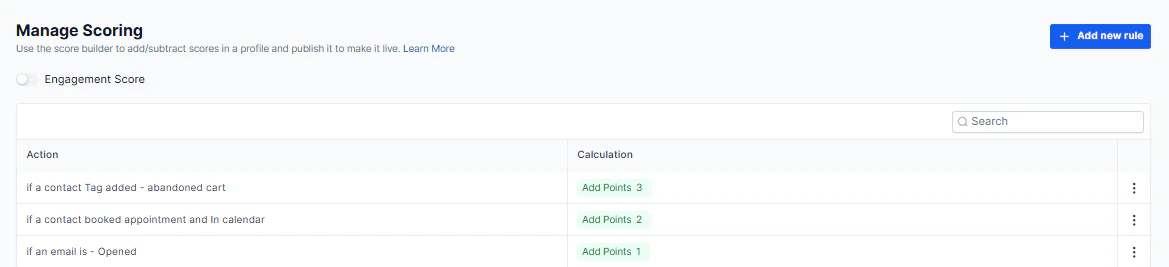
Contact engagement score — the score profile configuration with rules and point values
How scoring works
Engagement scores are built on customizable score profiles with configurable rules. You control exactly which behaviors add or subtract points.Draft vs. published
A score profile starts in Draft mode. Once published, the score becomes active and is applied to all contacts in your account. You can return to draft to make changes before republishing.Building scoring rules
1
Name the score profile
Edit the profile name and description to reflect its purpose (e.g., “Lead Engagement Score” or “Re-engagement Score”).
2
Add rules
Define which contact behaviors add or subtract points. Examples:
- +10 points when a contact clicks a trigger link
- +5 points when a contact opens an email
- -5 points when a contact goes 30 days without interaction
3
Save changes
Save after adding or editing each rule so the profile stays current.
4
Publish
When ready, publish the profile. Scores are immediately calculated and visible across all contacts.
Rule customization options
Rule customization options
- Add points — reward positive engagement behaviors (clicks, replies, form submissions, bookings).
- Subtract points — penalize inactivity or negative signals (unsubscribes, long silence periods).
- Rules can be edited at any time; changes take effect after saving and republishing.

Conversations inbox — engagement score displayed alongside each contact for priority-based sorting
Using scores in Conversations
Viewing scores
Engagement scores appear alongside each contact in your Conversations inbox. High scores identify contacts with the most active interaction.Sorting by score
Sort your conversation list by engagement score to surface the highest-priority contacts at the top of your queue.Filtering by score range
Use the Engagement Score quick filter to show only contacts within a specific score range — for example, show only contacts with a score above 50 for immediate sales outreach, or below 10 for re-engagement campaigns.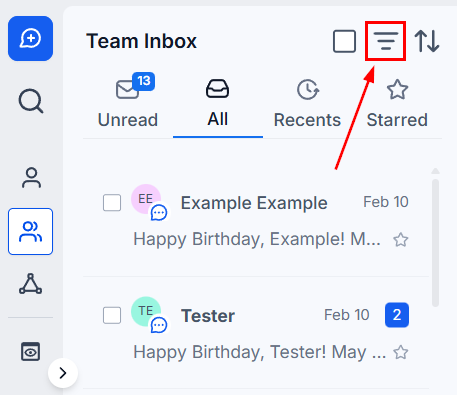
Quick filter by engagement score — filter conversations to surface high-priority or at-risk contacts