

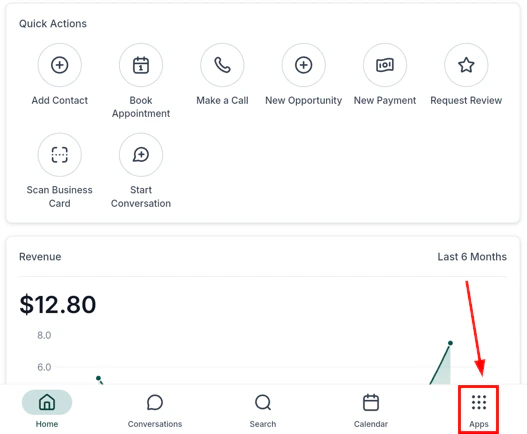
HoopAI mobile app — main navigation
Getting started
Download the app, log in, enable 2FA, and set up biometric authentication
Conversations
Unified inbox for SMS, email, WhatsApp, and Facebook Messenger
Contacts
Browse and manage contact records, scan business cards, and place calls
Calendars and appointments
View your schedule, book appointments, and share booking links
Opportunities
Track leads through your sales pipeline and update stages on the go
Phone and dialer
Make and receive calls with call scripts, local presence dialing, and voicemail
Payments and POS
Run your point-of-sale, accept Tap to Pay, and manage invoices and estimates
Social planner
Create, schedule, and publish social media posts across all connected platforms
Media and files
Access the media library, upload files, and manage contact documents
App settings
Configure push notifications, biometric login, permissions, and in-app settings
Notifications
Configure push notification preferences for messages, calls, tasks, and appointments
Dashboard
Live snapshot of open conversations, appointments, pipeline value, and activity
Reviews
View and respond to customer reviews from your mobile device
Reports (mobile)
Access key performance reports and metrics on the go
Workflows (mobile)
View and trigger workflows from the mobile app
Camera and scanner
Scan business cards and QR codes using your device camera
Offline mode
Access contacts and key data without an internet connection
iOS and Android
Platform-specific guides and minimum version requirements
iPad support
Use the app in full-screen layout on iPad
Getting started
1
Download the app
Search for Lead Connector in the App Store (iOS) or Google Play Store (Android) — that’s the name the HoopAI app is listed under. Log in with your HoopAI account credentials. Always keep the app updated to access the latest features.
2
Enable notifications
When prompted, allow push notifications. Go to App Settings > Notifications to configure which events send alerts — new messages, inbound calls, missed calls, tasks, and appointments.
3
Set up security
Go to App Settings to enable two-factor authentication (2FA) and biometric login (Face ID or fingerprint). These protect your account if your device is lost.
4
Switch between accounts
If you manage multiple accounts, tap your account name in the app sidebar to switch between them. The app reloads with the selected account’s data.
5
Start using core features
Open Conversations for your unified inbox, Contacts to manage your CRM, Calendars for appointments, and Opportunities for your pipeline. All data syncs live with the desktop platform.
Frequently asked questions
What is the app called in the App Store?
What is the app called in the App Store?
The app is listed as Lead Connector on both the Apple App Store and Google Play Store. Search for that name to find and download it.
Does the mobile app sync with the desktop platform?
Does the mobile app sync with the desktop platform?
Yes. The mobile app mirrors your desktop platform in real time. Any contact, conversation, or deal updated on mobile is instantly reflected on desktop, and vice versa.
Can I make and receive calls from the mobile app?
Can I make and receive calls from the mobile app?
Yes. The Phone and Dialer feature lets you make outbound calls and receive inbound calls directly in the app. Features include call scripts, local presence dialing, voicemail management, and post-call notes.
Can I accept payments in person using the mobile app?
Can I accept payments in person using the mobile app?
Yes. The Payments and POS feature supports Tap to Pay (contactless card payments directly on your phone), a full point-of-sale catalog, invoices, estimates, and document signing.
Is there an offline mode?
Is there an offline mode?
Yes. The app includes offline mode so you can access contacts and key data without an internet connection. Changes sync automatically when connectivity is restored. See the Offline Mode page for details on what is available offline.
Does the app work on iPad?
Does the app work on iPad?
Yes. The app supports iPad with a full-screen layout optimized for the larger display. See the iPad Support page for setup guidance and feature availability.