> ## Documentation Index
> Fetch the complete documentation index at: https://help.hoopai.com/llms.txt
> Use this file to discover all available pages before exploring further.
# Sites
> Build funnels, full websites, and web experiences using the HoopAI drag-and-drop builder.
The Sites module is your complete web-building toolkit — the drag-and-drop page builder, funnels, full multi-page websites, WordPress integration, and analytics. Everything is built on the same underlying editor.

 Multi-step, linear flows for lead generation and sales. A/B testing, order forms, upsell pages, and step analytics.
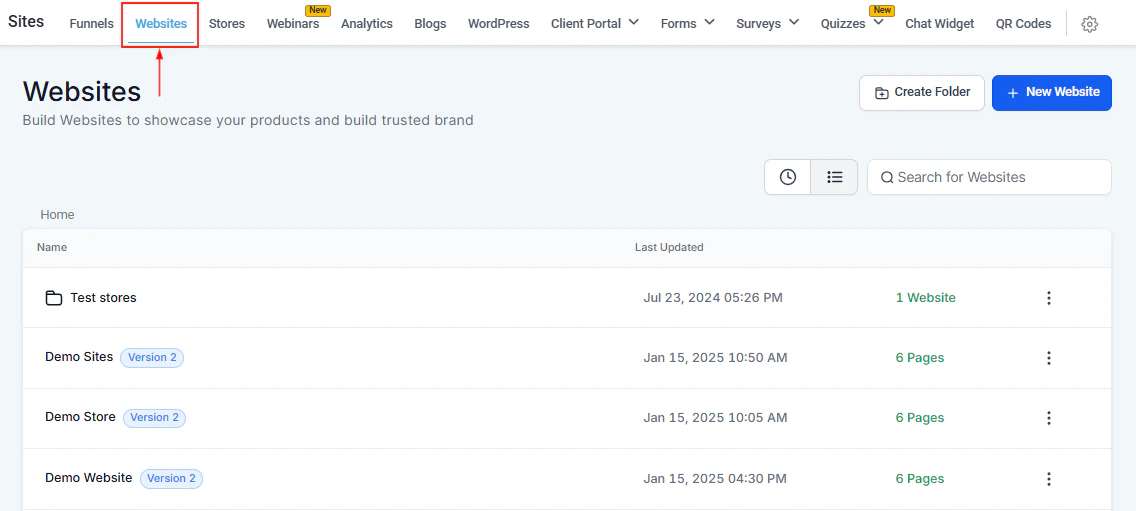
Full multi-page websites with persistent navigation, custom domains, and integrated blogs.
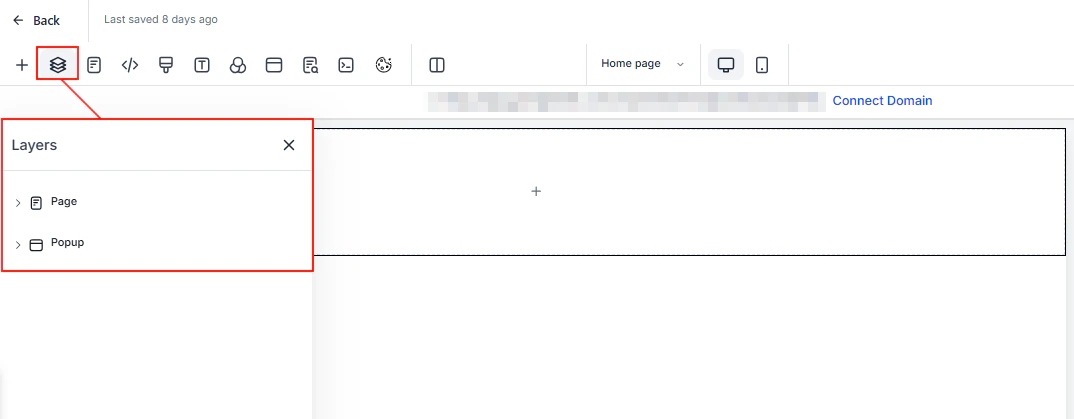
Drag-and-drop editor shared by all funnels and website pages — sections, elements, global styles, and custom code.
Track page views, form submissions, funnel conversion rates, and site-level performance in one place.
Connect your WordPress site to embed HoopAI forms, chat widgets, and tracking scripts.
## How Sites, Funnels, and Websites relate
The Sites section provides the tools used across all web-building in HoopAI. Here is how the three main web-building areas connect:
**Sites** — the tooling layer. The builder, analytics, WordPress integration, and form builder live here. When you build a funnel page, a website page, or a store page, you are using the editor found under Sites.
**Funnels** (in the Funnels & Websites nav section) — multi-step, linear flows designed for lead generation and sales. Each funnel step is a separate page. Funnels support A/B testing, order forms, upsell/downsell pages, and step-level analytics.
**Websites** (in the Funnels & Websites nav section) — full multi-page sites with persistent global navigation, a blog, and a shared domain. A website is better suited when you want a content site with multiple sections that visitors can browse freely rather than move through a fixed sequence.
**Stores** (in the Content nav section) — e-commerce storefronts with a product list, product detail pages, cart, checkout, and thank-you pages. Stores use the same builder but include commerce-specific elements like product grids and cart buttons.
## Getting started
Decide whether you need a funnel (for a single campaign or conversion flow), a website (for a full multi-page content site), or a store (for e-commerce). Most accounts use a combination of all three.
Open any funnel, website, or store page and click **Edit** to launch the drag-and-drop builder. Review the **Funnel / Website Builder** documentation to understand sections, elements, global styles, and mobile responsiveness.
Go to **Settings → Domains & URL Redirects** to connect your domain. Individual funnels and websites can each be assigned their own subdomain or path.
Install any external tracking scripts (Google Analytics, Facebook Pixel) under **Settings → External Tracking** or directly in the page settings. Then use the **Analytics Dashboard** to monitor performance across all your published pages.
If you have an existing WordPress site, go to **Sites → WordPress** and follow the integration steps to embed HoopAI chat widgets, forms, and tracking on your WordPress pages.
The form and survey builder under Sites creates forms and surveys that can be embedded on any funnel page, website page, or external site. Forms built here also appear in the Forms & Surveys section, where you can review submissions and configure notifications.
## Frequently asked questions
A funnel is a linear, step-by-step flow — visitors move from page to page in a defined sequence, which makes it ideal for lead generation and sales campaigns. A website is a browsable, multi-page site with a persistent navigation menu — visitors can move freely between pages, which makes it better for brand presence and content marketing.
Sites is the tooling section — it contains the builder, analytics, WordPress integration, and form builder that are shared across all web-building. The Funnels & Websites navigation section (which also includes a Websites group) is where you create and manage the actual funnel and website content built with those tools.
Yes. The analytics dashboard aggregates data across all published funnels, websites, and store pages in your account. You can filter by individual page, funnel, or date range to drill down on specific performance.
Not directly — WordPress pages are edited in WordPress. The WordPress integration lets you install a plugin that embeds HoopAI chat widgets, forms, and tracking scripts on your WordPress pages. It does not replace the WordPress editor with the HoopAI drag-and-drop builder.
Multi-step, linear flows for lead generation and sales. A/B testing, order forms, upsell pages, and step analytics.
Full multi-page websites with persistent navigation, custom domains, and integrated blogs.
Drag-and-drop editor shared by all funnels and website pages — sections, elements, global styles, and custom code.
Track page views, form submissions, funnel conversion rates, and site-level performance in one place.
Connect your WordPress site to embed HoopAI forms, chat widgets, and tracking scripts.
## How Sites, Funnels, and Websites relate
The Sites section provides the tools used across all web-building in HoopAI. Here is how the three main web-building areas connect:
**Sites** — the tooling layer. The builder, analytics, WordPress integration, and form builder live here. When you build a funnel page, a website page, or a store page, you are using the editor found under Sites.
**Funnels** (in the Funnels & Websites nav section) — multi-step, linear flows designed for lead generation and sales. Each funnel step is a separate page. Funnels support A/B testing, order forms, upsell/downsell pages, and step-level analytics.
**Websites** (in the Funnels & Websites nav section) — full multi-page sites with persistent global navigation, a blog, and a shared domain. A website is better suited when you want a content site with multiple sections that visitors can browse freely rather than move through a fixed sequence.
**Stores** (in the Content nav section) — e-commerce storefronts with a product list, product detail pages, cart, checkout, and thank-you pages. Stores use the same builder but include commerce-specific elements like product grids and cart buttons.
## Getting started
Decide whether you need a funnel (for a single campaign or conversion flow), a website (for a full multi-page content site), or a store (for e-commerce). Most accounts use a combination of all three.
Open any funnel, website, or store page and click **Edit** to launch the drag-and-drop builder. Review the **Funnel / Website Builder** documentation to understand sections, elements, global styles, and mobile responsiveness.
Go to **Settings → Domains & URL Redirects** to connect your domain. Individual funnels and websites can each be assigned their own subdomain or path.
Install any external tracking scripts (Google Analytics, Facebook Pixel) under **Settings → External Tracking** or directly in the page settings. Then use the **Analytics Dashboard** to monitor performance across all your published pages.
If you have an existing WordPress site, go to **Sites → WordPress** and follow the integration steps to embed HoopAI chat widgets, forms, and tracking on your WordPress pages.
The form and survey builder under Sites creates forms and surveys that can be embedded on any funnel page, website page, or external site. Forms built here also appear in the Forms & Surveys section, where you can review submissions and configure notifications.
## Frequently asked questions
A funnel is a linear, step-by-step flow — visitors move from page to page in a defined sequence, which makes it ideal for lead generation and sales campaigns. A website is a browsable, multi-page site with a persistent navigation menu — visitors can move freely between pages, which makes it better for brand presence and content marketing.
Sites is the tooling section — it contains the builder, analytics, WordPress integration, and form builder that are shared across all web-building. The Funnels & Websites navigation section (which also includes a Websites group) is where you create and manage the actual funnel and website content built with those tools.
Yes. The analytics dashboard aggregates data across all published funnels, websites, and store pages in your account. You can filter by individual page, funnel, or date range to drill down on specific performance.
Not directly — WordPress pages are edited in WordPress. The WordPress integration lets you install a plugin that embeds HoopAI chat widgets, forms, and tracking scripts on your WordPress pages. It does not replace the WordPress editor with the HoopAI drag-and-drop builder.