> ## Documentation Index
> Fetch the complete documentation index at: https://help.hoopai.com/llms.txt
> Use this file to discover all available pages before exploring further.
# Review response templates
> Build a library of reusable response templates for common review scenarios to respond to customer feedback quickly and consistently.
Responding to reviews promptly and professionally builds trust with potential customers and signals to Google and Facebook that you are an engaged business owner. Review response templates give you a library of pre-written replies for common scenarios — saving time while keeping your responses on-brand.
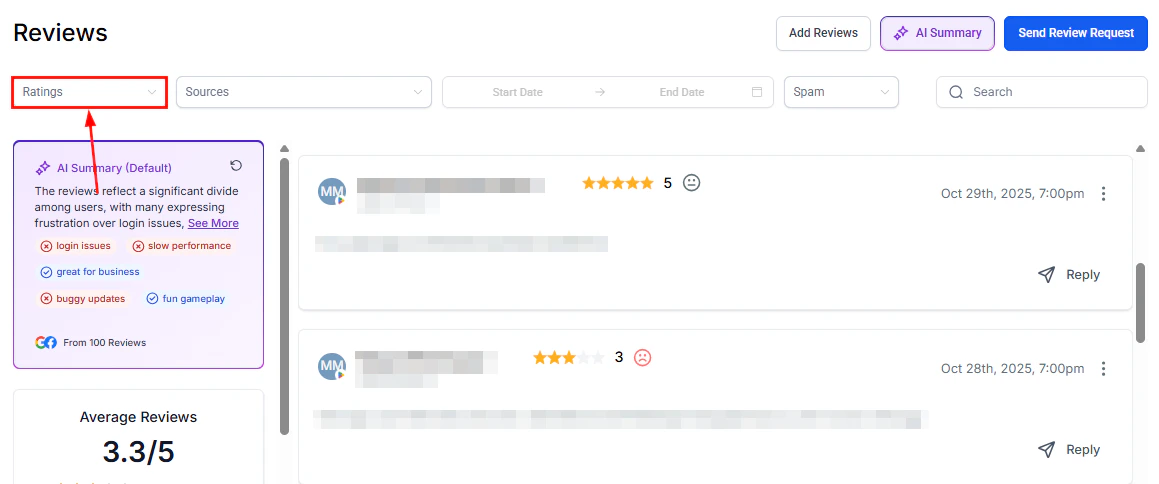
Review response templates are used when manually responding to reviews in **Reputation > Reviews**. For fully automated responses, see the [Reviews AI agent](/reputation/reviews-ai-agent).
## Why use response templates
* **Consistency** — every team member responds with the same tone and messaging
* **Speed** — paste and lightly personalize rather than writing from scratch each time
* **Coverage** — have a ready reply for every scenario: 5-star praise, 1-star complaints, neutral feedback, and spam
* **Professionalism** — well-crafted templates prevent emotional or reactive responses to negative reviews
***
## Responding to reviews manually
Navigate to **Reputation > Reviews**.
Use filters (rating, source, date range) to locate the review you want to respond to.
Click the reply icon on the review card to open the response field.
Type your response directly, or paste from your template library below. Personalize with the reviewer's name and any specific detail from their review before sending.
Click **Send** to post your response publicly on Google or Facebook.
***
 ## Template library by scenario
The following templates are starting points. Always personalize with the customer's name and a specific detail from their review before sending.
### 5-star reviews (positive)
Thank you so much, \[Name]! We're thrilled to hear you had such a great experience. Your kind words mean a lot to our team, and we look forward to serving you again soon.
Wow, thank you \[Name]! Reviews like yours make our day. If you know anyone who could use \[service], we'd love the referral. See you next time!
Thank you, \[Name]! We'll be sure to pass your kind words along to the team — they work hard to deliver this experience every time. We appreciate your support!
### 3- to 4-star reviews (mixed)
Thank you for taking the time to share your feedback, \[Name]. We're glad to hear \[positive aspect], and we appreciate your honest comments about \[area of concern]. We're always looking to improve, and your feedback helps us do that. We hope to earn a 5-star experience on your next visit.
Hi \[Name], thank you for your review. We'd love to learn more about how we can improve your experience. Please feel free to reach out to us at \[phone/email] — we'd appreciate the opportunity to make things right.
### 1- to 2-star reviews (negative)
Hi \[Name], thank you for bringing this to our attention. We're sorry to hear that your experience did not meet our standards, and we sincerely apologize for the inconvenience. We take all feedback seriously and would like to make this right. Please contact us at \[phone/email] so we can discuss this further.
We're sorry to hear about your experience, \[Name]. This is not the standard we hold ourselves to, and we want to do better. We'd appreciate the chance to speak with you directly — please reach out to our team at \[phone/email] and we'll do everything we can to resolve this.
Hi \[Name], we're sorry to hear you were disappointed. We'd like to understand more about what happened so we can address it properly. Could you reach out to us at \[phone/email]? We want to make sure every customer has a positive experience.
### No written comment (star-only reviews)
Thank you for the \[X]-star rating, \[Name]! We're glad you had a positive experience and hope to see you again soon.
Hi \[Name], thank you for your rating. We're sorry to see we didn't meet your expectations. We'd love to learn more — please contact us at \[phone/email] so we can address your concerns.
### Suspected spam or irrelevant reviews
Hi \[Name], we don't appear to have a record of your visit. We take all feedback seriously and want to ensure this is about the right business. Please feel free to contact us at \[phone/email] so we can clarify. If you believe you've left this review in error, we'd appreciate you updating it.
***
## Tips for personalizing templates
* Always use the reviewer's name from their Google or Facebook profile
* Reference a specific detail from their review to show you read it carefully
* For negative reviews, never copy-paste identical responses — each one should feel individual
* Keep responses concise — aim for 2–4 sentences for positive reviews, 3–6 sentences for negative ones
* Avoid defensive language, excuses, or contradicting the reviewer publicly
For consistent automated responses without manual effort, configure the [Reviews AI agent](/reputation/reviews-ai-agent) to handle reviews that match your criteria. Use manual templates for reviews that require a personal, nuanced touch.
***
## FAQs
Yes. Responses posted from the Reviews tab are published directly to the connected Google Business Profile or Facebook Page and are visible to anyone who views the review.
On Google, you can edit or delete your response by visiting the review on Google Maps or Google Search directly. Responses cannot be edited from within the HoopAI platform after they have been posted.
Responding to all reviews — both positive and negative — demonstrates engagement and is recommended for local SEO. At minimum, respond to all negative reviews within 24–48 hours. For high review volumes, use the Reviews AI agent to automate responses for positive reviews.
Avoid arguing with the reviewer, sharing private customer details, using defensive language, or making promises you cannot keep. Always invite the conversation offline rather than airing details publicly.
Create a shared document with your approved template library and guidelines. For fully automated consistency, configure a Reviews AI agent with specific tone settings — the AI applies the same style to every qualifying review regardless of who is monitoring the account.
## Template library by scenario
The following templates are starting points. Always personalize with the customer's name and a specific detail from their review before sending.
### 5-star reviews (positive)
Thank you so much, \[Name]! We're thrilled to hear you had such a great experience. Your kind words mean a lot to our team, and we look forward to serving you again soon.
Wow, thank you \[Name]! Reviews like yours make our day. If you know anyone who could use \[service], we'd love the referral. See you next time!
Thank you, \[Name]! We'll be sure to pass your kind words along to the team — they work hard to deliver this experience every time. We appreciate your support!
### 3- to 4-star reviews (mixed)
Thank you for taking the time to share your feedback, \[Name]. We're glad to hear \[positive aspect], and we appreciate your honest comments about \[area of concern]. We're always looking to improve, and your feedback helps us do that. We hope to earn a 5-star experience on your next visit.
Hi \[Name], thank you for your review. We'd love to learn more about how we can improve your experience. Please feel free to reach out to us at \[phone/email] — we'd appreciate the opportunity to make things right.
### 1- to 2-star reviews (negative)
Hi \[Name], thank you for bringing this to our attention. We're sorry to hear that your experience did not meet our standards, and we sincerely apologize for the inconvenience. We take all feedback seriously and would like to make this right. Please contact us at \[phone/email] so we can discuss this further.
We're sorry to hear about your experience, \[Name]. This is not the standard we hold ourselves to, and we want to do better. We'd appreciate the chance to speak with you directly — please reach out to our team at \[phone/email] and we'll do everything we can to resolve this.
Hi \[Name], we're sorry to hear you were disappointed. We'd like to understand more about what happened so we can address it properly. Could you reach out to us at \[phone/email]? We want to make sure every customer has a positive experience.
### No written comment (star-only reviews)
Thank you for the \[X]-star rating, \[Name]! We're glad you had a positive experience and hope to see you again soon.
Hi \[Name], thank you for your rating. We're sorry to see we didn't meet your expectations. We'd love to learn more — please contact us at \[phone/email] so we can address your concerns.
### Suspected spam or irrelevant reviews
Hi \[Name], we don't appear to have a record of your visit. We take all feedback seriously and want to ensure this is about the right business. Please feel free to contact us at \[phone/email] so we can clarify. If you believe you've left this review in error, we'd appreciate you updating it.
***
## Tips for personalizing templates
* Always use the reviewer's name from their Google or Facebook profile
* Reference a specific detail from their review to show you read it carefully
* For negative reviews, never copy-paste identical responses — each one should feel individual
* Keep responses concise — aim for 2–4 sentences for positive reviews, 3–6 sentences for negative ones
* Avoid defensive language, excuses, or contradicting the reviewer publicly
For consistent automated responses without manual effort, configure the [Reviews AI agent](/reputation/reviews-ai-agent) to handle reviews that match your criteria. Use manual templates for reviews that require a personal, nuanced touch.
***
## FAQs
Yes. Responses posted from the Reviews tab are published directly to the connected Google Business Profile or Facebook Page and are visible to anyone who views the review.
On Google, you can edit or delete your response by visiting the review on Google Maps or Google Search directly. Responses cannot be edited from within the HoopAI platform after they have been posted.
Responding to all reviews — both positive and negative — demonstrates engagement and is recommended for local SEO. At minimum, respond to all negative reviews within 24–48 hours. For high review volumes, use the Reviews AI agent to automate responses for positive reviews.
Avoid arguing with the reviewer, sharing private customer details, using defensive language, or making promises you cannot keep. Always invite the conversation offline rather than airing details publicly.
Create a shared document with your approved template library and guidelines. For fully automated consistency, configure a Reviews AI agent with specific tone settings — the AI applies the same style to every qualifying review regardless of who is monitoring the account.