> ## Documentation Index
> Fetch the complete documentation index at: https://help.hoopai.com/llms.txt
> Use this file to discover all available pages before exploring further.
# Negative review handling
> Strategies, workflows, and platform tools for responding to, flagging, and escalating negative reviews on the HoopAI platform.
Negative reviews are unavoidable for any active business — but how you handle them determines whether they damage or strengthen your reputation. The HoopAI platform gives you the tools to respond quickly, flag fraudulent reviews, and build workflows that prevent bad experiences from escalating online.
## Why negative reviews matter
A single negative review left without a response is often more damaging than the review itself. Studies consistently show that potential customers read owner responses before forming an opinion. A professional, empathetic reply signals that you care about customers even when things go wrong — and that signal can override the negative impression the original review creates.
Goals for negative review management:
* Respond within 24–48 hours to demonstrate responsiveness
* Move sensitive conversations offline and out of the public thread
* Flag and dispute genuinely fraudulent reviews through the appropriate channels
* Use patterns in negative feedback to improve service delivery
***
## Identifying and triaging negative reviews
Navigate to **Reputation > Reviews** and filter by star rating to surface all 1–3 star reviews.
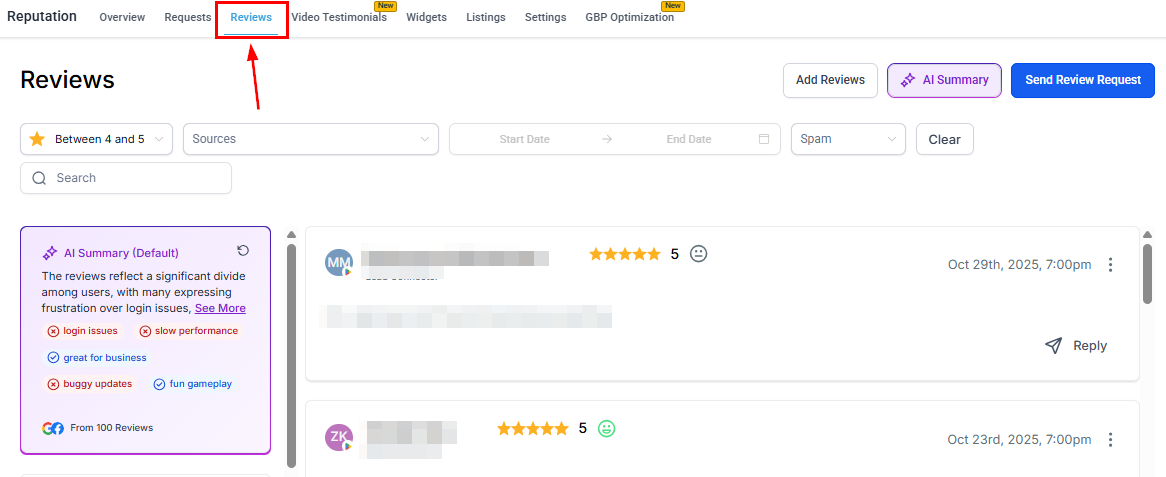 You can also sort by date to prioritize the most recent negative feedback.
Each review card displays:
* Reviewer name and platform (Google or Facebook)
* Star rating and date submitted
* Review text (if provided)
* Reply status (whether a response has been posted)
Use this view to build a daily or weekly triage habit — reviewing unresponded low-star feedback before other review management tasks.
***
## Responding to negative reviews
Click the reply button on the negative review card in **Reputation > Reviews**.
Begin your response by acknowledging the customer's experience. Avoid defending the business or contradicting the reviewer publicly — even if you believe the review is inaccurate.
Offer a sincere apology where appropriate and include a direct contact method (phone number or email). This shows other readers you are committed to resolution while moving the sensitive details out of the public thread.
Aim for 3–5 sentences. Long defensive responses rarely help — a brief, empathetic reply is more effective.
Click **Send** to publish your reply directly to the connected Google Business Profile or Facebook Page.
See [Review response templates](/reputation/review-response-templates) for ready-to-use responses crafted specifically for 1–2 star reviews, mixed feedback, and star-only ratings with no written comment.
***
## Using the AI agent for negative reviews
The [Reviews AI agent](/reputation/reviews-ai-agent) can be configured to automatically respond to reviews in any star rating range — including 1–3 star reviews. This is particularly useful for ensuring every negative review receives a timely reply outside business hours.
Best practice: create a dedicated agent for low-star reviews with an empathetic, service-recovery tone that differs from your positive-review agent. Configure the agent to:
* Use a tone such as **Empathetic** and **Professional**
* Include a footer that provides a direct contact method
* Apply a short response delay (15–30 minutes) so the reply feels considered rather than instant
You can run the AI agent for negative reviews alongside manual review for cases that need a more nuanced personal response.
***
## Flagging suspected spam or fake reviews
If you believe a review was left by someone who was never a customer, or appears to be a coordinated attack, use the platform's spam detection tools:
Locate the review in **Reputation > Reviews**.
Hover over the three-dot icon on the review card and select **Mark as spam**.
The HoopAI platform's spam detection algorithm evaluates the flagged review. Reviews marked as spam are held in a separate queue and will not receive automated AI responses.
You can also sort by date to prioritize the most recent negative feedback.
Each review card displays:
* Reviewer name and platform (Google or Facebook)
* Star rating and date submitted
* Review text (if provided)
* Reply status (whether a response has been posted)
Use this view to build a daily or weekly triage habit — reviewing unresponded low-star feedback before other review management tasks.
***
## Responding to negative reviews
Click the reply button on the negative review card in **Reputation > Reviews**.
Begin your response by acknowledging the customer's experience. Avoid defending the business or contradicting the reviewer publicly — even if you believe the review is inaccurate.
Offer a sincere apology where appropriate and include a direct contact method (phone number or email). This shows other readers you are committed to resolution while moving the sensitive details out of the public thread.
Aim for 3–5 sentences. Long defensive responses rarely help — a brief, empathetic reply is more effective.
Click **Send** to publish your reply directly to the connected Google Business Profile or Facebook Page.
See [Review response templates](/reputation/review-response-templates) for ready-to-use responses crafted specifically for 1–2 star reviews, mixed feedback, and star-only ratings with no written comment.
***
## Using the AI agent for negative reviews
The [Reviews AI agent](/reputation/reviews-ai-agent) can be configured to automatically respond to reviews in any star rating range — including 1–3 star reviews. This is particularly useful for ensuring every negative review receives a timely reply outside business hours.
Best practice: create a dedicated agent for low-star reviews with an empathetic, service-recovery tone that differs from your positive-review agent. Configure the agent to:
* Use a tone such as **Empathetic** and **Professional**
* Include a footer that provides a direct contact method
* Apply a short response delay (15–30 minutes) so the reply feels considered rather than instant
You can run the AI agent for negative reviews alongside manual review for cases that need a more nuanced personal response.
***
## Flagging suspected spam or fake reviews
If you believe a review was left by someone who was never a customer, or appears to be a coordinated attack, use the platform's spam detection tools:
Locate the review in **Reputation > Reviews**.
Hover over the three-dot icon on the review card and select **Mark as spam**.
The HoopAI platform's spam detection algorithm evaluates the flagged review. Reviews marked as spam are held in a separate queue and will not receive automated AI responses.
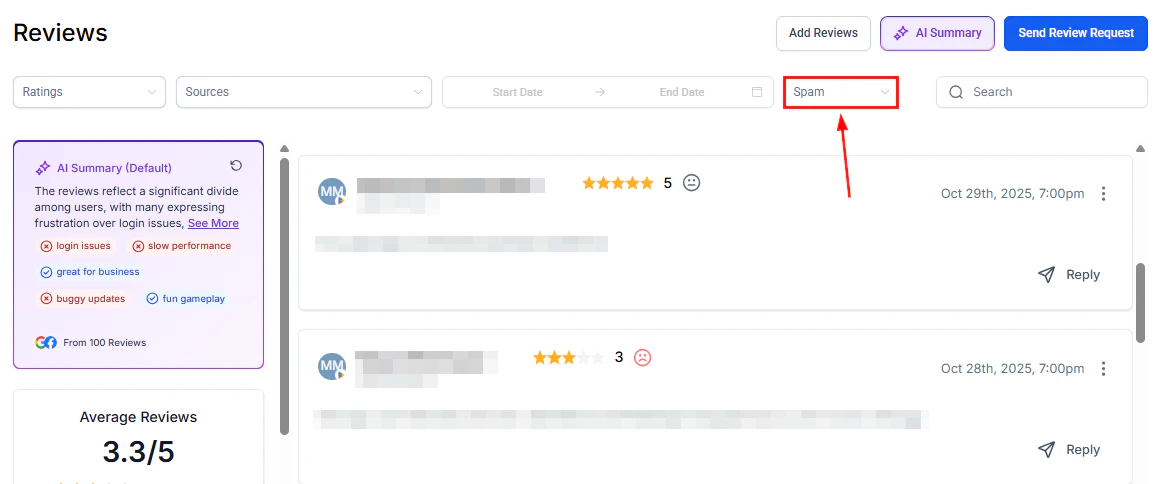 Periodically check the **Spam** filter in the Reviews tab to confirm that flagged reviews are genuinely suspicious and that no genuine reviews have been incorrectly flagged. Use **Mark as Not Spam** to restore genuine reviews.
Marking a review as spam within the HoopAI platform does not automatically remove it from Google or Facebook. The review remains publicly visible on those platforms unless it is separately disputed through their native tools.
***
## Disputing reviews on Google
The HoopAI platform provides tools to manage and respond to Google reviews, but formal review removal requests must be submitted directly to Google. To dispute a review that violates Google's policies:
1. Sign in to [Google Business Profile](https://business.google.com) using the account connected to your listing.
2. Navigate to your reviews and locate the review you want to dispute.
3. Click the flag icon next to the review to report it as violating Google's content policies.
4. Select the most applicable violation category (spam, fake, off-topic, conflict of interest, etc.).
5. Submit the report.
Google evaluates reported reviews against its content policies. Removal is not guaranteed and may take several days. Reviews that do not violate Google's policies — even if unfair or inaccurate — are typically not removed.
Repeatedly reporting the same review does not accelerate the process. If Google declines to remove a review, the best course of action is a professional public response followed by continued efforts to generate new positive reviews that push the negative review lower in the display order.
***
## Turning negative reviews into improvements
Negative reviews contain actionable intelligence. Build a habit of reviewing low-star feedback monthly to identify recurring themes:
* Filter reviews by 1–3 stars in **Reputation > Reviews**
* Use the **AI Summary** feature to surface common topics and sentiment patterns across all negative reviews
Periodically check the **Spam** filter in the Reviews tab to confirm that flagged reviews are genuinely suspicious and that no genuine reviews have been incorrectly flagged. Use **Mark as Not Spam** to restore genuine reviews.
Marking a review as spam within the HoopAI platform does not automatically remove it from Google or Facebook. The review remains publicly visible on those platforms unless it is separately disputed through their native tools.
***
## Disputing reviews on Google
The HoopAI platform provides tools to manage and respond to Google reviews, but formal review removal requests must be submitted directly to Google. To dispute a review that violates Google's policies:
1. Sign in to [Google Business Profile](https://business.google.com) using the account connected to your listing.
2. Navigate to your reviews and locate the review you want to dispute.
3. Click the flag icon next to the review to report it as violating Google's content policies.
4. Select the most applicable violation category (spam, fake, off-topic, conflict of interest, etc.).
5. Submit the report.
Google evaluates reported reviews against its content policies. Removal is not guaranteed and may take several days. Reviews that do not violate Google's policies — even if unfair or inaccurate — are typically not removed.
Repeatedly reporting the same review does not accelerate the process. If Google declines to remove a review, the best course of action is a professional public response followed by continued efforts to generate new positive reviews that push the negative review lower in the display order.
***
## Turning negative reviews into improvements
Negative reviews contain actionable intelligence. Build a habit of reviewing low-star feedback monthly to identify recurring themes:
* Filter reviews by 1–3 stars in **Reputation > Reviews**
* Use the **AI Summary** feature to surface common topics and sentiment patterns across all negative reviews
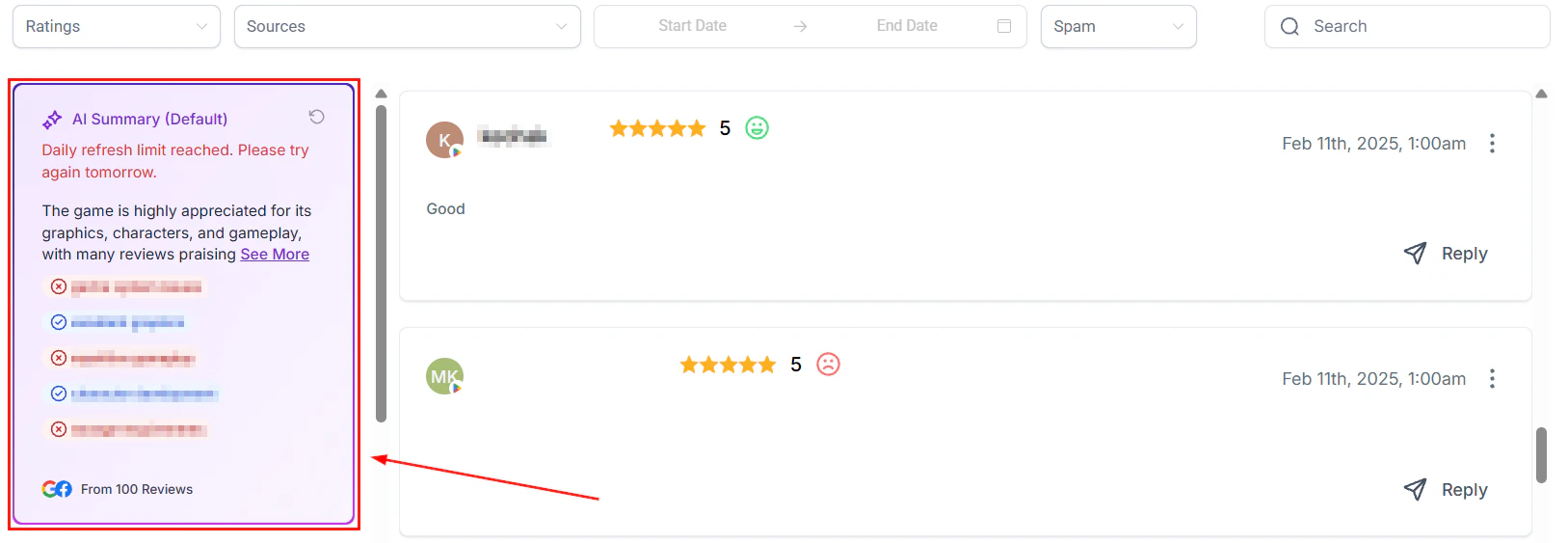 * Bring recurring complaints to team meetings as operational improvement items
* Track whether the frequency of a specific complaint decreases after process changes
A business that visibly improves in response to feedback — and can point to that improvement in review responses — builds long-term trust that no amount of negative reviews can undo.
***
## FAQs
No. Only Google can remove reviews from its platform, and only when a review violates its content policies. The HoopAI platform helps you flag suspicious reviews in your own system and respond professionally, but the formal dispute process must be completed through Google Business Profile directly.
Yes — responding to every negative review is strongly recommended. Even a brief, professional response signals to potential customers that you are attentive and care about the customer experience. Reviews left without a response often cause more reputational damage than the review itself.
Avoid contradicting the reviewer publicly, even if their account is inaccurate. Politely acknowledge their experience, clarify your standard process if relevant, and invite them to contact you directly to resolve the matter. Other readers will see your professional conduct regardless of the review's accuracy.
The most effective prevention is proactive review collection. Businesses that consistently request reviews from satisfied customers build a larger positive base that dilutes the impact of occasional negative reviews. Use automated review requests in **Automation > Workflows** to maintain a steady flow of new positive feedback.
Yes. Enable **dynamic language matching** on your negative-review AI agent and it will automatically reply in the same language as the reviewer's original comment.
* Bring recurring complaints to team meetings as operational improvement items
* Track whether the frequency of a specific complaint decreases after process changes
A business that visibly improves in response to feedback — and can point to that improvement in review responses — builds long-term trust that no amount of negative reviews can undo.
***
## FAQs
No. Only Google can remove reviews from its platform, and only when a review violates its content policies. The HoopAI platform helps you flag suspicious reviews in your own system and respond professionally, but the formal dispute process must be completed through Google Business Profile directly.
Yes — responding to every negative review is strongly recommended. Even a brief, professional response signals to potential customers that you are attentive and care about the customer experience. Reviews left without a response often cause more reputational damage than the review itself.
Avoid contradicting the reviewer publicly, even if their account is inaccurate. Politely acknowledge their experience, clarify your standard process if relevant, and invite them to contact you directly to resolve the matter. Other readers will see your professional conduct regardless of the review's accuracy.
The most effective prevention is proactive review collection. Businesses that consistently request reviews from satisfied customers build a larger positive base that dilutes the impact of occasional negative reviews. Use automated review requests in **Automation > Workflows** to maintain a steady flow of new positive feedback.
Yes. Enable **dynamic language matching** on your negative-review AI agent and it will automatically reply in the same language as the reviewer's original comment.