> ## Documentation Index
> Fetch the complete documentation index at: https://help.hoopai.com/llms.txt
> Use this file to discover all available pages before exploring further.
# GBP optimization
> Update your Google Business Profile, manage reviews, schedule posts, and track your profile health score — all from the HoopAI Platform.
The GBP Optimization feature helps you manage your Google Business Profile (GBP) directly from the HoopAI Platform. It provides tools to update profile details, monitor reviews, preview changes in real time, and track your overall profile health score.
 ## Accessing GBP optimization
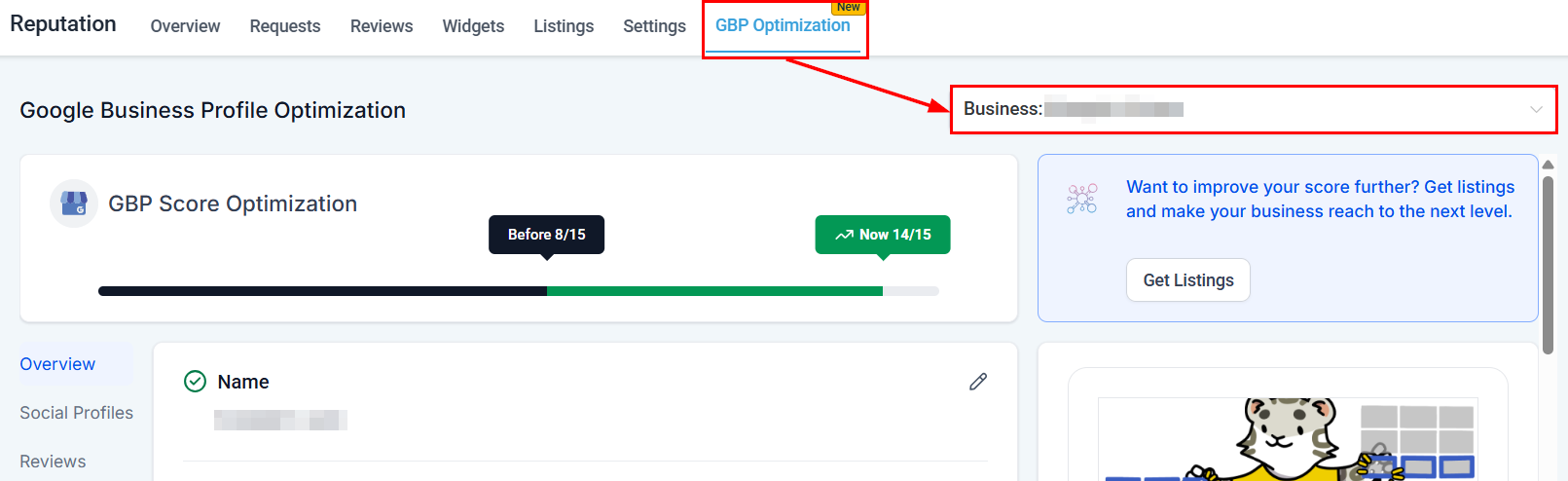
Navigate to **Reputation > GBP Optimization**, then select your business location from the dropdown menu. Your current GBP score displays at the top, allowing you to track improvements over time.
***
## Profile management
### Overview section
The overview section lets you:
* Update your business name and description
* Add product images, a company logo, and other relevant visuals
* Modify phone numbers
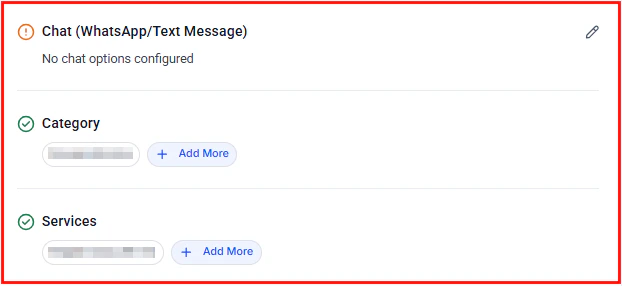
* Add WhatsApp or text message contact options
* Specify business categories and services
* Include special attributes (veteran-owned, pet-friendly, wheelchair accessible, etc.)
* Set your company address, opening date, and operating hours
If both the WhatsApp and Text Message fields are filled, Text Message will take priority as the contact method shown on your GBP listing.
### Social profiles
Enhance your credibility by adding relevant social media links (Facebook, Instagram, LinkedIn, and more). Click **Save** after adding links to retain the changes.
***
## Reviews management
View all your GBP reviews in one location, monitor customer sentiment, and respond promptly to feedback — without leaving the platform.
***
## Scheduled posts
View upcoming scheduled GBP posts or jump directly to the Social Planner to schedule new content. Published posts appear under **Preview > Updates**, where you can edit, reschedule, or delete upcoming content.
See [GBP posts](/reputation/gbp-posts) for full instructions on creating What's New, Event, and Offer posts.
***
## Live preview tool
As you make updates, the Live Preview panel displays how your listing will appear to customers on Google Search and Google Maps. Use this to verify that everything looks correct before saving.
***
## Profile completeness tracking
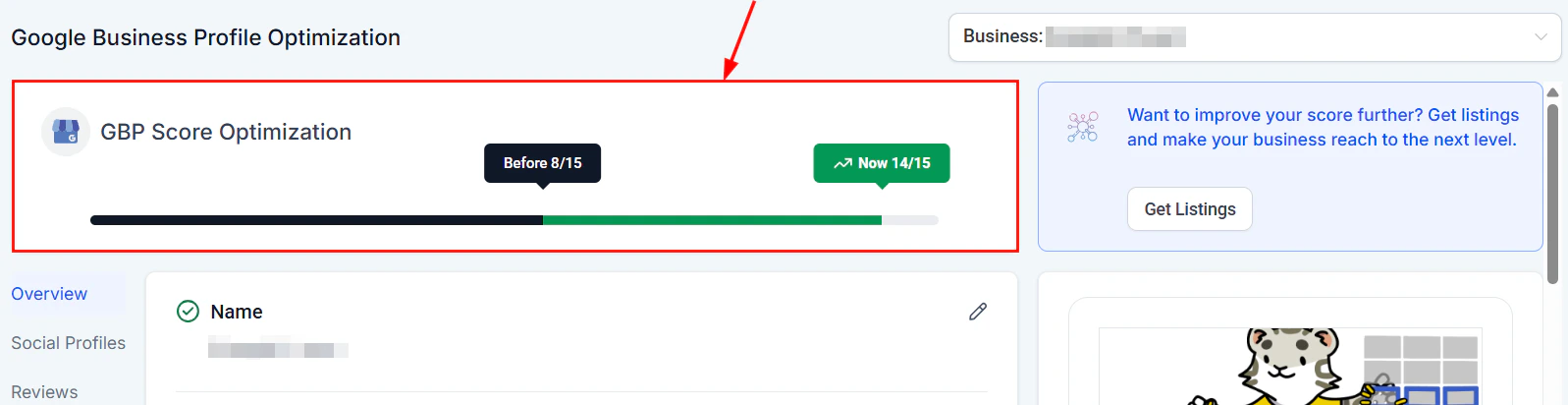
Review your **Profile Score** to see how complete your GBP is. Follow the alerts highlighting areas that need attention for step-by-step improvement guidance.
## Accessing GBP optimization
Navigate to **Reputation > GBP Optimization**, then select your business location from the dropdown menu. Your current GBP score displays at the top, allowing you to track improvements over time.
***
## Profile management
### Overview section
The overview section lets you:
* Update your business name and description
* Add product images, a company logo, and other relevant visuals
* Modify phone numbers
* Add WhatsApp or text message contact options
* Specify business categories and services
* Include special attributes (veteran-owned, pet-friendly, wheelchair accessible, etc.)
* Set your company address, opening date, and operating hours
If both the WhatsApp and Text Message fields are filled, Text Message will take priority as the contact method shown on your GBP listing.
### Social profiles
Enhance your credibility by adding relevant social media links (Facebook, Instagram, LinkedIn, and more). Click **Save** after adding links to retain the changes.
***
## Reviews management
View all your GBP reviews in one location, monitor customer sentiment, and respond promptly to feedback — without leaving the platform.
***
## Scheduled posts
View upcoming scheduled GBP posts or jump directly to the Social Planner to schedule new content. Published posts appear under **Preview > Updates**, where you can edit, reschedule, or delete upcoming content.
See [GBP posts](/reputation/gbp-posts) for full instructions on creating What's New, Event, and Offer posts.
***
## Live preview tool
As you make updates, the Live Preview panel displays how your listing will appear to customers on Google Search and Google Maps. Use this to verify that everything looks correct before saving.
***
## Profile completeness tracking
Review your **Profile Score** to see how complete your GBP is. Follow the alerts highlighting areas that need attention for step-by-step improvement guidance.
 A complete Google Business Profile increases your chances of appearing in the local "3-pack" search results and drives more calls, direction requests, and website visits.
***
## Reviews and messaging
Customers can also contact you directly via the GBP chat feature. The HoopAI Platform routes incoming GBP messages to your Conversations inbox automatically.
A complete Google Business Profile increases your chances of appearing in the local "3-pack" search results and drives more calls, direction requests, and website visits.
***
## Reviews and messaging
Customers can also contact you directly via the GBP chat feature. The HoopAI Platform routes incoming GBP messages to your Conversations inbox automatically.
 ***
## FAQs
Your GBP score reflects how complete and optimized your Google Business Profile is. It is based on factors such as whether you have a business description, photos, categories, hours, attributes, and contact details filled in. Follow the improvement alerts in the platform to raise your score.
Most updates appear on Google Search and Google Maps within a few minutes to a few hours. Complex changes such as category updates may take longer for Google to review and approve.
Yes. Use the location dropdown at the top of the GBP Optimization section to switch between locations. Each location has its own profile score and management tools.
Text Message takes priority as the contact method shown on your GBP listing when both fields are populated. Remove the Text Message entry if you want WhatsApp to display instead.
Incoming messages from Google Business Profile chat are routed automatically to your **Conversations** inbox within the HoopAI Platform, so you can respond without leaving the platform.
GBP posts are created and scheduled through the Social Planner. From the GBP Optimization section, click **Go to Social Planner** in the Scheduled Posts panel, or navigate directly to **Marketing > Social Planner**. See [GBP posts](/reputation/gbp-posts) for detailed instructions.
HoopAI supports three GBP post types: **What's New** (general updates), **Event** (time-bound events with start and end dates), and **Offer** (promotions with optional coupon codes and redemption links).
***
## FAQs
Your GBP score reflects how complete and optimized your Google Business Profile is. It is based on factors such as whether you have a business description, photos, categories, hours, attributes, and contact details filled in. Follow the improvement alerts in the platform to raise your score.
Most updates appear on Google Search and Google Maps within a few minutes to a few hours. Complex changes such as category updates may take longer for Google to review and approve.
Yes. Use the location dropdown at the top of the GBP Optimization section to switch between locations. Each location has its own profile score and management tools.
Text Message takes priority as the contact method shown on your GBP listing when both fields are populated. Remove the Text Message entry if you want WhatsApp to display instead.
Incoming messages from Google Business Profile chat are routed automatically to your **Conversations** inbox within the HoopAI Platform, so you can respond without leaving the platform.
GBP posts are created and scheduled through the Social Planner. From the GBP Optimization section, click **Go to Social Planner** in the Scheduled Posts panel, or navigate directly to **Marketing > Social Planner**. See [GBP posts](/reputation/gbp-posts) for detailed instructions.
HoopAI supports three GBP post types: **What's New** (general updates), **Event** (time-bound events with start and end dates), and **Offer** (promotions with optional coupon codes and redemption links).