> ## Documentation Index
> Fetch the complete documentation index at: https://help.hoopai.com/llms.txt
> Use this file to discover all available pages before exploring further.
# Reporting
> Call reports, appointment analytics, agent performance, ads reporting, revenue reporting, attribution, custom reports, and scheduled report delivery.
The Reporting section offers insights, metrics, and visualizations for tracking key business performance indicators. From lead generation and conversion rates to call logs and ad spend, Reporting gives you the data you need to optimize your strategy.
 Review inbound and outbound call metrics, duration, and outcomes
Analyze appointment bookings, outcomes, and calendar performance
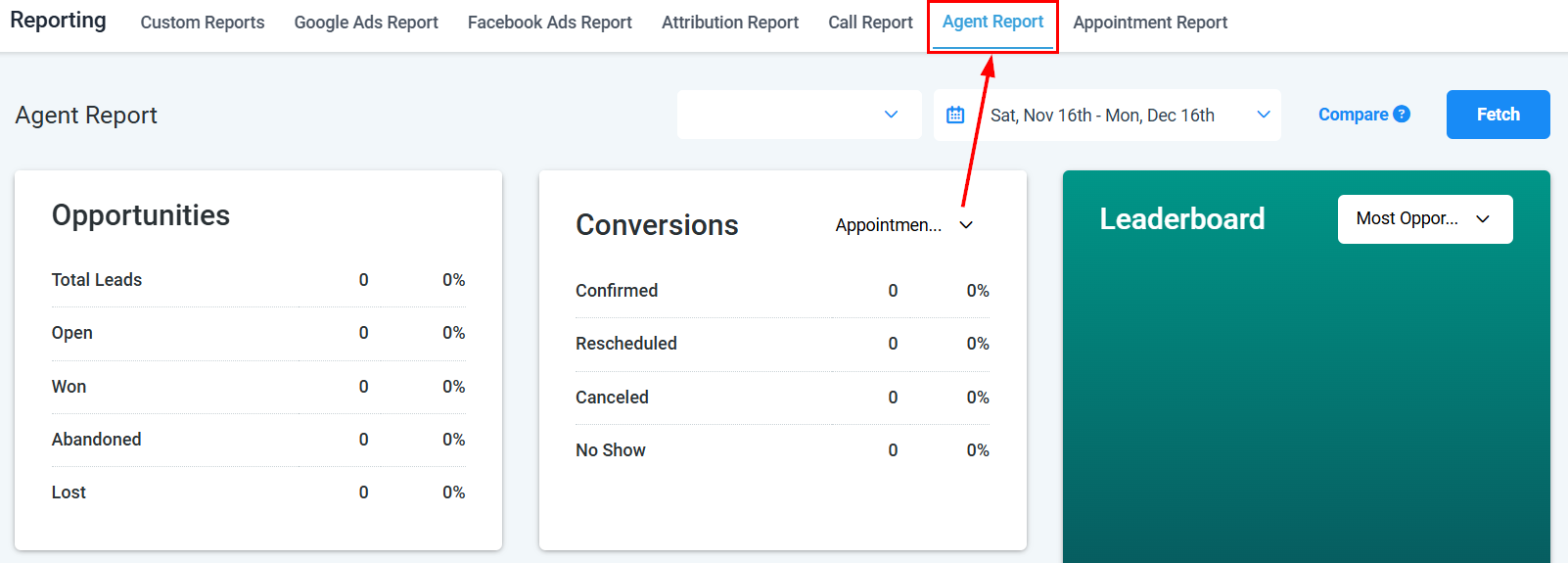
Measure individual agent performance across calls and conversations
Monitor Google Ads and Facebook Ads campaign performance in one place
Build tailored reports using your own metrics, columns, and filters
Track system-level changes, user actions, and account activity logs
Monitor email open rates, click rates, reply rates, and deliverability
Analyze stage-by-stage conversion rates to find pipeline bottlenecks
Schedule automated report delivery by email at any cadence
Track payments, invoices, subscription revenue, and refunds over time
Trace which sources and touchpoints are generating and converting leads
Track new contacts added, opt-ins, and contact list growth over time
Measure how leads move through your funnel and where they convert
Review SMS delivery rates, reply rates, and opt-out trends
Track engagement, reach, and performance across social platforms
Analyze workflow enrollment counts, completion rates, and action performance
Review review volume, average rating trends, and response metrics
Connect Google Analytics to track website and funnel visitor behavior
Connect Meta Pixel to track ad conversions and website events
## Getting started
Click **Reporting** in the left sidebar of the HoopAI Platform. You need reporting permissions enabled on your user role — contact your administrator if the section is unavailable.
Browse the report categories above. Use Call Reporting for phone metrics, Appointment Report for booking analysis, Agent Reporting for team performance, or Ads Reporting for paid campaign data.
Each report includes a date range picker and relevant filters such as calendar, team member, pipeline, or channel. Narrow the data to the scope you want to analyze.
Go to **Reporting > Custom Reports** to create a report view with exactly the columns and filters you need. Save it as a named report for repeated use.
Open **Reporting > Report Scheduling** to set up automated email delivery of any report on a daily, weekly, or monthly cadence — useful for sending summaries to team members or clients.
## Frequently asked questions
HoopAI includes call, appointment, agent, ads, email, SMS, social media, workflow, funnel, revenue, attribution, contact growth, conversion, reputation, audit, and custom reports. Report types are added regularly.
Yes. Most reports include an **Export** or **Download** button that saves data as an Excel or CSV file. Custom reports can also be scheduled for automatic email delivery.
Access to individual reporting sections depends on your user role and account permissions. If a report is unavailable, contact your account administrator to review your role settings.
Date range availability varies by report type. Call reporting supports up to 180 days. Attribution and ad reporting ranges depend on when your integrations were connected. Custom reports can query all historical data stored in your account.
Yes. Export any report as a spreadsheet and share the file externally. For recurring sharing, use the Report Scheduling feature to send reports by email automatically.
Attribution reporting shows which lead sources, campaigns, and touchpoints are driving contact creation and conversions. Use it to understand which marketing channels are performing and where to focus your budget.
Review inbound and outbound call metrics, duration, and outcomes
Analyze appointment bookings, outcomes, and calendar performance
Measure individual agent performance across calls and conversations
Monitor Google Ads and Facebook Ads campaign performance in one place
Build tailored reports using your own metrics, columns, and filters
Track system-level changes, user actions, and account activity logs
Monitor email open rates, click rates, reply rates, and deliverability
Analyze stage-by-stage conversion rates to find pipeline bottlenecks
Schedule automated report delivery by email at any cadence
Track payments, invoices, subscription revenue, and refunds over time
Trace which sources and touchpoints are generating and converting leads
Track new contacts added, opt-ins, and contact list growth over time
Measure how leads move through your funnel and where they convert
Review SMS delivery rates, reply rates, and opt-out trends
Track engagement, reach, and performance across social platforms
Analyze workflow enrollment counts, completion rates, and action performance
Review review volume, average rating trends, and response metrics
Connect Google Analytics to track website and funnel visitor behavior
Connect Meta Pixel to track ad conversions and website events
## Getting started
Click **Reporting** in the left sidebar of the HoopAI Platform. You need reporting permissions enabled on your user role — contact your administrator if the section is unavailable.
Browse the report categories above. Use Call Reporting for phone metrics, Appointment Report for booking analysis, Agent Reporting for team performance, or Ads Reporting for paid campaign data.
Each report includes a date range picker and relevant filters such as calendar, team member, pipeline, or channel. Narrow the data to the scope you want to analyze.
Go to **Reporting > Custom Reports** to create a report view with exactly the columns and filters you need. Save it as a named report for repeated use.
Open **Reporting > Report Scheduling** to set up automated email delivery of any report on a daily, weekly, or monthly cadence — useful for sending summaries to team members or clients.
## Frequently asked questions
HoopAI includes call, appointment, agent, ads, email, SMS, social media, workflow, funnel, revenue, attribution, contact growth, conversion, reputation, audit, and custom reports. Report types are added regularly.
Yes. Most reports include an **Export** or **Download** button that saves data as an Excel or CSV file. Custom reports can also be scheduled for automatic email delivery.
Access to individual reporting sections depends on your user role and account permissions. If a report is unavailable, contact your account administrator to review your role settings.
Date range availability varies by report type. Call reporting supports up to 180 days. Attribution and ad reporting ranges depend on when your integrations were connected. Custom reports can query all historical data stored in your account.
Yes. Export any report as a spreadsheet and share the file externally. For recurring sharing, use the Report Scheduling feature to send reports by email automatically.
Attribution reporting shows which lead sources, campaigns, and touchpoints are driving contact creation and conversions. Use it to understand which marketing channels are performing and where to focus your budget.