> ## Documentation Index
> Fetch the complete documentation index at: https://help.hoopai.com/llms.txt
> Use this file to discover all available pages before exploring further.
# Email Reporting
> Track email open rates, click rates, reply rates, and deliverability metrics for campaigns and individual agents in the HoopAI Platform.
The Email Reporting section gives you visibility into how your email campaigns and individual agent emails are performing. Track opens, clicks, replies, and deliverability to optimize your outreach and identify what is resonating with your audience.
## Where to find email stats
Email performance data is available in two places:
* **Agent Reporting → Email section** — per-agent email metrics (sent, opened, clicked, replied)
* **Marketing → Email Statistics** — campaign-level email performance for bulk sends
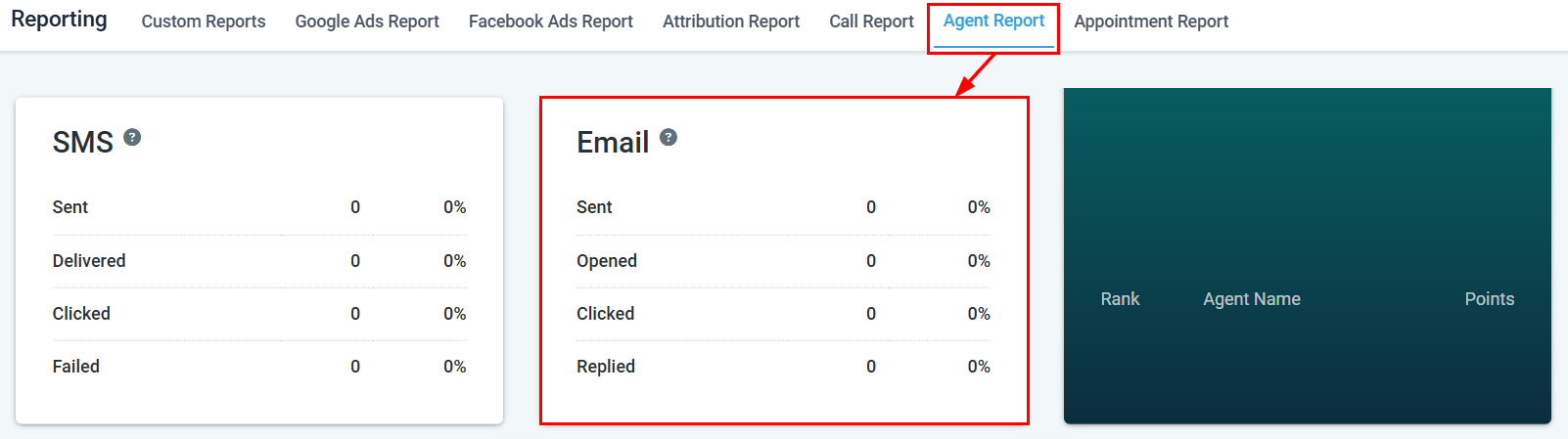
For individual agent email metrics, navigate to **Reporting → Agent Reporting** and scroll to the Email section. For bulk email campaign stats, navigate to **Marketing → Email Campaigns**.
***
## Agent email metrics
The Email section within Agent Reporting provides a per-agent breakdown of email activity. Use the **User** filter to select a specific agent or view all agents together.
 ### Key metrics
Total number of emails sent by the agent in the selected date range.
Number and percentage of sent emails that were opened by the recipient.
Number of recipients who clicked a link within the email.
Number of recipients who replied to the email.
***
## Email campaign statistics
For bulk email campaigns, HoopAI tracks the following delivery and engagement metrics:
### Deliverability metrics
| Metric | Description |
| ------------------- | -------------------------------------------------------- |
| **Sent** | Total emails dispatched in the campaign |
| **Delivered** | Emails successfully delivered to recipients |
| **Bounced** | Emails that could not be delivered (hard or soft bounce) |
| **Unsubscribed** | Recipients who opted out after receiving the email |
| **Spam complaints** | Emails marked as spam by recipients |
### Engagement metrics
| Metric | Description |
| ----------------------------- | ----------------------------------------------------------- |
| **Open rate** | Percentage of delivered emails that were opened |
| **Click rate** | Percentage of delivered emails with at least one link click |
| **Click-to-open rate (CTOR)** | Percentage of openers who also clicked a link |
| **Reply rate** | Percentage of recipients who replied |
A healthy open rate varies by industry, but 20–30% is a common benchmark. If your open rate is below 15%, review your subject lines, sender name, and the time of day you are sending.
***
## Improving email performance
Low open rates usually indicate issues with subject lines, sender reputation, or send timing. Try A/B testing subject lines, sending from a recognizable name, and experimenting with send times. Also check that your sending domain is properly authenticated (SPF, DKIM, DMARC).
If opens are healthy but clicks are low, the issue is likely in the email body. Ensure your call-to-action is prominent, your links are working, and your content is relevant to the segment you are targeting.
Hard bounces indicate invalid email addresses. Regularly clean your contact lists to remove invalid emails. A high bounce rate can damage your sender reputation over time.
High unsubscribes suggest your audience did not opt in clearly or is receiving irrelevant content. Review your list hygiene, segmentation, and email frequency.
***
## Frequently asked questions
Navigate to **Marketing → Email Campaigns**, locate the campaign, and click it to view the full statistics including open rate, click rate, bounces, and unsubscribes.
Yes. In **Reporting → Agent Reporting**, use the User filter to select an agent and scroll to the Email section to see their sent, opened, clicked, and replied metrics.
Open tracking requires the recipient's email client to load a tracking pixel. Some email clients (notably Apple Mail with Mail Privacy Protection) block pixel-based tracking, which can suppress open rates. Consider using click rate as a more reliable engagement signal.
Ensure your sending domain has SPF, DKIM, and DMARC records configured. Keep your contact lists clean, avoid spam trigger words, and maintain a consistent sending volume. See [Email services](/settings/email-services) for domain authentication setup.
Yes. Email campaign stats can be exported from the campaign detail view. Agent-level email data can be exported via a Custom Report filtered by user and activity type.
***
## Related articles
* [Agent reporting](/reporting/agent-reporting)
* [Custom reports](/reporting/custom-reports)
* [Email campaigns](/marketing/email-campaigns)
### Key metrics
Total number of emails sent by the agent in the selected date range.
Number and percentage of sent emails that were opened by the recipient.
Number of recipients who clicked a link within the email.
Number of recipients who replied to the email.
***
## Email campaign statistics
For bulk email campaigns, HoopAI tracks the following delivery and engagement metrics:
### Deliverability metrics
| Metric | Description |
| ------------------- | -------------------------------------------------------- |
| **Sent** | Total emails dispatched in the campaign |
| **Delivered** | Emails successfully delivered to recipients |
| **Bounced** | Emails that could not be delivered (hard or soft bounce) |
| **Unsubscribed** | Recipients who opted out after receiving the email |
| **Spam complaints** | Emails marked as spam by recipients |
### Engagement metrics
| Metric | Description |
| ----------------------------- | ----------------------------------------------------------- |
| **Open rate** | Percentage of delivered emails that were opened |
| **Click rate** | Percentage of delivered emails with at least one link click |
| **Click-to-open rate (CTOR)** | Percentage of openers who also clicked a link |
| **Reply rate** | Percentage of recipients who replied |
A healthy open rate varies by industry, but 20–30% is a common benchmark. If your open rate is below 15%, review your subject lines, sender name, and the time of day you are sending.
***
## Improving email performance
Low open rates usually indicate issues with subject lines, sender reputation, or send timing. Try A/B testing subject lines, sending from a recognizable name, and experimenting with send times. Also check that your sending domain is properly authenticated (SPF, DKIM, DMARC).
If opens are healthy but clicks are low, the issue is likely in the email body. Ensure your call-to-action is prominent, your links are working, and your content is relevant to the segment you are targeting.
Hard bounces indicate invalid email addresses. Regularly clean your contact lists to remove invalid emails. A high bounce rate can damage your sender reputation over time.
High unsubscribes suggest your audience did not opt in clearly or is receiving irrelevant content. Review your list hygiene, segmentation, and email frequency.
***
## Frequently asked questions
Navigate to **Marketing → Email Campaigns**, locate the campaign, and click it to view the full statistics including open rate, click rate, bounces, and unsubscribes.
Yes. In **Reporting → Agent Reporting**, use the User filter to select an agent and scroll to the Email section to see their sent, opened, clicked, and replied metrics.
Open tracking requires the recipient's email client to load a tracking pixel. Some email clients (notably Apple Mail with Mail Privacy Protection) block pixel-based tracking, which can suppress open rates. Consider using click rate as a more reliable engagement signal.
Ensure your sending domain has SPF, DKIM, and DMARC records configured. Keep your contact lists clean, avoid spam trigger words, and maintain a consistent sending volume. See [Email services](/settings/email-services) for domain authentication setup.
Yes. Email campaign stats can be exported from the campaign detail view. Agent-level email data can be exported via a Custom Report filtered by user and activity type.
***
## Related articles
* [Agent reporting](/reporting/agent-reporting)
* [Custom reports](/reporting/custom-reports)
* [Email campaigns](/marketing/email-campaigns)