> ## Documentation Index
> Fetch the complete documentation index at: https://help.hoopai.com/llms.txt
> Use this file to discover all available pages before exploring further.
# Unsplash
> Browse and use free high-resolution stock photography from Unsplash directly in the Hoop platform.
Media Storage integrates with Unsplash, a royalty-free stock media platform, giving you direct access to an expansive collection of high-quality visuals at no additional cost.
## Accessing Unsplash
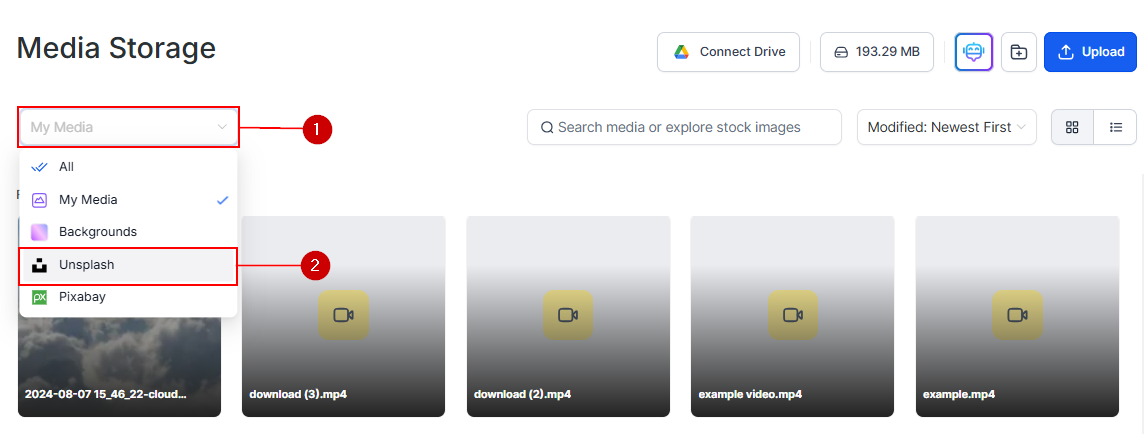
Click **Media Storage** in the left navigation sidebar.
In the filter dropdown, select **Unsplash**. The library switches to the Unsplash photo catalog.
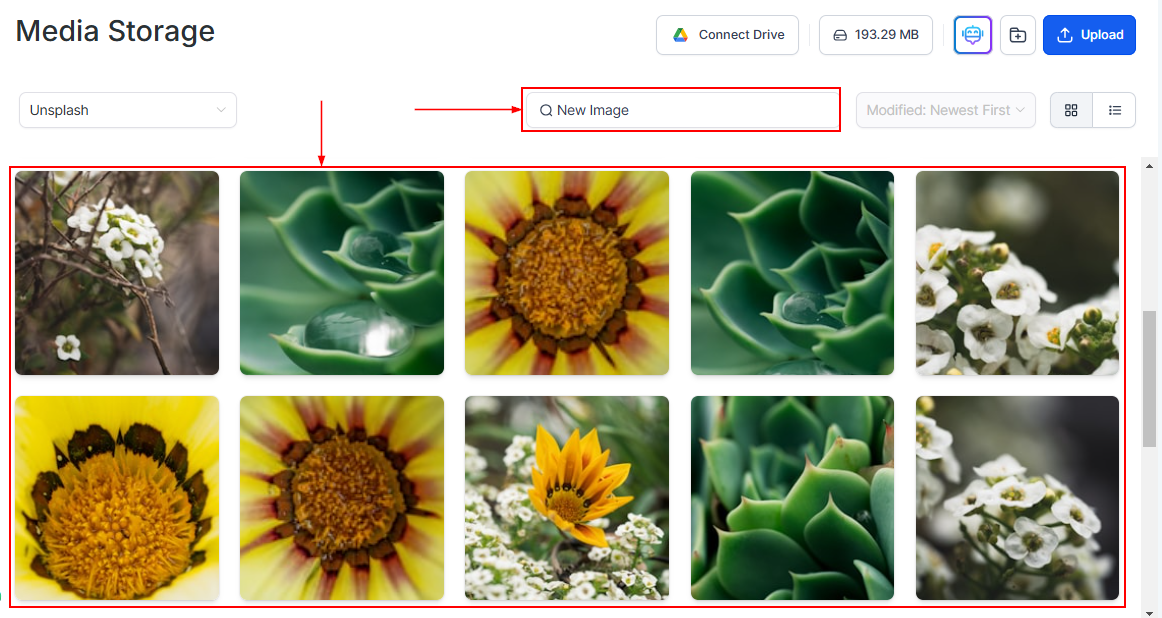
 Once you have selected the Unsplash option, a search bar appears. Use it to find images that align with the tone and vision of your project.
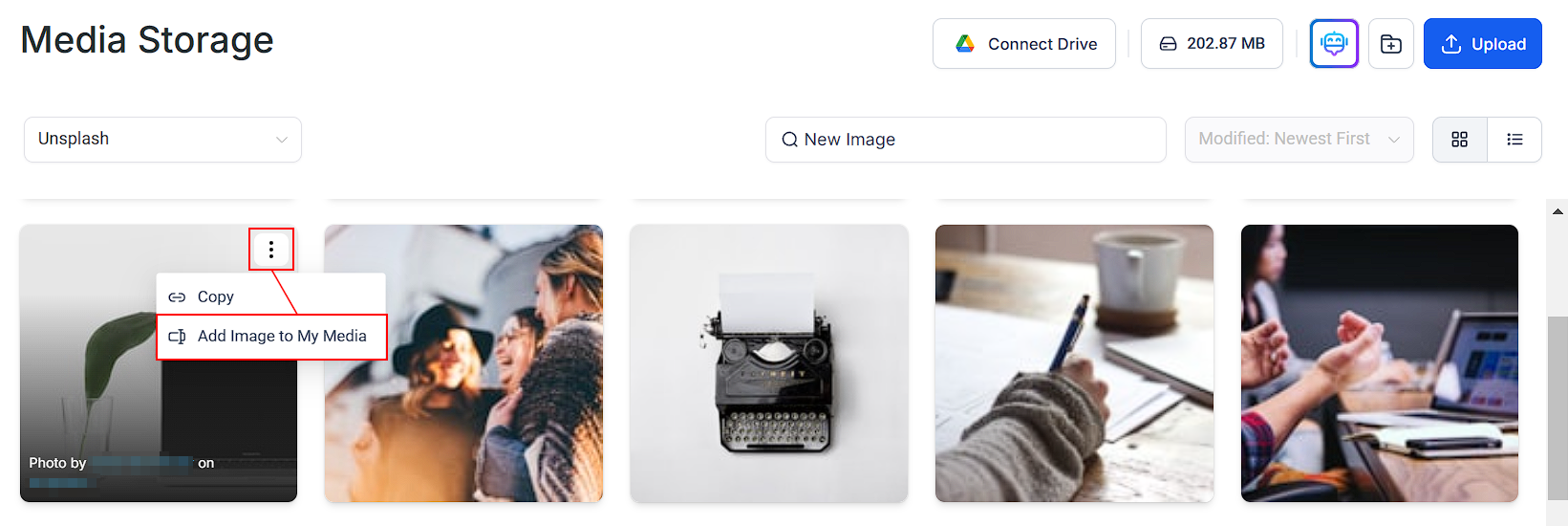
 Click an image to preview it. Use **Add Image to My Media** to save it to your personal media library, or insert it directly into your content.
 Images from Unsplash are stored on Hoop's servers when selected, ensuring they remain available even if removed from the original source. These images are only added to My Media if manually saved via **Add Image to My Media**; otherwise, they remain hidden to keep your library organized. This prevents broken images and enhances reliability across funnels, blogs, and emails.
## Using Unsplash images
Once added to your media library, Unsplash images are available everywhere in the platform:
* Page builder image elements in funnels and websites
* Email template images
* Blog post featured images
* Social media post graphics
* Course lesson thumbnails
## Unsplash license
All Unsplash photos are available under the **Unsplash License**, which allows free use for commercial and non-commercial purposes. Modification — including cropping, resizing, and adding overlays — is permitted. Attribution is encouraged but not required.
## Tips for finding great images
Instead of "office," try "productive morning" or "focused work." Unsplash responds well to contextual and emotional search terms.
Ensure the downloaded image is at least 1920 px wide for use as a full-width hero background.
For landing page hero backgrounds, choose photos with large empty areas — sky, walls, or open space — where you can overlay text without readability issues.
Both Unsplash and Pixabay are available simultaneously. Use Unsplash for editorial-quality photographs and Pixabay for illustrations, vectors, and a wider variety of media types.
Images from Unsplash are stored on Hoop's servers when selected, ensuring they remain available even if removed from the original source. These images are only added to My Media if manually saved via **Add Image to My Media**; otherwise, they remain hidden to keep your library organized. This prevents broken images and enhances reliability across funnels, blogs, and emails.
## Using Unsplash images
Once added to your media library, Unsplash images are available everywhere in the platform:
* Page builder image elements in funnels and websites
* Email template images
* Blog post featured images
* Social media post graphics
* Course lesson thumbnails
## Unsplash license
All Unsplash photos are available under the **Unsplash License**, which allows free use for commercial and non-commercial purposes. Modification — including cropping, resizing, and adding overlays — is permitted. Attribution is encouraged but not required.
## Tips for finding great images
Instead of "office," try "productive morning" or "focused work." Unsplash responds well to contextual and emotional search terms.
Ensure the downloaded image is at least 1920 px wide for use as a full-width hero background.
For landing page hero backgrounds, choose photos with large empty areas — sky, walls, or open space — where you can overlay text without readability issues.
Both Unsplash and Pixabay are available simultaneously. Use Unsplash for editorial-quality photographs and Pixabay for illustrations, vectors, and a wider variety of media types.