> ## Documentation Index
> Fetch the complete documentation index at: https://help.hoopai.com/llms.txt
> Use this file to discover all available pages before exploring further.
# Marketing
> Email marketing, social media scheduling, ad campaigns, affiliate management, reputation management, brand boards, and prospecting tools.
The Marketing section gives you a full suite of tools to reach your audience across every channel. From social media scheduling to email campaigns to affiliate tracking, everything is connected to your CRM contacts for seamless marketing workflows.
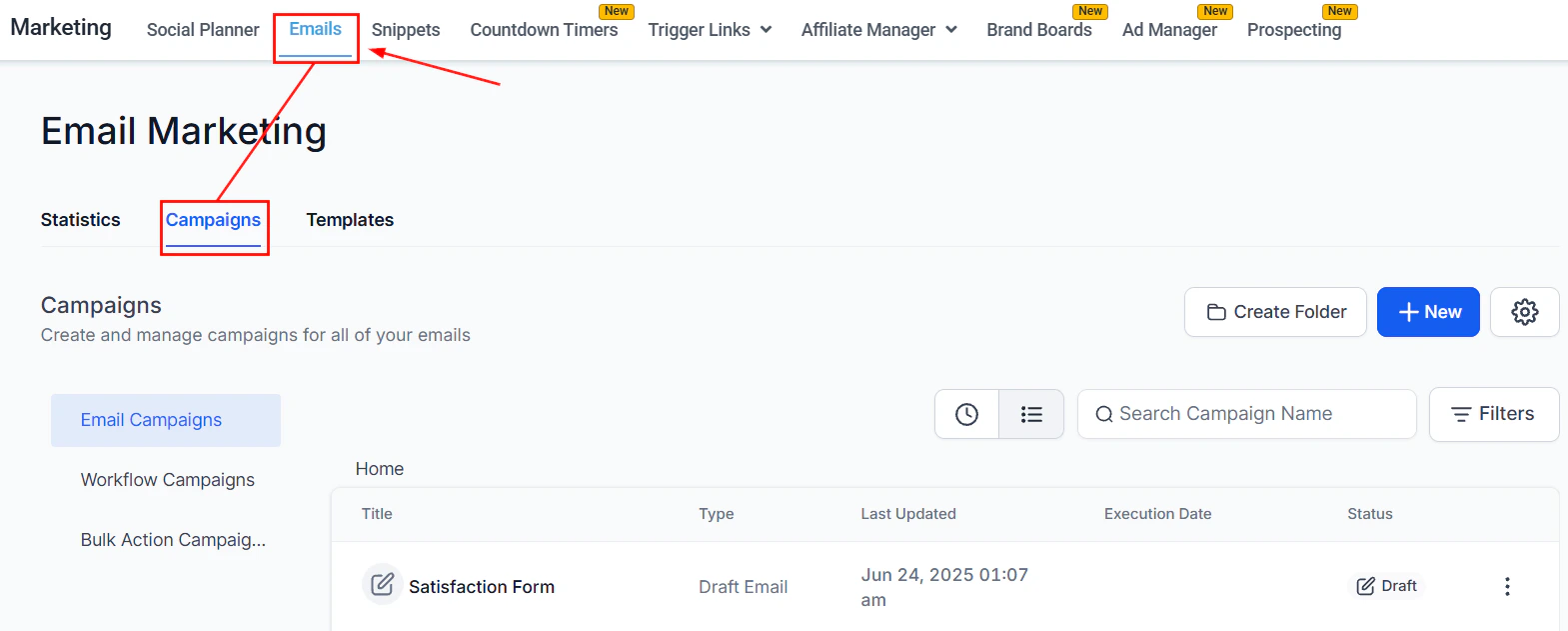 Design and send email campaigns using a drag-and-drop builder with templates, RSS feeds, and analytics
Schedule and publish posts across Facebook, Instagram, LinkedIn, TikTok, YouTube, Pinterest, Google My Business, and more
Launch and manage Facebook and Google ad campaigns directly from the platform
Automate the tracking of referrals, commissions, and payouts for your affiliate program
Collect reviews, manage listings, and track your brand's digital presence across Google and Facebook
Create and manage brand kits with logos, colors, and fonts for consistent on-brand content across all clients and channels
Search for local businesses, audit their online presence, and add them as contacts or leads with one click
## Getting started
Go to **Settings > Integrations** to connect your email sending service, social media accounts, Google Ads, and Facebook Ads accounts.
Open **Marketing > Email Marketing** to create your first campaign. Choose a template, customize with the drag-and-drop builder, and set your sending domain for deliverability.
Open **Marketing > Social Planner** and connect your social accounts. Use the calendar view to plan, schedule, and publish posts in bulk across all platforms.
Open **Marketing > Ad Manager**, connect your Meta or Google Ads account, and create a campaign. Attribution data ties back to your CRM contacts automatically.
Open **Marketing > Affiliate Manager**, create a campaign, and generate unique tracking links or coupon codes for each affiliate. Commission rules are configured per campaign.
## Frequently asked questions
The platform covers email marketing, social media scheduling, paid advertising (Facebook and Google), affiliate marketing, reputation management, and SMS — all tied to your CRM contacts.
No. The Social Planner, Email Builder, and all other marketing tools are built into the platform, so you can manage all channels from a single dashboard without third-party integrations.
Yes. You can connect Gmail, Outlook, SendGrid, Mailgun, or any custom SMTP provider. You can also set up a dedicated sending domain for improved deliverability.
The Affiliate Manager lets you create campaigns, assign unique tracking links or coupon codes to affiliates, and automatically calculate commissions when sales are made through those links. Payouts can be processed manually or via PayPal.
Yes. The Ad Manager lets you create and manage Facebook and Google campaigns without leaving the HoopAI Platform. Campaign performance data is tied to your CRM contacts.
A trigger link is a special URL that, when clicked by a contact in an email or SMS, automatically fires a CRM workflow — such as tagging the contact, sending a follow-up, or moving them through a pipeline stage.
Design and send email campaigns using a drag-and-drop builder with templates, RSS feeds, and analytics
Schedule and publish posts across Facebook, Instagram, LinkedIn, TikTok, YouTube, Pinterest, Google My Business, and more
Launch and manage Facebook and Google ad campaigns directly from the platform
Automate the tracking of referrals, commissions, and payouts for your affiliate program
Collect reviews, manage listings, and track your brand's digital presence across Google and Facebook
Create and manage brand kits with logos, colors, and fonts for consistent on-brand content across all clients and channels
Search for local businesses, audit their online presence, and add them as contacts or leads with one click
## Getting started
Go to **Settings > Integrations** to connect your email sending service, social media accounts, Google Ads, and Facebook Ads accounts.
Open **Marketing > Email Marketing** to create your first campaign. Choose a template, customize with the drag-and-drop builder, and set your sending domain for deliverability.
Open **Marketing > Social Planner** and connect your social accounts. Use the calendar view to plan, schedule, and publish posts in bulk across all platforms.
Open **Marketing > Ad Manager**, connect your Meta or Google Ads account, and create a campaign. Attribution data ties back to your CRM contacts automatically.
Open **Marketing > Affiliate Manager**, create a campaign, and generate unique tracking links or coupon codes for each affiliate. Commission rules are configured per campaign.
## Frequently asked questions
The platform covers email marketing, social media scheduling, paid advertising (Facebook and Google), affiliate marketing, reputation management, and SMS — all tied to your CRM contacts.
No. The Social Planner, Email Builder, and all other marketing tools are built into the platform, so you can manage all channels from a single dashboard without third-party integrations.
Yes. You can connect Gmail, Outlook, SendGrid, Mailgun, or any custom SMTP provider. You can also set up a dedicated sending domain for improved deliverability.
The Affiliate Manager lets you create campaigns, assign unique tracking links or coupon codes to affiliates, and automatically calculate commissions when sales are made through those links. Payouts can be processed manually or via PayPal.
Yes. The Ad Manager lets you create and manage Facebook and Google campaigns without leaving the HoopAI Platform. Campaign performance data is tied to your CRM contacts.
A trigger link is a special URL that, when clicked by a contact in an email or SMS, automatically fires a CRM workflow — such as tagging the contact, sending a follow-up, or moving them through a pipeline stage.