> ## Documentation Index
> Fetch the complete documentation index at: https://help.hoopai.com/llms.txt
> Use this file to discover all available pages before exploring further.
# Setting up your phone number
> Purchase and configure a phone number in HoopAI to enable calling and SMS, then complete A2P 10DLC registration.
A phone number is required to send SMS messages and make calls through HoopAI. You purchase the number directly inside the platform — no external provider needed. After purchasing, completing A2P 10DLC registration unlocks bulk SMS sending.
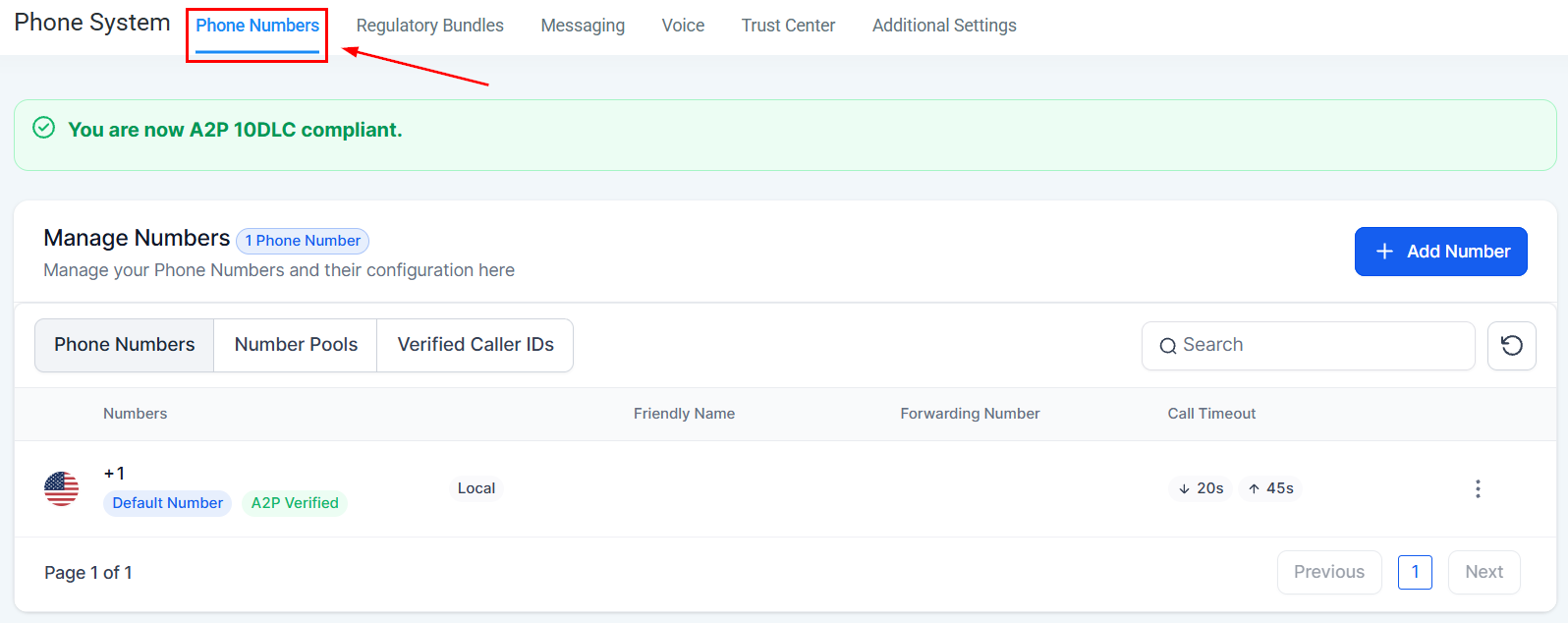 ## Step 1 — Purchase a phone number
Click **Settings** in the left sidebar and select **Phone Numbers**.
Click **Add Number** or the **+** button to open the number purchase flow.
Select your country. Then choose between a **local** number (a regional area code) or a **toll-free** number (e.g., 1-800).
Local numbers typically have higher answer rates from contacts who recognise the area code. Toll-free numbers can be useful for national brands.
Enter your desired area code to see available numbers. Select one and click **Buy** to complete the purchase.
***
## Step 2 — Configure your number
After purchasing, click the number to open its settings.
## Step 1 — Purchase a phone number
Click **Settings** in the left sidebar and select **Phone Numbers**.
Click **Add Number** or the **+** button to open the number purchase flow.
Select your country. Then choose between a **local** number (a regional area code) or a **toll-free** number (e.g., 1-800).
Local numbers typically have higher answer rates from contacts who recognise the area code. Toll-free numbers can be useful for national brands.
Enter your desired area code to see available numbers. Select one and click **Buy** to complete the purchase.
***
## Step 2 — Configure your number
After purchasing, click the number to open its settings.
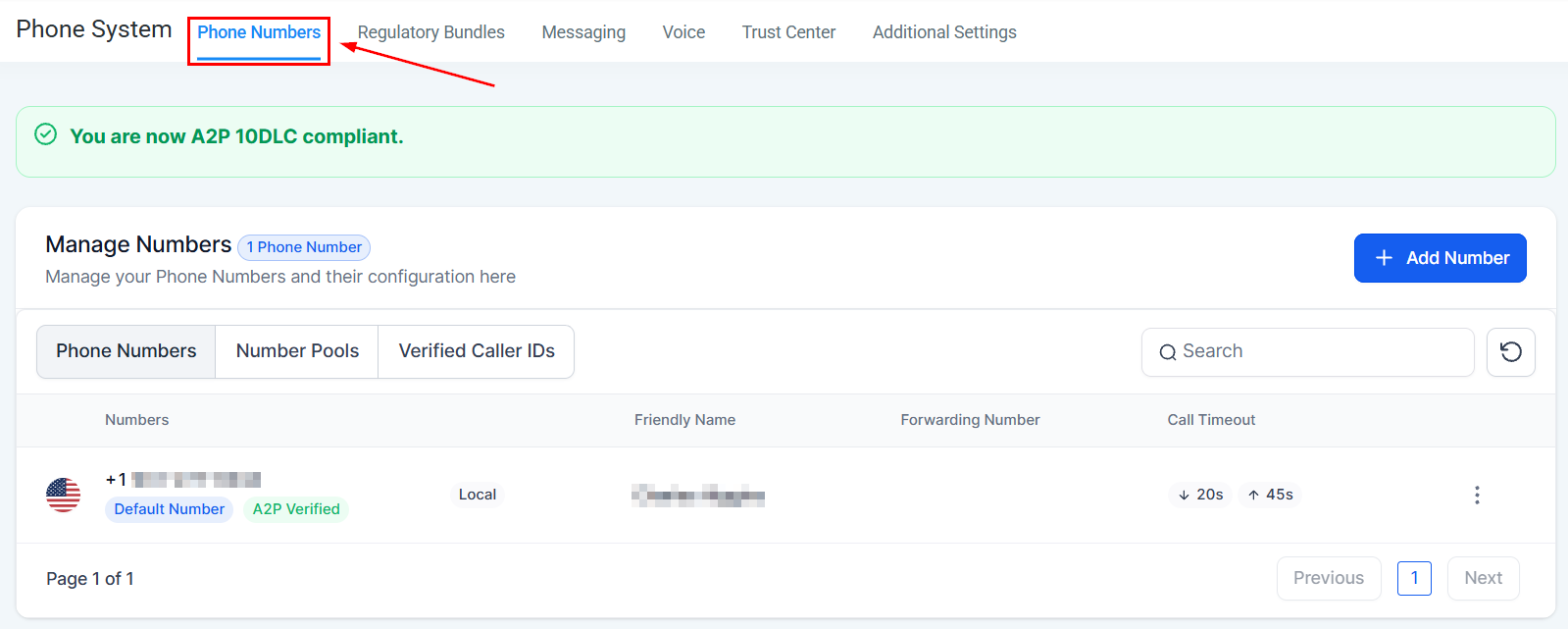 Key settings to configure:
| Setting | Description |
| ----------------- | ------------------------------------------------------------------------------------ |
| Name | A label for the number (e.g., "Main Sales Line") — internal only |
| Forwarding number | A personal or office phone to forward incoming calls when needed |
| Caller ID pass | Shows your HoopAI number (not your forwarding number) as the outbound caller ID |
| Call connect | Requires a keypress before connecting forwarded calls — reduces robocall connections |
| Whisper message | Plays a brief audio clip to you before connecting a forwarded call |
| Call recording | Automatically records all calls on this number |
***
## Step 3 — Configure voice call settings
Go to the **Voice Calls** tab within phone settings to configure:
* **Inbound call routing** — which user or team receives incoming calls
* **Voicemail greeting** — the message callers hear when no one answers
* **Business hours** — restrict when inbound calls ring through
Key settings to configure:
| Setting | Description |
| ----------------- | ------------------------------------------------------------------------------------ |
| Name | A label for the number (e.g., "Main Sales Line") — internal only |
| Forwarding number | A personal or office phone to forward incoming calls when needed |
| Caller ID pass | Shows your HoopAI number (not your forwarding number) as the outbound caller ID |
| Call connect | Requires a keypress before connecting forwarded calls — reduces robocall connections |
| Whisper message | Plays a brief audio clip to you before connecting a forwarded call |
| Call recording | Automatically records all calls on this number |
***
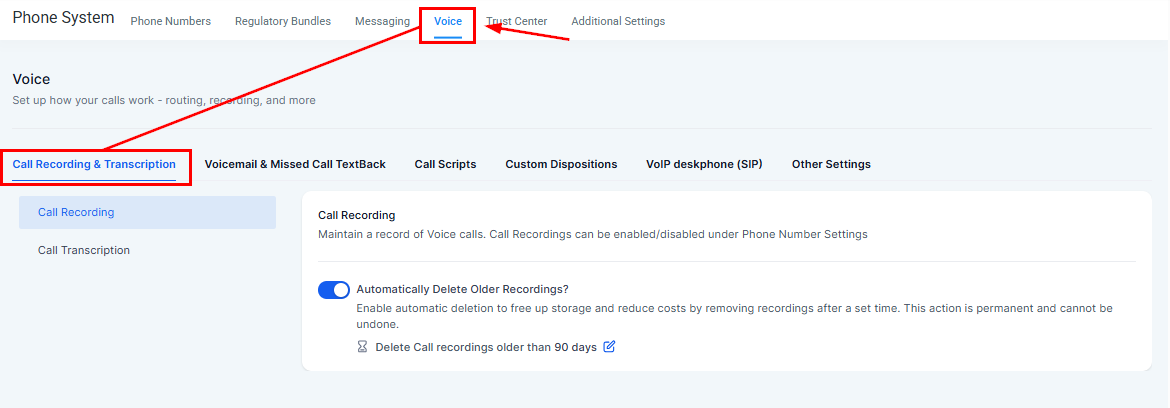
## Step 3 — Configure voice call settings
Go to the **Voice Calls** tab within phone settings to configure:
* **Inbound call routing** — which user or team receives incoming calls
* **Voicemail greeting** — the message callers hear when no one answers
* **Business hours** — restrict when inbound calls ring through
 ***
## Step 4 — Complete A2P 10DLC registration
A2P 10DLC is a US carrier requirement for businesses sending SMS messages. Without registration, carriers will filter or block your outbound SMS.
A2P 10DLC registration is mandatory for all US SMS. Start this immediately after purchasing your number — approval typically takes 1–5 business days.
Go to **Settings > Trust Center** to begin registration. You will need:
* Your legal business name (exactly as registered)
* EIN / Tax ID
* Business website URL
* Business type (LLC, Corporation, Sole Proprietor, etc.)
* A description of how you will use SMS
[Full A2P 10DLC registration guide →](/academy/onboarding/a2p-10dlc-registration)
***
## Using multiple phone numbers
You can purchase additional numbers for different purposes — for example, a separate number per team member, or a dedicated number for each marketing campaign. Each number has independent call and SMS settings.
When using the dialer, you can choose which number to call from using the **From** dropdown — useful if you have multiple numbers assigned to your account.
***
## Frequently asked questions
Local US and Canadian numbers are typically a low monthly fee (around \$1–2/month) plus per-minute and per-message usage charges. Toll-free numbers are slightly higher. Pricing is shown during the purchase flow. Check your HoopAI plan details for included credits.
Yes — number porting is available. Contact HoopAI support to initiate a port request. The process typically takes 2–4 weeks and requires a Letter of Authorization (LOA) from your current carrier.
A2P 10DLC is primarily required for bulk/campaign SMS. Low-volume 1-on-1 conversational SMS may work without full registration initially, but carriers can still filter unregistered traffic. Complete registration promptly to ensure reliable delivery for all SMS.
Rejections are usually due to incomplete business information or a mismatch between your legal name and EIN records. Review the rejection reason in **Settings > Trust Center** and resubmit with corrected information. Contact HoopAI support if you need help resolving a rejection.
Yes — international SMS is supported for many countries. Purchase or use an existing number that supports international sending, and ensure the contact's phone number includes the correct country code. Additional per-message rates apply for international destinations.
***
## Step 4 — Complete A2P 10DLC registration
A2P 10DLC is a US carrier requirement for businesses sending SMS messages. Without registration, carriers will filter or block your outbound SMS.
A2P 10DLC registration is mandatory for all US SMS. Start this immediately after purchasing your number — approval typically takes 1–5 business days.
Go to **Settings > Trust Center** to begin registration. You will need:
* Your legal business name (exactly as registered)
* EIN / Tax ID
* Business website URL
* Business type (LLC, Corporation, Sole Proprietor, etc.)
* A description of how you will use SMS
[Full A2P 10DLC registration guide →](/academy/onboarding/a2p-10dlc-registration)
***
## Using multiple phone numbers
You can purchase additional numbers for different purposes — for example, a separate number per team member, or a dedicated number for each marketing campaign. Each number has independent call and SMS settings.
When using the dialer, you can choose which number to call from using the **From** dropdown — useful if you have multiple numbers assigned to your account.
***
## Frequently asked questions
Local US and Canadian numbers are typically a low monthly fee (around \$1–2/month) plus per-minute and per-message usage charges. Toll-free numbers are slightly higher. Pricing is shown during the purchase flow. Check your HoopAI plan details for included credits.
Yes — number porting is available. Contact HoopAI support to initiate a port request. The process typically takes 2–4 weeks and requires a Letter of Authorization (LOA) from your current carrier.
A2P 10DLC is primarily required for bulk/campaign SMS. Low-volume 1-on-1 conversational SMS may work without full registration initially, but carriers can still filter unregistered traffic. Complete registration promptly to ensure reliable delivery for all SMS.
Rejections are usually due to incomplete business information or a mismatch between your legal name and EIN records. Review the rejection reason in **Settings > Trust Center** and resubmit with corrected information. Contact HoopAI support if you need help resolving a rejection.
Yes — international SMS is supported for many countries. Purchase or use an existing number that supports international sending, and ensure the contact's phone number includes the correct country code. Additional per-message rates apply for international destinations.