> ## Documentation Index
> Fetch the complete documentation index at: https://help.hoopai.com/llms.txt
> Use this file to discover all available pages before exploring further.
# Do Not Disturb (DND) settings in HoopAI
> Block outgoing SMS, email, or calls per contact, automate DND compliance, and manage opt-out workflows in HoopAI conversations.
Do Not Disturb (DND) lets you prevent outgoing messages on specific channels for a contact — or block all communication entirely. It is essential for respecting contact preferences and maintaining compliance with SMS and email regulations.
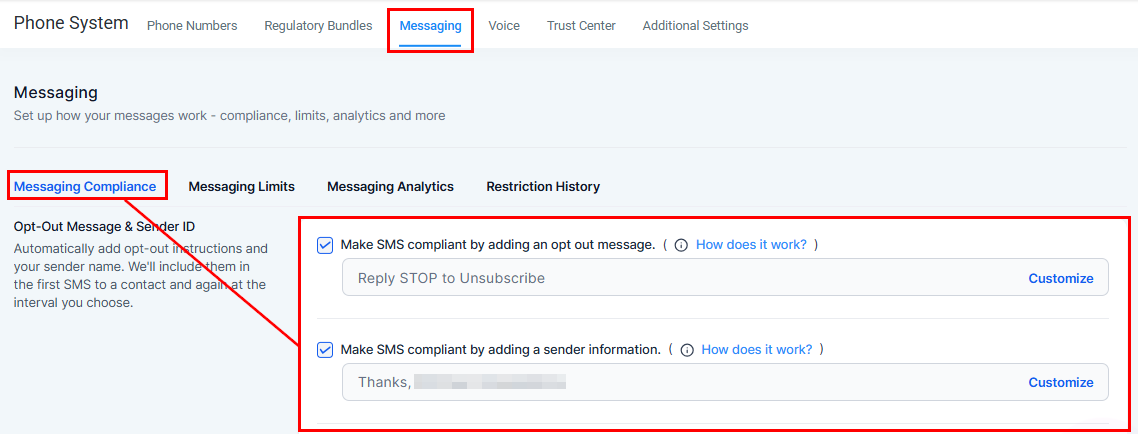 ## DND types
Prevents any communication from being sent to the contact through any integrated channel.
Restrict one or more specific channels while keeping others open. Configurable for: Calls, Email, Facebook, GMB, SMS, and WhatsApp.
For example, if a contact prefers email over text, you can enable SMS DND while leaving email open.
***
## DND statuses
| Status | Meaning |
| ------- | ----------------------------------------------------------------- |
| DND On | No automatic or manual outgoing messages are sent on that channel |
| DND Off | Messages function normally — automated and manual |
## DND types
Prevents any communication from being sent to the contact through any integrated channel.
Restrict one or more specific channels while keeping others open. Configurable for: Calls, Email, Facebook, GMB, SMS, and WhatsApp.
For example, if a contact prefers email over text, you can enable SMS DND while leaving email open.
***
## DND statuses
| Status | Meaning |
| ------- | ----------------------------------------------------------------- |
| DND On | No automatic or manual outgoing messages are sent on that channel |
| DND Off | Messages function normally — automated and manual |
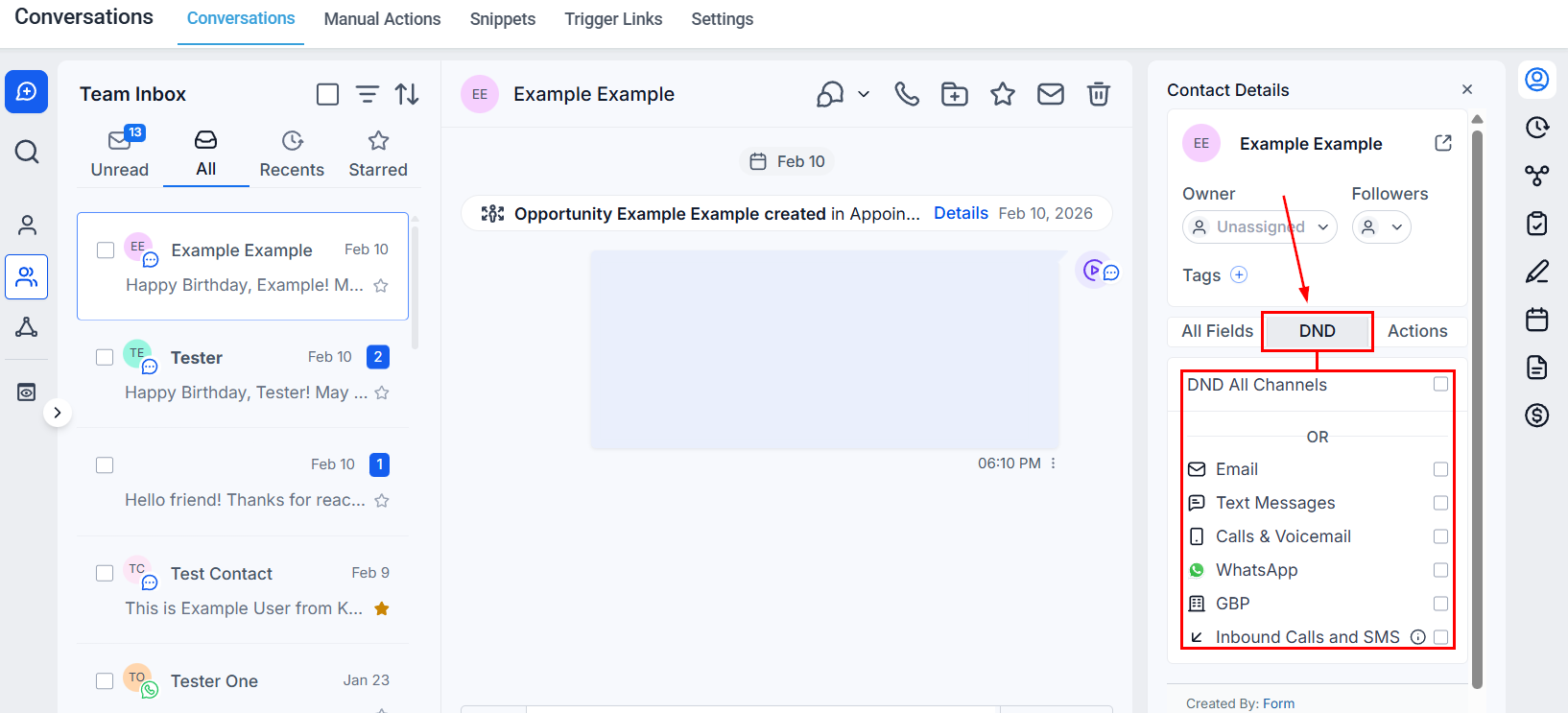 If a channel integration is disconnected and later reconnected, each contact retains its previous DND status.
***
## Automated compliance
Hoop includes built-in compliance features to automatically manage DND based on contact responses.
### SMS compliance
An automatic opt-out message is appended to SMS communications, allowing recipients to reply STOP to unsubscribe. This automatically updates the contact's SMS DND settings.
SMS messages can be configured to include sender details for transparency.
Go to **Settings → Phone System → Messaging → Messaging Compliance** to customize opt-out message wording.
### Email compliance
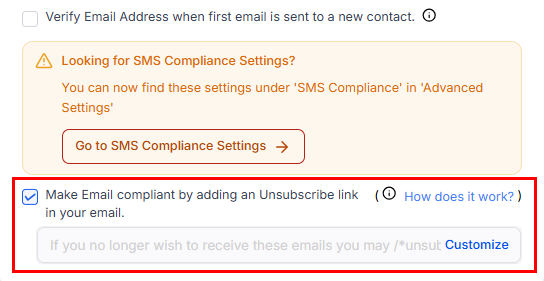
An unsubscribe link is automatically included in outgoing emails. When clicked, it sets the contact's email DND. Customize the unsubscribe settings at **Settings → Business Profile → General section**.
If a channel integration is disconnected and later reconnected, each contact retains its previous DND status.
***
## Automated compliance
Hoop includes built-in compliance features to automatically manage DND based on contact responses.
### SMS compliance
An automatic opt-out message is appended to SMS communications, allowing recipients to reply STOP to unsubscribe. This automatically updates the contact's SMS DND settings.
SMS messages can be configured to include sender details for transparency.
Go to **Settings → Phone System → Messaging → Messaging Compliance** to customize opt-out message wording.
### Email compliance
An unsubscribe link is automatically included in outgoing emails. When clicked, it sets the contact's email DND. Customize the unsubscribe settings at **Settings → Business Profile → General section**.
 ***
## SMS DND types
Two types of SMS DND can be applied to a contact:
| Type | How it's set | How it's removed |
| --------- | -------------------------------------------------------------------------- | -------------------------------------------------- |
| Temporary | Contact's number returns error codes 30003, 30005, or 30006 | Can be updated from the contact record |
| Permanent | Contact replies STOP, UNSUBSCRIBE, or CANCEL — or returns error code 30004 | Contact must text START to the number to re-opt in |
***
## DND for inbound calls and SMS
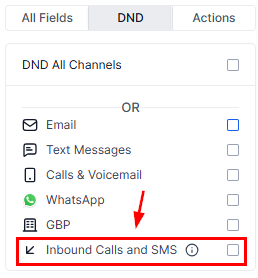
Enable **DND Inbound** to prevent a specific contact from being able to call or text your CRM number. This blocks all incoming communication from that contact.
***
## SMS DND types
Two types of SMS DND can be applied to a contact:
| Type | How it's set | How it's removed |
| --------- | -------------------------------------------------------------------------- | -------------------------------------------------- |
| Temporary | Contact's number returns error codes 30003, 30005, or 30006 | Can be updated from the contact record |
| Permanent | Contact replies STOP, UNSUBSCRIBE, or CANCEL — or returns error code 30004 | Contact must text START to the number to re-opt in |
***
## DND for inbound calls and SMS
Enable **DND Inbound** to prevent a specific contact from being able to call or text your CRM number. This blocks all incoming communication from that contact.
 ***
## Email DND auto-enable triggers
The system will automatically enable email DND for a contact if any of the following occur:
* **ISP permanent failures** — bounce, generic, suppress-complaint, suppress-unsubscribe, or suppress-bounce events.
* **Spam complaint** — the recipient marks your email as spam (Mailgun complaint event).
* **Unsubscribe** — the recipient clicks the unsubscribe link.
You can disable DND from the contact record for the reasons above, except when the contact has been marked as SPAM. For bounce or suppression events, remove the contact's email from your ISP's suppression list and validate the email before re-enabling.
***
## Workflow integration
You can trigger DND changes automatically in workflows. For example: when a contact unsubscribes from email, a workflow action automatically enables their email DND — ensuring every touchpoint respects their preferences without manual intervention.
***
## FAQs
Hoop intelligently skips the communication steps that the contact has opted out of, ensuring compliance without removing them from the workflow entirely.
Yes. Use the workflow options to remove a contact from all active workflows if they no longer wish to be contacted in any form.
***
## Email DND auto-enable triggers
The system will automatically enable email DND for a contact if any of the following occur:
* **ISP permanent failures** — bounce, generic, suppress-complaint, suppress-unsubscribe, or suppress-bounce events.
* **Spam complaint** — the recipient marks your email as spam (Mailgun complaint event).
* **Unsubscribe** — the recipient clicks the unsubscribe link.
You can disable DND from the contact record for the reasons above, except when the contact has been marked as SPAM. For bounce or suppression events, remove the contact's email from your ISP's suppression list and validate the email before re-enabling.
***
## Workflow integration
You can trigger DND changes automatically in workflows. For example: when a contact unsubscribes from email, a workflow action automatically enables their email DND — ensuring every touchpoint respects their preferences without manual intervention.
***
## FAQs
Hoop intelligently skips the communication steps that the contact has opted out of, ensuring compliance without removing them from the workflow entirely.
Yes. Use the workflow options to remove a contact from all active workflows if they no longer wish to be contacted in any form.