> ## Documentation Index
> Fetch the complete documentation index at: https://help.hoopai.com/llms.txt
> Use this file to discover all available pages before exploring further.
# Contact engagement score in HoopAI
> Build scoring rules, publish score profiles, and filter conversations by engagement score to prioritize your most active HoopAI leads.
The Contact Engagement Score gives every contact a numeric score that reflects how actively they are interacting with your business. Use it to prioritize high-value conversations, identify contacts who need more nurturing, and make informed decisions about where to focus your team's time.
 ## How scoring works
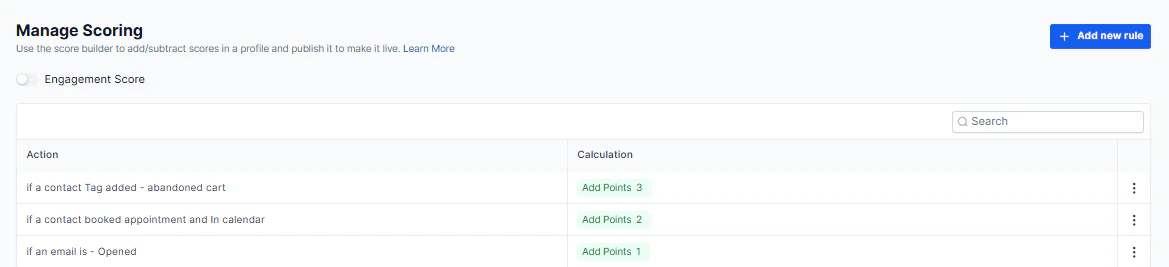
Engagement scores are built on customizable **score profiles** with configurable rules. You control exactly which behaviors add or subtract points.
### Draft vs. published
A score profile starts in **Draft** mode. Once published, the score becomes active and is applied to all contacts in your account. You can return to draft to make changes before republishing.
### Building scoring rules
Edit the profile name and description to reflect its purpose (e.g., "Lead Engagement Score" or "Re-engagement Score").
Define which contact behaviors add or subtract points. Examples:
* +10 points when a contact clicks a trigger link
* +5 points when a contact opens an email
* -5 points when a contact goes 30 days without interaction
Save after adding or editing each rule so the profile stays current.
When ready, publish the profile. Scores are immediately calculated and visible across all contacts.
* **Add points** — reward positive engagement behaviors (clicks, replies, form submissions, bookings).
* **Subtract points** — penalize inactivity or negative signals (unsubscribes, long silence periods).
* Rules can be edited at any time; changes take effect after saving and republishing.
***
## How scoring works
Engagement scores are built on customizable **score profiles** with configurable rules. You control exactly which behaviors add or subtract points.
### Draft vs. published
A score profile starts in **Draft** mode. Once published, the score becomes active and is applied to all contacts in your account. You can return to draft to make changes before republishing.
### Building scoring rules
Edit the profile name and description to reflect its purpose (e.g., "Lead Engagement Score" or "Re-engagement Score").
Define which contact behaviors add or subtract points. Examples:
* +10 points when a contact clicks a trigger link
* +5 points when a contact opens an email
* -5 points when a contact goes 30 days without interaction
Save after adding or editing each rule so the profile stays current.
When ready, publish the profile. Scores are immediately calculated and visible across all contacts.
* **Add points** — reward positive engagement behaviors (clicks, replies, form submissions, bookings).
* **Subtract points** — penalize inactivity or negative signals (unsubscribes, long silence periods).
* Rules can be edited at any time; changes take effect after saving and republishing.
***
 ## Using scores in Conversations
### Viewing scores
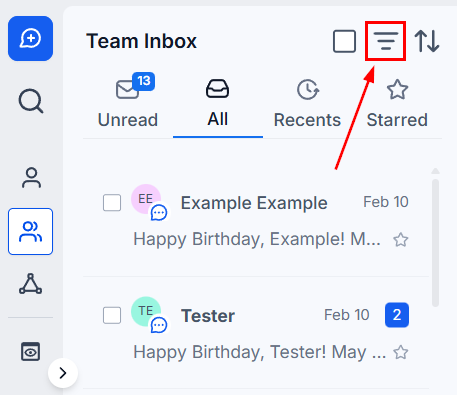
Engagement scores appear alongside each contact in your Conversations inbox. High scores identify contacts with the most active interaction.
### Sorting by score
Sort your conversation list by engagement score to surface the highest-priority contacts at the top of your queue.
### Filtering by score range
Use the **Engagement Score** quick filter to show only contacts within a specific score range — for example, show only contacts with a score above 50 for immediate sales outreach, or below 10 for re-engagement campaigns.
Combine the Engagement Score filter with other quick filters (like Last Message Channel or Assigned) to build highly targeted conversation views, then save them as named Views for reuse.
***
## Using scores in Conversations
### Viewing scores
Engagement scores appear alongside each contact in your Conversations inbox. High scores identify contacts with the most active interaction.
### Sorting by score
Sort your conversation list by engagement score to surface the highest-priority contacts at the top of your queue.
### Filtering by score range
Use the **Engagement Score** quick filter to show only contacts within a specific score range — for example, show only contacts with a score above 50 for immediate sales outreach, or below 10 for re-engagement campaigns.
Combine the Engagement Score filter with other quick filters (like Last Message Channel or Assigned) to build highly targeted conversation views, then save them as named Views for reuse.
***
 ## Strategic uses
| Score range | Recommended action |
| --------------- | ---------------------------------------------- |
| High (top tier) | Prioritize for immediate sales outreach |
| Medium | Continue nurturing with relevant content |
| Low | Enroll in re-engagement workflows |
| Very low / zero | Review contact quality; consider list cleaning |
## Strategic uses
| Score range | Recommended action |
| --------------- | ---------------------------------------------- |
| High (top tier) | Prioritize for immediate sales outreach |
| Medium | Continue nurturing with relevant content |
| Low | Enroll in re-engagement workflows |
| Very low / zero | Review contact quality; consider list cleaning |