> ## Documentation Index
> Fetch the complete documentation index at: https://help.hoopai.com/llms.txt
> Use this file to discover all available pages before exploring further.
# Activity cards in HoopAI conversations
> Track appointments, invoices, opportunities, and contact field changes inline in HoopAI conversations — no screen switching needed.
Activity Cards appear inside your conversation thread whenever a significant action occurs for a contact — such as an appointment being booked or an invoice being paid. They keep your entire team informed without anyone needing to navigate to a different part of the platform.
 ## Types of activity cards
### Appointments
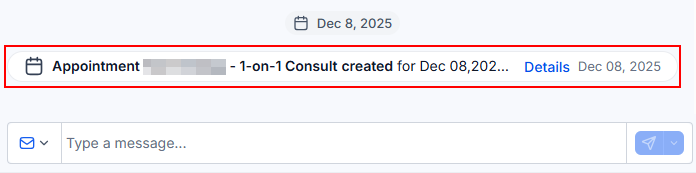
When an appointment is created, rescheduled, or canceled, an Activity Card appears in the conversation panel. Click the card to edit the appointment details directly without leaving the conversation.
### Invoices
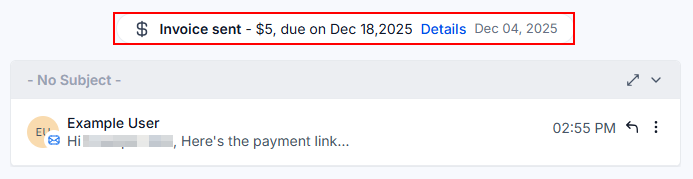
An Activity Card appears when an invoice is sent to a contact or when payment is received. Clicking the card opens the invoice in a new tab so you can review all the details.
## Types of activity cards
### Appointments
When an appointment is created, rescheduled, or canceled, an Activity Card appears in the conversation panel. Click the card to edit the appointment details directly without leaving the conversation.
### Invoices
An Activity Card appears when an invoice is sent to a contact or when payment is received. Clicking the card opens the invoice in a new tab so you can review all the details.
 ### Do Not Disturb (DND)
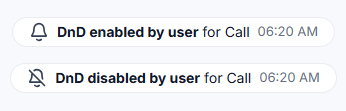
Activity Cards notify you as soon as a contact is marked as Do Not Disturb or removed from the DND list. This ensures your team always knows the contact's communication preferences before sending a message.
### Do Not Disturb (DND)
Activity Cards notify you as soon as a contact is marked as Do Not Disturb or removed from the DND list. This ensures your team always knows the contact's communication preferences before sending a message.
 ### Contact fields
When a contact automatically updates a field — for example, by submitting a form — a card appears in the thread. Click it to view the updated field details and understand what information changed.
### Opportunities
Activity Cards related to opportunities appear when a new opportunity is created, updated, or deleted. Click the card to edit the opportunity in real time without navigating away from the conversation.
### Contact fields
When a contact automatically updates a field — for example, by submitting a form — a card appears in the thread. Click it to view the updated field details and understand what information changed.
### Opportunities
Activity Cards related to opportunities appear when a new opportunity is created, updated, or deleted. Click the card to edit the opportunity in real time without navigating away from the conversation.
 ***
## Why activity cards matter
Activity Cards ensure that every team member handling a conversation has instant visibility into key events happening around the contact. Key benefits:
* No context switching — view and act on appointments, invoices, and opportunities without leaving Conversations.
* Team alignment — everyone sees the same activity timeline for the contact.
* Quick access — clickable cards link directly to the related record.
* Audit trail — timestamped cards provide a clear sequence of events.
***
## Why activity cards matter
Activity Cards ensure that every team member handling a conversation has instant visibility into key events happening around the contact. Key benefits:
* No context switching — view and act on appointments, invoices, and opportunities without leaving Conversations.
* Team alignment — everyone sees the same activity timeline for the contact.
* Quick access — clickable cards link directly to the related record.
* Audit trail — timestamped cards provide a clear sequence of events.