> ## Documentation Index
> Fetch the complete documentation index at: https://help.hoopai.com/llms.txt
> Use this file to discover all available pages before exploring further.
# Calendar types
> Choose the right calendar type for your scheduling needs — event, round robin, class, collective, personal, or service booking.
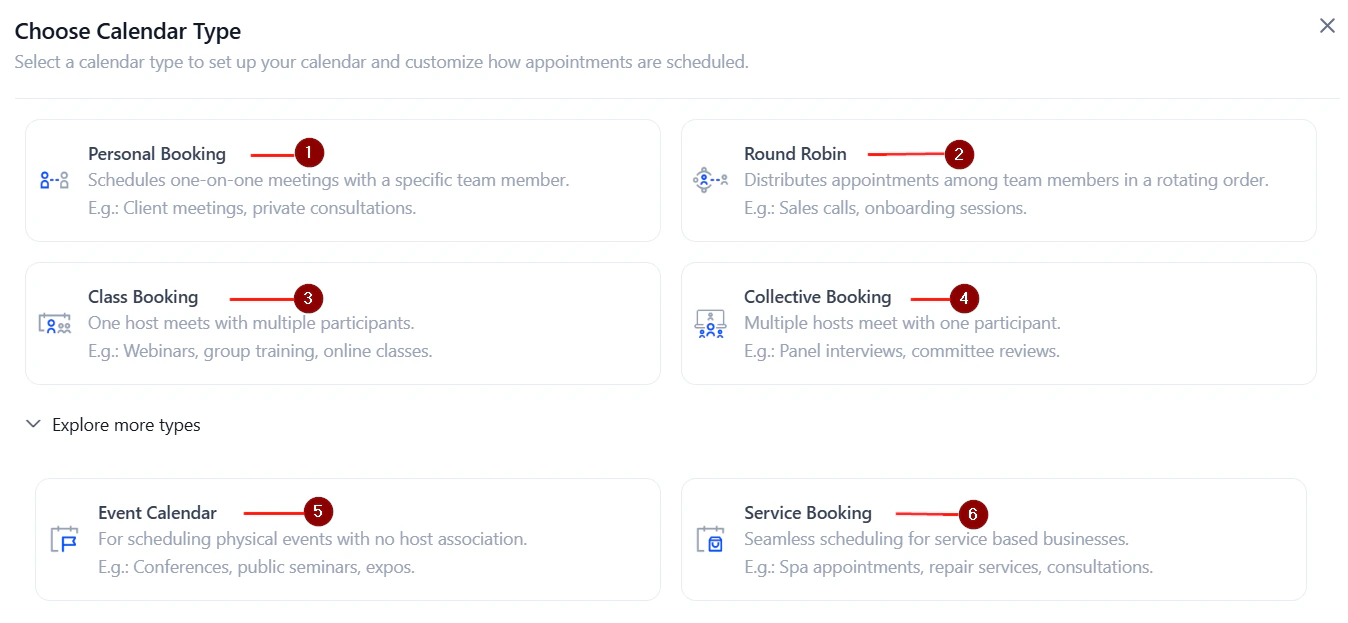
The HoopAI Platform supports six calendar types, each designed for a different scheduling scenario. Understanding the differences helps you pick the right one from the start.
 ## Overview of calendar types
A general-purpose calendar for individual booking links. Best for one-on-one appointments or public events where no specific team member is required.
Distributes bookings across a team by rotating assignments based on availability or equal distribution. Ideal for sales teams, support queues, and shared scheduling.
Allows multiple contacts to book the same time slot up to a defined seat capacity. Perfect for workshops, webinars, fitness classes, and group training sessions. Maximum 9,999 seats per slot.
All assigned team members must be available for a slot to appear as bookable. Used for panel interviews, multi-specialist consultations, or any meeting requiring multiple attendees simultaneously.
A 1:1 booking calendar assigned to a single user. Designed for intimate, one-on-one meetings — sales calls, coaching sessions, consultations.
A calendar for service-based businesses that groups services into a single booking interface. Supports staff assignment, rooms, equipment, and Google My Business listing. See [Service calendars](/calendars/service-calendar).
***
## Choosing the right calendar type
| Type | Team members | Capacity | Best use case |
| --------------- | ----------------------- | ----------- | -------------------------------------------------- |
| **Event** | One | 1 per slot | Public events, general appointments |
| **Round robin** | Multiple | 1 per slot | Distribute bookings across a sales or support team |
| **Class** | One | Up to 9,999 | Group sessions, workshops, webinars |
| **Collective** | Multiple (all required) | 1 per slot | Panel interviews, multi-member consultations |
| **Personal** | One | 1 per slot | 1:1 individual meetings |
| **Service** | Multiple (by service) | 1 per slot | Service-based businesses with staff and resources |
***
## Event calendar
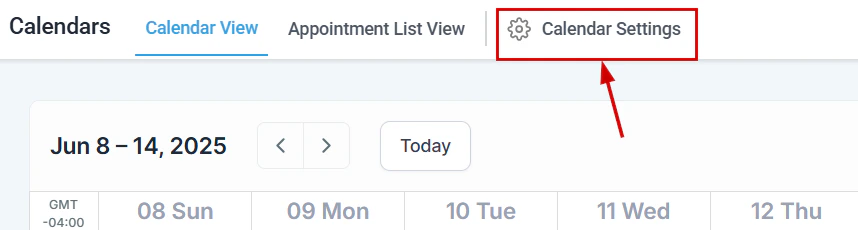
Event calendars are the most flexible type. They work for one-person appointment scheduling or public events with open registration.
## Overview of calendar types
A general-purpose calendar for individual booking links. Best for one-on-one appointments or public events where no specific team member is required.
Distributes bookings across a team by rotating assignments based on availability or equal distribution. Ideal for sales teams, support queues, and shared scheduling.
Allows multiple contacts to book the same time slot up to a defined seat capacity. Perfect for workshops, webinars, fitness classes, and group training sessions. Maximum 9,999 seats per slot.
All assigned team members must be available for a slot to appear as bookable. Used for panel interviews, multi-specialist consultations, or any meeting requiring multiple attendees simultaneously.
A 1:1 booking calendar assigned to a single user. Designed for intimate, one-on-one meetings — sales calls, coaching sessions, consultations.
A calendar for service-based businesses that groups services into a single booking interface. Supports staff assignment, rooms, equipment, and Google My Business listing. See [Service calendars](/calendars/service-calendar).
***
## Choosing the right calendar type
| Type | Team members | Capacity | Best use case |
| --------------- | ----------------------- | ----------- | -------------------------------------------------- |
| **Event** | One | 1 per slot | Public events, general appointments |
| **Round robin** | Multiple | 1 per slot | Distribute bookings across a sales or support team |
| **Class** | One | Up to 9,999 | Group sessions, workshops, webinars |
| **Collective** | Multiple (all required) | 1 per slot | Panel interviews, multi-member consultations |
| **Personal** | One | 1 per slot | 1:1 individual meetings |
| **Service** | Multiple (by service) | 1 per slot | Service-based businesses with staff and resources |
***
## Event calendar
Event calendars are the most flexible type. They work for one-person appointment scheduling or public events with open registration.
 **Key features:**
* Single booking link per calendar
* Optional payment collection at booking
* Custom form attachment
* Confirmation page customization (message or redirect URL)
***
## Round robin calendar
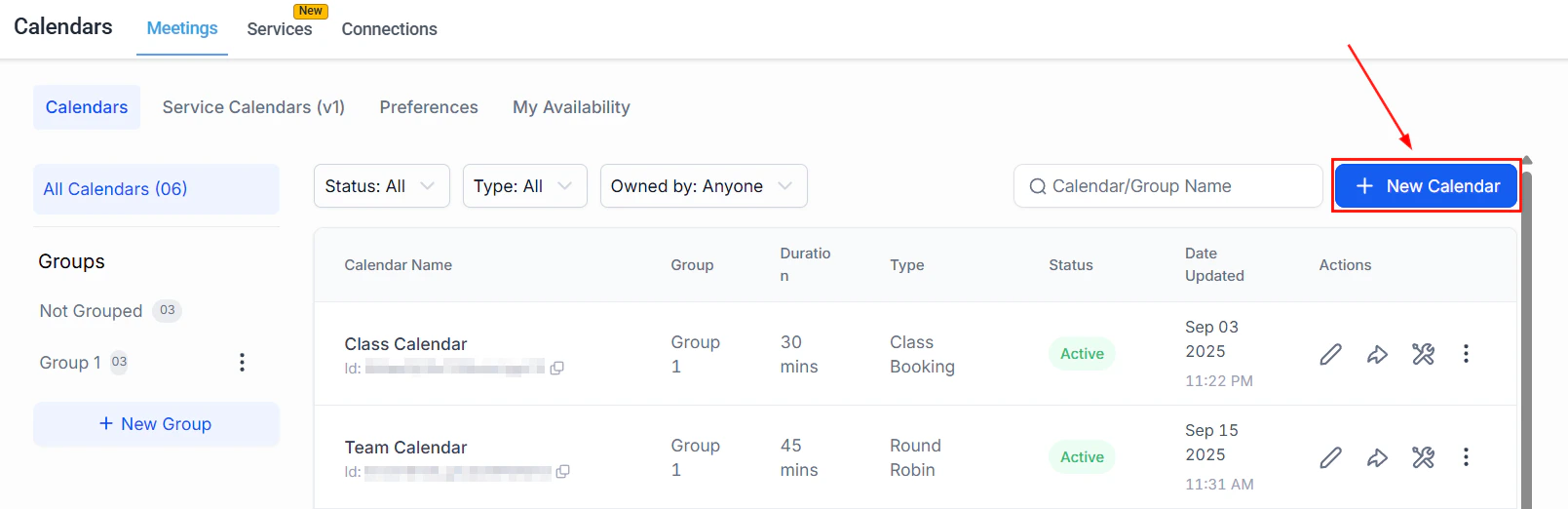
Round robin calendars distribute incoming bookings among a group of team members.
**Key features:**
* Single booking link per calendar
* Optional payment collection at booking
* Custom form attachment
* Confirmation page customization (message or redirect URL)
***
## Round robin calendar
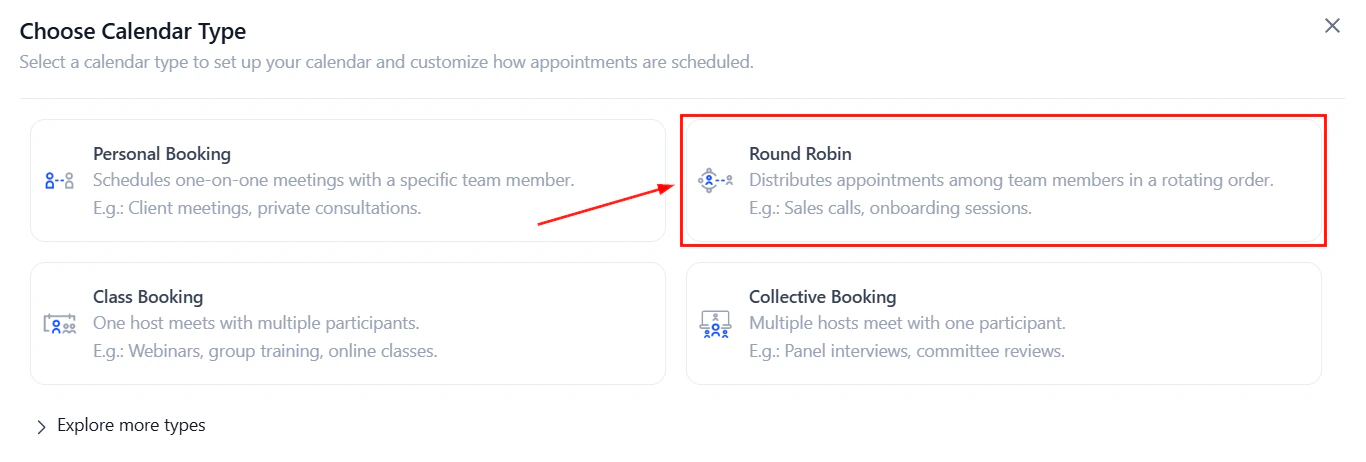
Round robin calendars distribute incoming bookings among a group of team members.
 You define how assignments are made:
* **Optimize for availability** — assign to whoever is free at the selected time
* **Optimize for equal distribution** — assign to each team member at random to balance workloads
You define how assignments are made:
* **Optimize for availability** — assign to whoever is free at the selected time
* **Optimize for equal distribution** — assign to each team member at random to balance workloads
 **Key features:**
* **Look Busy** — hide a percentage of available slots to create booking urgency
* **Staff selection toggle** — optionally let bookers choose which team member they want
* **Contact routing preferences** — control whether rescheduled appointments stay with the same team member
When only one team member is added to a round robin calendar, you can add multiple meeting locations.
***
## Class booking calendar
Class calendars are one-to-many: a single appointment slot can accommodate multiple attendees up to a configured seat limit.
**Key features:**
* **Look Busy** — hide a percentage of available slots to create booking urgency
* **Staff selection toggle** — optionally let bookers choose which team member they want
* **Contact routing preferences** — control whether rescheduled appointments stay with the same team member
When only one team member is added to a round robin calendar, you can add multiple meeting locations.
***
## Class booking calendar
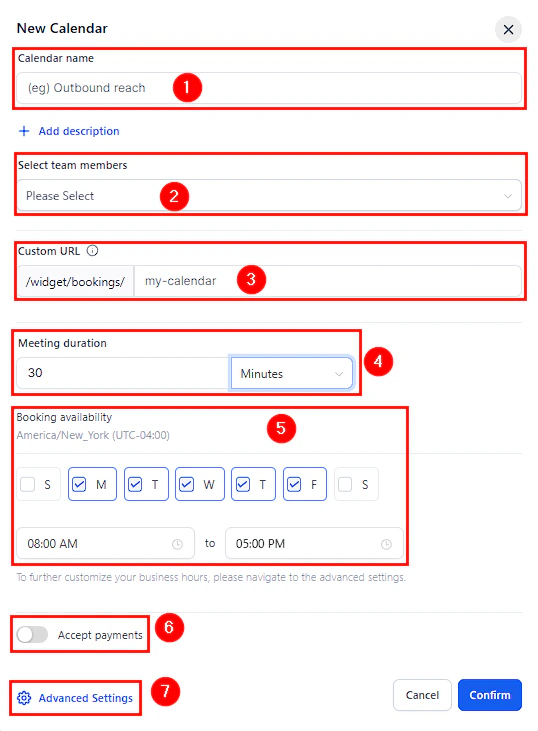
Class calendars are one-to-many: a single appointment slot can accommodate multiple attendees up to a configured seat limit.
 **Key features:**
* **Seats per class** — set the maximum number of attendees per slot (up to 9,999)
* **Seats per slot widget** — show remaining spots on the booking widget to create urgency
* Attendees can be charged individually, or a deposit can be collected
* Coupon codes supported for class checkout
If you use a video conferencing tool (Zoom, Google Meet), the tool's attendee limit applies independently. For example, Zoom limits attendees based on your license tier.
***
## Collective booking calendar
Collective calendars show only time slots when all assigned team members are simultaneously available.
**Key features:**
* Minimum 2 team members required
* Primary owner designation (can be changed by clicking "Make Owner")
* Dynamic team assignment — automatically finds the next available group slot
* All standard availability, form, and notification settings apply
***
## Personal calendar
Personal calendars are functionally similar to event calendars but scoped to a single user. They support all standard advanced settings including:
* Recurring meeting setup
* Guest invitations
* Pre-populate fields (sticky contact)
* Consent checkbox for SMS compliance
* Payment collection
***
## Service booking calendar
Service calendars are covered in full detail in the [Service calendars](/calendars/service-calendar) guide. In brief, they allow service-based businesses to:
* Define individual services with prices, durations, and staff assignments
* Manage rooms and equipment as bookable resources
* Display a customer-facing service menu
* Accept add-ons at booking time
* List services on Google My Business for organic appointment booking
***
## Calendar groups
Any calendar type can be added to a **calendar group** — a shared booking page that lets contacts choose from multiple calendars. Groups are useful when you offer multiple service types or have multiple team members with individual booking links. See [Calendar settings](/calendars/calendar-settings) for setup instructions.
**Key features:**
* **Seats per class** — set the maximum number of attendees per slot (up to 9,999)
* **Seats per slot widget** — show remaining spots on the booking widget to create urgency
* Attendees can be charged individually, or a deposit can be collected
* Coupon codes supported for class checkout
If you use a video conferencing tool (Zoom, Google Meet), the tool's attendee limit applies independently. For example, Zoom limits attendees based on your license tier.
***
## Collective booking calendar
Collective calendars show only time slots when all assigned team members are simultaneously available.
**Key features:**
* Minimum 2 team members required
* Primary owner designation (can be changed by clicking "Make Owner")
* Dynamic team assignment — automatically finds the next available group slot
* All standard availability, form, and notification settings apply
***
## Personal calendar
Personal calendars are functionally similar to event calendars but scoped to a single user. They support all standard advanced settings including:
* Recurring meeting setup
* Guest invitations
* Pre-populate fields (sticky contact)
* Consent checkbox for SMS compliance
* Payment collection
***
## Service booking calendar
Service calendars are covered in full detail in the [Service calendars](/calendars/service-calendar) guide. In brief, they allow service-based businesses to:
* Define individual services with prices, durations, and staff assignments
* Manage rooms and equipment as bookable resources
* Display a customer-facing service menu
* Accept add-ons at booking time
* List services on Google My Business for organic appointment booking
***
## Calendar groups
Any calendar type can be added to a **calendar group** — a shared booking page that lets contacts choose from multiple calendars. Groups are useful when you offer multiple service types or have multiple team members with individual booking links. See [Calendar settings](/calendars/calendar-settings) for setup instructions.