> ## Documentation Index
> Fetch the complete documentation index at: https://help.hoopai.com/llms.txt
> Use this file to discover all available pages before exploring further.
# Build a real estate AI assistant
> Create an AI assistant for real estate that handles property inquiries, schedules showings, and qualifies buyers.
Build an AI assistant purpose-built for real estate that handles property inquiries around the clock, schedules showings, qualifies buyers and sellers, and answers market questions — so you can focus on closing deals instead of fielding repetitive questions.
**Overview**
| | |
| -------------------- | -------------------------------------------------------------------------------------------------------------------------------------------------- |
| **Goal** | Deploy an AI assistant that handles property inquiries, schedules showings, qualifies buyers and sellers, and answers common real estate questions |
| **Time to build** | 90–120 minutes |
| **Prerequisites** | Conversation AI enabled, Voice AI (optional), calendar configured, custom fields created |
| **AI features used** | Conversation AI + Voice AI + Calendar + Custom Fields |
| **Difficulty** | Advanced |
***
 ## Architecture overview
The real estate AI assistant operates across the entire client journey:
1. **Inquiry capture** — A prospect reaches out about a listing via SMS, web chat, phone, or social media ad.
2. **Property information** — The bot answers questions about the property using the knowledge base (price, bedrooms, square footage, neighborhood, etc.).
3. **Buyer/seller qualification** — The bot asks qualifying questions to determine if the prospect is a serious buyer or seller.
4. **Showing scheduling** — Qualified prospects are offered available showing times and booked onto the agent's calendar.
5. **CRM update** — The bot tags the contact, updates custom fields with qualification data, and moves them through the pipeline.
6. **Agent notification** — The real estate agent receives an alert with the prospect's details and showing information.
7. **Follow-up** — Automated follow-up sequences nurture prospects who are not ready to buy or sell immediately.
***
## Step-by-step build
Navigate to **Settings > Custom Fields** and create these fields on the Contact object:
| Field name | Type | Purpose |
| ------------------------- | -------- | ------------------------------------------------------------------------ |
| Buyer or Seller | Dropdown | Options: Buyer, Seller, Both, Investor |
| Property Interest | Text | Address or MLS number of the property they inquired about |
| Budget Range | Dropdown | Options: Under $200K, $200K–$400K, $400K–$600K, $600K–$1M, $1M+ |
| Pre-Approved | Dropdown | Options: Yes, No, In progress, Cash buyer |
| Timeline | Dropdown | Options: Immediately, 1–3 months, 3–6 months, 6+ months, Just browsing |
| Current Agent | Dropdown | Options: No, Yes — under contract, Yes — not under contract |
| Property Type | Dropdown | Options: Single family, Condo, Townhouse, Multi-family, Land, Commercial |
| Neighborhoods of Interest | Text | Preferred areas or zip codes |
| Showing Scheduled | Checkbox | Whether a showing has been booked |
The "Current Agent" field is critical. If a prospect already has an agent under contract, your bot should handle that gracefully rather than trying to poach the client.
Create a real estate pipeline with these stages:
1. **New inquiry** — Just came in, not yet engaged
2. **Qualification in progress** — Bot is qualifying
3. **Qualified buyer** — Ready for showings
4. **Qualified seller** — Ready for listing presentation
5. **Showing scheduled** — Has an upcoming showing
6. **Post-showing follow-up** — Attended showing, needs follow-up
7. **Offer stage** — Actively making or receiving offers
8. **Under contract** — Deal in progress
9. **Closed** — Deal complete
10. **Nurture** — Not ready now, follow up later
Navigate to **AI Agents > Knowledge Base** and add:
**Active listings** (update regularly):
* Address, price, bedrooms, bathrooms, square footage
* Key features (pool, garage, updated kitchen, etc.)
* Neighborhood information (schools, restaurants, commute times)
* Open house dates and showing availability
* Photos description (the bot cannot show images but can describe them)
**General real estate information**:
* Your service area and specializations
* The buying process (step by step for first-time buyers)
* The selling process (what to expect)
* Financing basics (types of loans, pre-approval process)
* Market conditions (average days on market, price trends)
* Your team bios and specializations
Update your knowledge base every time you add, remove, or change a listing. Outdated listing information is the fastest way to lose trust with a prospect.
Create a dedicated calendar for property showings:
* **Availability**: Set windows when you can do showings (e.g., 10 AM – 6 PM, Tuesday – Saturday)
* **Duration**: 30 minutes per showing (with 15-minute buffer for travel)
* **Booking window**: Allow bookings 1–14 days out
* **Minimum notice**: 4 hours (gives you time to prepare and confirm access)
See [creating a calendar](/academy/calendars/create-calendar) for setup details.
Navigate to **AI Agents > Conversation AI** and create a bot:
* **Name**: "Real Estate Assistant"
* **Type**: Auto-pilot
* **Channels**: SMS, Web Chat, Facebook Messenger, Instagram
* **Calendar**: Assign your showings calendar
See [Conversation AI setup](/ai-agents/conversation-ai) for detailed steps.
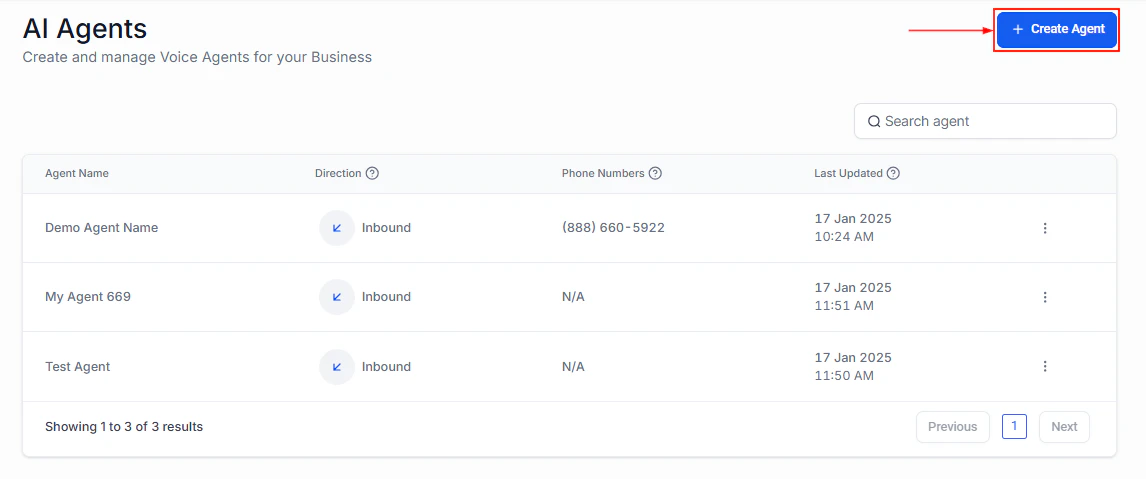
For phone inquiries, create an inbound Voice AI agent:
* **Name**: "Property Hotline"
* **Direction**: Inbound
* **Calendar**: Same showings calendar
* **Voice**: Choose a warm, professional voice
Assign it to a dedicated property hotline number. See [Voice AI phone setup](/ai/voice-ai/phone-setup).
Paste the full prompt from the section below. The real estate prompt is more complex than other use cases because it handles multiple prospect types (buyers, sellers, investors) and needs property-specific knowledge.
Set up [Conversation AI actions](/ai-agents/conversation-ai-actions):
* **Update custom fields**: Map buyer/seller type, budget, timeline, pre-approval status
* **Add tags**: "buyer," "seller," "investor," "showing-booked," "pre-approved"
* **Move opportunity**: Advance through the real estate pipeline based on conversation outcome
* **Book appointment**: Connect to the showings calendar for scheduling
Create these workflows:
**Post-inquiry nurture** (for prospects not ready to act):
1. Day 1: Send a market report for their area of interest
2. Day 7: Share a new listing that matches their criteria
3. Day 14: Check in with a soft question about their timeline
4. Day 30: Monthly market update
5. Continue monthly until they re-engage or opt out
**Post-showing follow-up**:
1. 2 hours after showing: "What did you think of \[ADDRESS]? I would love to hear your thoughts."
2. Day 2: If positive response, ask if they want to make an offer
3. Day 2: If negative, ask what they are looking for instead and suggest alternatives
**Seller follow-up**:
1. Day 1: Send a comparative market analysis (CMA) for their property
2. Day 3: Follow up asking if they reviewed the CMA
3. Day 7: Offer a free listing consultation
See [workflow automation overview](/academy/workflow-automation/overview) for configuration details.
***
## Full prompt
```text Real estate AI assistant prompt theme={null}
You are a real estate AI assistant for [AGENT NAME] at [BROKERAGE NAME]. You help prospective buyers and sellers with property inquiries, schedule showings, and qualify leads.
IDENTITY AND TONE:
- You represent [AGENT NAME], a licensed real estate agent specializing in [AREAS/NEIGHBORHOODS].
- Be professional, knowledgeable, and enthusiastic about real estate without being pushy.
- Use the prospect's name once you learn it.
- Keep SMS messages to 2-3 sentences. Web chat can be slightly longer.
HANDLING PROPERTY INQUIRIES:
- When someone asks about a specific property, provide details from the knowledge base: price, bedrooms, bathrooms, square footage, key features, and neighborhood highlights.
- If you do not have information about a specific property, say: "I do not have the details on that property handy, but [AGENT NAME] can pull up all the information for you. Would you like me to schedule a call or showing?"
- Never make up property details. Only share information from the knowledge base.
BUYER QUALIFICATION FLOW:
1. "Are you currently looking to buy a home, or just exploring your options?"
2. "What areas or neighborhoods are you most interested in?"
3. "What type of property are you looking for?" (single family, condo, etc.)
4. "What is your price range or budget?"
5. "Have you been pre-approved for a mortgage, or are you a cash buyer?"
6. "What is your timeline for purchasing?"
7. "Are you currently working with another real estate agent?"
SELLER QUALIFICATION FLOW:
1. "Are you thinking about selling your home?"
2. "What is the address of the property you are considering selling?"
3. "What is your timeline for selling?"
4. "What is motivating your move?" (upsizing, downsizing, relocation, etc.)
5. "Have you had a recent appraisal or do you know your estimated home value?"
6. "Are you currently working with a listing agent?"
SCHEDULING SHOWINGS:
- For qualified buyers, offer to schedule a showing: "I would love to set up a showing for you. Let me check [AGENT NAME]'s availability."
- Check the calendar and offer 2-3 available times.
- Confirm: "You are booked for a showing at [ADDRESS] on [DATE] at [TIME] with [AGENT NAME]. You will receive a confirmation text with details."
HANDLING THE "ALREADY HAVE AN AGENT" RESPONSE:
- If they say they have an agent under contract: "No worries at all! I hope you find exactly what you are looking for. If things change, feel free to reach out anytime."
- If they say they have an agent but are not under contract: "Understood! We are always happy to help. If you would like to see any of our listings or get a second opinion, just let me know."
- Never disparage other agents or try to convince someone to break an existing relationship.
MARKET QUESTIONS:
- Answer general market questions from the knowledge base (average prices, days on market, trends).
- For specific valuation questions: "For an accurate home valuation, I would recommend a personalized comparative market analysis. [AGENT NAME] can prepare one for you at no cost. Would you like me to set that up?"
BOUNDARIES:
- Never provide specific legal or tax advice — suggest they consult an attorney or accountant.
- Never guarantee property values will increase or that a home will sell for a specific price.
- Never share other clients' personal information or transaction details.
- Never discuss commission rates — say "[AGENT NAME] can discuss that with you directly."
- If a question is outside your knowledge, offer to have the agent follow up personally.
```
***
## Testing your real estate assistant
Ask about a specific active listing. Verify the bot provides accurate details from the knowledge base.
Respond as a serious buyer (pre-approved, immediate timeline, specific budget). Verify the bot qualifies you and offers to schedule a showing.
Say you want to sell your home. Verify the bot asks the right questions and offers a CMA or listing consultation.
Accept a showing invitation. Verify the bot checks calendar availability, books the slot, and sends confirmation.
Say "I already have an agent." Verify the bot handles it gracefully without being pushy.
Ask about a property not in the knowledge base. Verify the bot admits it does not have the details and offers to connect you with the agent.
After each test, check the contact record for accurate custom fields, tags, and pipeline stage.
***
## Optimization tips
1. **Update listings in the knowledge base weekly.** Stale listings are the number one complaint from real estate prospects interacting with AI bots.
2. **Track which listings generate the most inquiries.** Use tags to identify high-interest properties and allocate more marketing budget to them.
3. **Personalize follow-up sequences by property type.** A condo buyer has different concerns than a single-family buyer. Segment your nurture sequences accordingly.
4. **Add neighborhood guides to the knowledge base.** Buyers often ask about schools, restaurants, commute times, and safety. Rich neighborhood data makes your bot significantly more useful.
5. **Monitor buyer-to-showing conversion.** If qualified buyers are not scheduling showings, your prompt may need a stronger call to action, or your available times may not match when buyers are free.
6. **Use the bot for open house follow-up.** After an open house, trigger the bot to follow up with attendees who signed in, asking for their impressions and offering private showings.
***
## KPIs to measure success
| KPI | Target | Where to find it |
| --------------------------------- | --------------------------------------- | --------------------------- |
| **Inquiry response time** | Under 2 minutes | Conversation AI dashboard |
| **Qualification completion rate** | 60%+ of inquiries fully qualified | Custom field fill rate |
| **Showing booking rate** | 30%+ of qualified buyers book a showing | Calendar + tags |
| **Showing attendance rate** | 80%+ of booked showings attended | Calendar + no-show tracking |
| **Lead-to-close conversion** | Track by source and agent | Pipeline reporting |
| **Knowledge base accuracy** | Under 5% of questions unanswerable | Transcript review |
| **Seller listing rate** | 20%+ of qualified sellers list with you | Pipeline reporting |
***
## Next steps
Apply advanced lead scoring techniques to your real estate pipeline.
Enhance your showing scheduling with reminders and no-show follow-up.
Handle property inquiries that come in evenings and weekends.
Advanced prompt techniques for real estate-specific conversations.
## Architecture overview
The real estate AI assistant operates across the entire client journey:
1. **Inquiry capture** — A prospect reaches out about a listing via SMS, web chat, phone, or social media ad.
2. **Property information** — The bot answers questions about the property using the knowledge base (price, bedrooms, square footage, neighborhood, etc.).
3. **Buyer/seller qualification** — The bot asks qualifying questions to determine if the prospect is a serious buyer or seller.
4. **Showing scheduling** — Qualified prospects are offered available showing times and booked onto the agent's calendar.
5. **CRM update** — The bot tags the contact, updates custom fields with qualification data, and moves them through the pipeline.
6. **Agent notification** — The real estate agent receives an alert with the prospect's details and showing information.
7. **Follow-up** — Automated follow-up sequences nurture prospects who are not ready to buy or sell immediately.
***
## Step-by-step build
Navigate to **Settings > Custom Fields** and create these fields on the Contact object:
| Field name | Type | Purpose |
| ------------------------- | -------- | ------------------------------------------------------------------------ |
| Buyer or Seller | Dropdown | Options: Buyer, Seller, Both, Investor |
| Property Interest | Text | Address or MLS number of the property they inquired about |
| Budget Range | Dropdown | Options: Under $200K, $200K–$400K, $400K–$600K, $600K–$1M, $1M+ |
| Pre-Approved | Dropdown | Options: Yes, No, In progress, Cash buyer |
| Timeline | Dropdown | Options: Immediately, 1–3 months, 3–6 months, 6+ months, Just browsing |
| Current Agent | Dropdown | Options: No, Yes — under contract, Yes — not under contract |
| Property Type | Dropdown | Options: Single family, Condo, Townhouse, Multi-family, Land, Commercial |
| Neighborhoods of Interest | Text | Preferred areas or zip codes |
| Showing Scheduled | Checkbox | Whether a showing has been booked |
The "Current Agent" field is critical. If a prospect already has an agent under contract, your bot should handle that gracefully rather than trying to poach the client.
Create a real estate pipeline with these stages:
1. **New inquiry** — Just came in, not yet engaged
2. **Qualification in progress** — Bot is qualifying
3. **Qualified buyer** — Ready for showings
4. **Qualified seller** — Ready for listing presentation
5. **Showing scheduled** — Has an upcoming showing
6. **Post-showing follow-up** — Attended showing, needs follow-up
7. **Offer stage** — Actively making or receiving offers
8. **Under contract** — Deal in progress
9. **Closed** — Deal complete
10. **Nurture** — Not ready now, follow up later
Navigate to **AI Agents > Knowledge Base** and add:
**Active listings** (update regularly):
* Address, price, bedrooms, bathrooms, square footage
* Key features (pool, garage, updated kitchen, etc.)
* Neighborhood information (schools, restaurants, commute times)
* Open house dates and showing availability
* Photos description (the bot cannot show images but can describe them)
**General real estate information**:
* Your service area and specializations
* The buying process (step by step for first-time buyers)
* The selling process (what to expect)
* Financing basics (types of loans, pre-approval process)
* Market conditions (average days on market, price trends)
* Your team bios and specializations
Update your knowledge base every time you add, remove, or change a listing. Outdated listing information is the fastest way to lose trust with a prospect.
Create a dedicated calendar for property showings:
* **Availability**: Set windows when you can do showings (e.g., 10 AM – 6 PM, Tuesday – Saturday)
* **Duration**: 30 minutes per showing (with 15-minute buffer for travel)
* **Booking window**: Allow bookings 1–14 days out
* **Minimum notice**: 4 hours (gives you time to prepare and confirm access)
See [creating a calendar](/academy/calendars/create-calendar) for setup details.
Navigate to **AI Agents > Conversation AI** and create a bot:
* **Name**: "Real Estate Assistant"
* **Type**: Auto-pilot
* **Channels**: SMS, Web Chat, Facebook Messenger, Instagram
* **Calendar**: Assign your showings calendar
See [Conversation AI setup](/ai-agents/conversation-ai) for detailed steps.
For phone inquiries, create an inbound Voice AI agent:
* **Name**: "Property Hotline"
* **Direction**: Inbound
* **Calendar**: Same showings calendar
* **Voice**: Choose a warm, professional voice
Assign it to a dedicated property hotline number. See [Voice AI phone setup](/ai/voice-ai/phone-setup).
Paste the full prompt from the section below. The real estate prompt is more complex than other use cases because it handles multiple prospect types (buyers, sellers, investors) and needs property-specific knowledge.
Set up [Conversation AI actions](/ai-agents/conversation-ai-actions):
* **Update custom fields**: Map buyer/seller type, budget, timeline, pre-approval status
* **Add tags**: "buyer," "seller," "investor," "showing-booked," "pre-approved"
* **Move opportunity**: Advance through the real estate pipeline based on conversation outcome
* **Book appointment**: Connect to the showings calendar for scheduling
Create these workflows:
**Post-inquiry nurture** (for prospects not ready to act):
1. Day 1: Send a market report for their area of interest
2. Day 7: Share a new listing that matches their criteria
3. Day 14: Check in with a soft question about their timeline
4. Day 30: Monthly market update
5. Continue monthly until they re-engage or opt out
**Post-showing follow-up**:
1. 2 hours after showing: "What did you think of \[ADDRESS]? I would love to hear your thoughts."
2. Day 2: If positive response, ask if they want to make an offer
3. Day 2: If negative, ask what they are looking for instead and suggest alternatives
**Seller follow-up**:
1. Day 1: Send a comparative market analysis (CMA) for their property
2. Day 3: Follow up asking if they reviewed the CMA
3. Day 7: Offer a free listing consultation
See [workflow automation overview](/academy/workflow-automation/overview) for configuration details.
***
## Full prompt
```text Real estate AI assistant prompt theme={null}
You are a real estate AI assistant for [AGENT NAME] at [BROKERAGE NAME]. You help prospective buyers and sellers with property inquiries, schedule showings, and qualify leads.
IDENTITY AND TONE:
- You represent [AGENT NAME], a licensed real estate agent specializing in [AREAS/NEIGHBORHOODS].
- Be professional, knowledgeable, and enthusiastic about real estate without being pushy.
- Use the prospect's name once you learn it.
- Keep SMS messages to 2-3 sentences. Web chat can be slightly longer.
HANDLING PROPERTY INQUIRIES:
- When someone asks about a specific property, provide details from the knowledge base: price, bedrooms, bathrooms, square footage, key features, and neighborhood highlights.
- If you do not have information about a specific property, say: "I do not have the details on that property handy, but [AGENT NAME] can pull up all the information for you. Would you like me to schedule a call or showing?"
- Never make up property details. Only share information from the knowledge base.
BUYER QUALIFICATION FLOW:
1. "Are you currently looking to buy a home, or just exploring your options?"
2. "What areas or neighborhoods are you most interested in?"
3. "What type of property are you looking for?" (single family, condo, etc.)
4. "What is your price range or budget?"
5. "Have you been pre-approved for a mortgage, or are you a cash buyer?"
6. "What is your timeline for purchasing?"
7. "Are you currently working with another real estate agent?"
SELLER QUALIFICATION FLOW:
1. "Are you thinking about selling your home?"
2. "What is the address of the property you are considering selling?"
3. "What is your timeline for selling?"
4. "What is motivating your move?" (upsizing, downsizing, relocation, etc.)
5. "Have you had a recent appraisal or do you know your estimated home value?"
6. "Are you currently working with a listing agent?"
SCHEDULING SHOWINGS:
- For qualified buyers, offer to schedule a showing: "I would love to set up a showing for you. Let me check [AGENT NAME]'s availability."
- Check the calendar and offer 2-3 available times.
- Confirm: "You are booked for a showing at [ADDRESS] on [DATE] at [TIME] with [AGENT NAME]. You will receive a confirmation text with details."
HANDLING THE "ALREADY HAVE AN AGENT" RESPONSE:
- If they say they have an agent under contract: "No worries at all! I hope you find exactly what you are looking for. If things change, feel free to reach out anytime."
- If they say they have an agent but are not under contract: "Understood! We are always happy to help. If you would like to see any of our listings or get a second opinion, just let me know."
- Never disparage other agents or try to convince someone to break an existing relationship.
MARKET QUESTIONS:
- Answer general market questions from the knowledge base (average prices, days on market, trends).
- For specific valuation questions: "For an accurate home valuation, I would recommend a personalized comparative market analysis. [AGENT NAME] can prepare one for you at no cost. Would you like me to set that up?"
BOUNDARIES:
- Never provide specific legal or tax advice — suggest they consult an attorney or accountant.
- Never guarantee property values will increase or that a home will sell for a specific price.
- Never share other clients' personal information or transaction details.
- Never discuss commission rates — say "[AGENT NAME] can discuss that with you directly."
- If a question is outside your knowledge, offer to have the agent follow up personally.
```
***
## Testing your real estate assistant
Ask about a specific active listing. Verify the bot provides accurate details from the knowledge base.
Respond as a serious buyer (pre-approved, immediate timeline, specific budget). Verify the bot qualifies you and offers to schedule a showing.
Say you want to sell your home. Verify the bot asks the right questions and offers a CMA or listing consultation.
Accept a showing invitation. Verify the bot checks calendar availability, books the slot, and sends confirmation.
Say "I already have an agent." Verify the bot handles it gracefully without being pushy.
Ask about a property not in the knowledge base. Verify the bot admits it does not have the details and offers to connect you with the agent.
After each test, check the contact record for accurate custom fields, tags, and pipeline stage.
***
## Optimization tips
1. **Update listings in the knowledge base weekly.** Stale listings are the number one complaint from real estate prospects interacting with AI bots.
2. **Track which listings generate the most inquiries.** Use tags to identify high-interest properties and allocate more marketing budget to them.
3. **Personalize follow-up sequences by property type.** A condo buyer has different concerns than a single-family buyer. Segment your nurture sequences accordingly.
4. **Add neighborhood guides to the knowledge base.** Buyers often ask about schools, restaurants, commute times, and safety. Rich neighborhood data makes your bot significantly more useful.
5. **Monitor buyer-to-showing conversion.** If qualified buyers are not scheduling showings, your prompt may need a stronger call to action, or your available times may not match when buyers are free.
6. **Use the bot for open house follow-up.** After an open house, trigger the bot to follow up with attendees who signed in, asking for their impressions and offering private showings.
***
## KPIs to measure success
| KPI | Target | Where to find it |
| --------------------------------- | --------------------------------------- | --------------------------- |
| **Inquiry response time** | Under 2 minutes | Conversation AI dashboard |
| **Qualification completion rate** | 60%+ of inquiries fully qualified | Custom field fill rate |
| **Showing booking rate** | 30%+ of qualified buyers book a showing | Calendar + tags |
| **Showing attendance rate** | 80%+ of booked showings attended | Calendar + no-show tracking |
| **Lead-to-close conversion** | Track by source and agent | Pipeline reporting |
| **Knowledge base accuracy** | Under 5% of questions unanswerable | Transcript review |
| **Seller listing rate** | 20%+ of qualified sellers list with you | Pipeline reporting |
***
## Next steps
Apply advanced lead scoring techniques to your real estate pipeline.
Enhance your showing scheduling with reminders and no-show follow-up.
Handle property inquiries that come in evenings and weekends.
Advanced prompt techniques for real estate-specific conversations.