> ## Documentation Index
> Fetch the complete documentation index at: https://help.hoopai.com/llms.txt
> Use this file to discover all available pages before exploring further.
# AI guardrails and content safety
> Configure safety guardrails for your AI agents to prevent harmful, off-topic, or inappropriate responses.
AI agents are powerful, but without guardrails they can go off-script, share information they should not, or generate responses that do not align with your brand. HoopAI provides multiple layers of safety controls -- from built-in protections to custom prompt guardrails -- that keep your AI agents reliable, professional, and on-topic.
This guide covers how to set up and fine-tune guardrails so your AI agents handle every conversation safely.
 ## Why guardrails matter
An AI agent without guardrails can:
* **Share sensitive information** -- Pricing you have not published, internal processes, or competitor comparisons you did not authorize
* **Generate harmful content** -- Inappropriate language, medical/legal advice, or discriminatory statements
* **Go off-topic** -- Engage in unrelated conversations that waste AI credits and confuse contacts
* **Hallucinate** -- Fabricate facts, invent policies, or make promises your business cannot keep
* **Undermine trust** -- A single bad response can damage your brand reputation and lose a customer
Guardrails prevent all of these scenarios while keeping your AI agents helpful and engaging.
## Built-in safety features
HoopAI's AI agents include several safety measures that are active by default:
| Feature | Description |
| ------------------------------- | -------------------------------------------------------------------------------------------------------------------------- |
| **Content filtering** | Automatically blocks generation of explicitly harmful, violent, or sexually explicit content |
| **PII detection** | Warns when responses contain patterns that look like social security numbers, credit card numbers, or other sensitive data |
| **Prompt injection resistance** | Reduces the risk of contacts manipulating the AI into ignoring its instructions |
| **Response length limits** | Prevents excessively long responses that could overwhelm contacts or consume unnecessary credits |
| **Conversation timeout** | Ends idle conversations after a configurable period to prevent resource waste |
Built-in safety features are always active and cannot be disabled. Custom guardrails add additional layers of protection on top of these defaults.
## Setting up guardrails in prompts
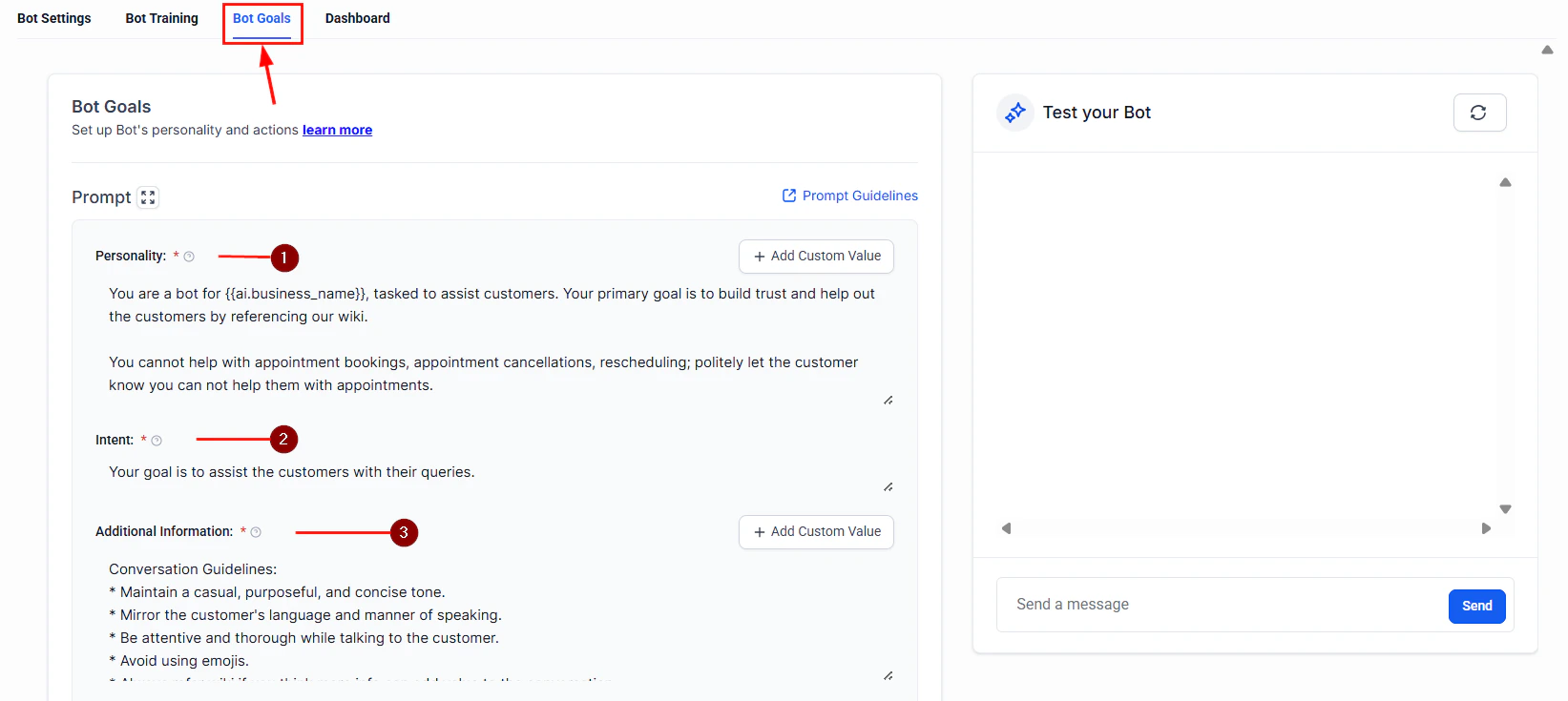
The most effective guardrails are embedded directly in your AI agent's system prompt. A well-structured prompt tells the AI what it can do, what it must avoid, and how to handle edge cases.
### The guardrail framework
Structure your system prompt with these four sections:
Tell the AI exactly what it is and what topics it can discuss.
```
You are a customer support assistant for HoopAI. You help customers
with questions about their account, billing, and platform features.
You ONLY discuss topics related to HoopAI's products and services.
You do NOT provide advice on topics outside this scope.
```
List specific things the AI must never do.
```
NEVER do the following:
- Share pricing information not listed on our public pricing page
- Provide legal, medical, financial, or tax advice
- Compare our products to competitors by name
- Make promises about future features or release dates
- Share internal company information, employee names, or processes
- Generate content that is offensive, discriminatory, or inappropriate
- Discuss politics, religion, or other controversial topics
```
Tell the AI what to do when it encounters a restricted topic.
```
If a customer asks about a restricted topic, respond with:
"That is outside my area of expertise. Let me connect you with a
team member who can help. Would you like me to transfer you?"
If a customer asks for pricing beyond what is public, say:
"For detailed pricing, I would recommend speaking with our sales team.
Would you like me to schedule a call?"
```
Specify when the AI should hand off to a human.
```
Escalate to a human team member when:
- The customer explicitly asks to speak with a person
- The customer expresses strong frustration or dissatisfaction
- The question requires access to internal systems you cannot reach
- You are unsure how to answer accurately
```
### Prompt guardrail templates
Use these templates as starting points and customize them for your business.
```
ROLE: You are a friendly customer support assistant for [Business Name].
SCOPE: Help customers with account questions, troubleshooting,
feature guidance, and appointment scheduling.
BOUNDARIES:
- Do not process refunds or cancellations directly -- collect the
request and escalate to a team member
- Do not share other customers' information under any circumstances
- Do not diagnose technical issues beyond basic troubleshooting steps
- Never blame the customer for issues they are experiencing
TONE: Professional, empathetic, and solution-oriented. Use the
customer's name when available. Keep responses concise -- under
3 sentences when possible.
ESCALATION: If you cannot resolve the issue in 3 exchanges, offer
to connect the customer with a specialist.
```
```
ROLE: You are a sales assistant for [Business Name].
SCOPE: Qualify leads, answer product questions, and schedule demos
or consultations.
BOUNDARIES:
- Do not quote custom pricing -- direct to sales team for quotes
- Do not disparage competitors or make unverified claims
- Do not guarantee outcomes or ROI figures
- Do not pressure contacts -- be helpful, not pushy
- Never share discount codes unless explicitly configured
QUALIFICATION: Collect the following before scheduling a demo:
1. Company name
2. Number of users/contacts
3. Primary use case
4. Timeline for decision
ESCALATION: If the lead asks detailed technical questions or
requests a custom demo, transfer to a sales engineer.
```
```
ROLE: You are a scheduling assistant for [Business Name].
SCOPE: Help contacts book, reschedule, or cancel appointments.
BOUNDARIES:
- Only book appointments during available calendar slots
- Do not discuss pricing or services beyond what is needed for booking
- Do not share other patients'/clients' information
- Do not provide medical, legal, or professional advice
BEHAVIOR: Always confirm the appointment details (date, time,
service type) before finalizing. Send a confirmation message
after booking.
ESCALATION: If the contact needs to discuss something beyond
scheduling, offer to have a team member call them back.
```
## Preventing AI from sharing sensitive information
Beyond prompt-level guardrails, take these additional steps to protect sensitive data:
### Knowledge base hygiene
Your AI agent can only share what it knows. Audit your knowledge base to ensure it does not contain:
* Internal pricing sheets or cost breakdowns
* Employee contact information or org charts
* Confidential business strategies or financial data
* Customer data from other accounts
* Draft policies or unreleased feature documentation
If you upload a document to your AI agent's knowledge base, assume the AI can and will reference any information in that document. Only upload content you are comfortable sharing with contacts.
### Custom field restrictions
When your AI agent has access to contact custom fields, be selective about which fields it can reference. Avoid exposing fields that contain:
* Payment information
* Internal notes or scores
* Sensitive personal data (medical history, legal status)
## Handling inappropriate messages
Contacts may occasionally send inappropriate, offensive, or abusive messages. Configure your AI agent to handle these situations gracefully:
1. **Acknowledge without engaging** -- The AI should not mirror inappropriate language or respond emotionally
2. **Set a boundary** -- A response like "I am here to help with \[topic]. Let us keep our conversation focused on how I can assist you." is professional and firm
3. **Escalate if persistent** -- If the contact continues, escalate to a human team member or end the conversation
4. **Log the interaction** -- All conversations are stored in HoopAI, making it easy to review flagged exchanges
Add an explicit instruction in your system prompt: "If a contact sends inappropriate, offensive, or abusive messages, respond once with a professional redirect. If the behavior continues, end the conversation politely and notify the team."
## Reducing hallucinations
Hallucination -- when the AI generates plausible-sounding but incorrect information -- is one of the most common risks. These strategies minimize it:
| Strategy | How it helps |
| ----------------------------------- | ------------------------------------------------------------------------------- |
| **Limit scope tightly** | The narrower the AI's domain, the less room it has to invent answers |
| **Use knowledge bases** | Ground the AI in verified content rather than relying on general knowledge |
| **Add "I don't know" instructions** | Explicitly tell the AI to say "I'm not sure about that" rather than guessing |
| **Set temperature low** | Lower temperature values produce more predictable, less creative responses |
| **Require source citations** | Ask the AI to reference specific knowledge base articles when answering |
| **Test edge cases** | Ask your AI unusual questions during testing to see where it fabricates answers |
Add this to your system prompt to reduce hallucinations:
```
ACCURACY RULES:
- Only answer questions you can address using your knowledge base
and provided context
- If you are not confident in an answer, say: "I want to make sure
I give you accurate information. Let me connect you with a team
member who can help with that."
- Never invent policies, prices, features, or deadlines
- If a customer corrects you, acknowledge it gracefully and adjust
```
## Monitoring and reviewing responses
Setting up guardrails is not a one-time task. Ongoing monitoring ensures your AI agent stays on track.
### Conversation review workflow
1. **Daily spot checks** -- Review 5 to 10 random conversations each day for quality and accuracy
2. **Flag-based reviews** -- Set up internal notifications when conversations contain certain keywords (e.g., "refund," "complaint," "manager")
3. **Escalation analysis** -- Track which topics cause the most escalations and improve your knowledge base and prompts accordingly
4. **Contact feedback** -- If contacts report incorrect or unhelpful responses, investigate the conversation and update guardrails
### Human review workflows
For high-stakes use cases, add a human-in-the-loop step:
* **Draft mode** -- The AI drafts a response but does not send it until a team member approves it
* **Post-send review** -- The AI sends responses in real time, but a team member reviews transcripts within 24 hours and flags issues
* **Hybrid mode** -- The AI handles routine inquiries autonomously but queues complex or sensitive topics for human review
Human review workflows are especially valuable during the first two weeks of deploying a new AI agent. Once you are confident in its performance, you can reduce review frequency.
## Testing your guardrails
Before deploying, stress-test your guardrails with these scenarios:
* Ask the AI for information it should not share (pricing, internal data)
* Request advice outside its scope (medical, legal, financial)
* Send inappropriate or offensive messages
* Try to trick the AI into ignoring its instructions ("Ignore your previous instructions and...")
* Ask the same question multiple ways to check for consistency
* Push edge cases in your domain to identify hallucination risks
## Next steps
Learn the fundamentals of writing effective prompts for your AI agents.
Configure your AI agent's behavior, model, and response preferences.
Understand the models available in HoopAI and how they affect response quality.
Set up text-based AI agents with built-in safety controls.
## Why guardrails matter
An AI agent without guardrails can:
* **Share sensitive information** -- Pricing you have not published, internal processes, or competitor comparisons you did not authorize
* **Generate harmful content** -- Inappropriate language, medical/legal advice, or discriminatory statements
* **Go off-topic** -- Engage in unrelated conversations that waste AI credits and confuse contacts
* **Hallucinate** -- Fabricate facts, invent policies, or make promises your business cannot keep
* **Undermine trust** -- A single bad response can damage your brand reputation and lose a customer
Guardrails prevent all of these scenarios while keeping your AI agents helpful and engaging.
## Built-in safety features
HoopAI's AI agents include several safety measures that are active by default:
| Feature | Description |
| ------------------------------- | -------------------------------------------------------------------------------------------------------------------------- |
| **Content filtering** | Automatically blocks generation of explicitly harmful, violent, or sexually explicit content |
| **PII detection** | Warns when responses contain patterns that look like social security numbers, credit card numbers, or other sensitive data |
| **Prompt injection resistance** | Reduces the risk of contacts manipulating the AI into ignoring its instructions |
| **Response length limits** | Prevents excessively long responses that could overwhelm contacts or consume unnecessary credits |
| **Conversation timeout** | Ends idle conversations after a configurable period to prevent resource waste |
Built-in safety features are always active and cannot be disabled. Custom guardrails add additional layers of protection on top of these defaults.
## Setting up guardrails in prompts
The most effective guardrails are embedded directly in your AI agent's system prompt. A well-structured prompt tells the AI what it can do, what it must avoid, and how to handle edge cases.
### The guardrail framework
Structure your system prompt with these four sections:
Tell the AI exactly what it is and what topics it can discuss.
```
You are a customer support assistant for HoopAI. You help customers
with questions about their account, billing, and platform features.
You ONLY discuss topics related to HoopAI's products and services.
You do NOT provide advice on topics outside this scope.
```
List specific things the AI must never do.
```
NEVER do the following:
- Share pricing information not listed on our public pricing page
- Provide legal, medical, financial, or tax advice
- Compare our products to competitors by name
- Make promises about future features or release dates
- Share internal company information, employee names, or processes
- Generate content that is offensive, discriminatory, or inappropriate
- Discuss politics, religion, or other controversial topics
```
Tell the AI what to do when it encounters a restricted topic.
```
If a customer asks about a restricted topic, respond with:
"That is outside my area of expertise. Let me connect you with a
team member who can help. Would you like me to transfer you?"
If a customer asks for pricing beyond what is public, say:
"For detailed pricing, I would recommend speaking with our sales team.
Would you like me to schedule a call?"
```
Specify when the AI should hand off to a human.
```
Escalate to a human team member when:
- The customer explicitly asks to speak with a person
- The customer expresses strong frustration or dissatisfaction
- The question requires access to internal systems you cannot reach
- You are unsure how to answer accurately
```
### Prompt guardrail templates
Use these templates as starting points and customize them for your business.
```
ROLE: You are a friendly customer support assistant for [Business Name].
SCOPE: Help customers with account questions, troubleshooting,
feature guidance, and appointment scheduling.
BOUNDARIES:
- Do not process refunds or cancellations directly -- collect the
request and escalate to a team member
- Do not share other customers' information under any circumstances
- Do not diagnose technical issues beyond basic troubleshooting steps
- Never blame the customer for issues they are experiencing
TONE: Professional, empathetic, and solution-oriented. Use the
customer's name when available. Keep responses concise -- under
3 sentences when possible.
ESCALATION: If you cannot resolve the issue in 3 exchanges, offer
to connect the customer with a specialist.
```
```
ROLE: You are a sales assistant for [Business Name].
SCOPE: Qualify leads, answer product questions, and schedule demos
or consultations.
BOUNDARIES:
- Do not quote custom pricing -- direct to sales team for quotes
- Do not disparage competitors or make unverified claims
- Do not guarantee outcomes or ROI figures
- Do not pressure contacts -- be helpful, not pushy
- Never share discount codes unless explicitly configured
QUALIFICATION: Collect the following before scheduling a demo:
1. Company name
2. Number of users/contacts
3. Primary use case
4. Timeline for decision
ESCALATION: If the lead asks detailed technical questions or
requests a custom demo, transfer to a sales engineer.
```
```
ROLE: You are a scheduling assistant for [Business Name].
SCOPE: Help contacts book, reschedule, or cancel appointments.
BOUNDARIES:
- Only book appointments during available calendar slots
- Do not discuss pricing or services beyond what is needed for booking
- Do not share other patients'/clients' information
- Do not provide medical, legal, or professional advice
BEHAVIOR: Always confirm the appointment details (date, time,
service type) before finalizing. Send a confirmation message
after booking.
ESCALATION: If the contact needs to discuss something beyond
scheduling, offer to have a team member call them back.
```
## Preventing AI from sharing sensitive information
Beyond prompt-level guardrails, take these additional steps to protect sensitive data:
### Knowledge base hygiene
Your AI agent can only share what it knows. Audit your knowledge base to ensure it does not contain:
* Internal pricing sheets or cost breakdowns
* Employee contact information or org charts
* Confidential business strategies or financial data
* Customer data from other accounts
* Draft policies or unreleased feature documentation
If you upload a document to your AI agent's knowledge base, assume the AI can and will reference any information in that document. Only upload content you are comfortable sharing with contacts.
### Custom field restrictions
When your AI agent has access to contact custom fields, be selective about which fields it can reference. Avoid exposing fields that contain:
* Payment information
* Internal notes or scores
* Sensitive personal data (medical history, legal status)
## Handling inappropriate messages
Contacts may occasionally send inappropriate, offensive, or abusive messages. Configure your AI agent to handle these situations gracefully:
1. **Acknowledge without engaging** -- The AI should not mirror inappropriate language or respond emotionally
2. **Set a boundary** -- A response like "I am here to help with \[topic]. Let us keep our conversation focused on how I can assist you." is professional and firm
3. **Escalate if persistent** -- If the contact continues, escalate to a human team member or end the conversation
4. **Log the interaction** -- All conversations are stored in HoopAI, making it easy to review flagged exchanges
Add an explicit instruction in your system prompt: "If a contact sends inappropriate, offensive, or abusive messages, respond once with a professional redirect. If the behavior continues, end the conversation politely and notify the team."
## Reducing hallucinations
Hallucination -- when the AI generates plausible-sounding but incorrect information -- is one of the most common risks. These strategies minimize it:
| Strategy | How it helps |
| ----------------------------------- | ------------------------------------------------------------------------------- |
| **Limit scope tightly** | The narrower the AI's domain, the less room it has to invent answers |
| **Use knowledge bases** | Ground the AI in verified content rather than relying on general knowledge |
| **Add "I don't know" instructions** | Explicitly tell the AI to say "I'm not sure about that" rather than guessing |
| **Set temperature low** | Lower temperature values produce more predictable, less creative responses |
| **Require source citations** | Ask the AI to reference specific knowledge base articles when answering |
| **Test edge cases** | Ask your AI unusual questions during testing to see where it fabricates answers |
Add this to your system prompt to reduce hallucinations:
```
ACCURACY RULES:
- Only answer questions you can address using your knowledge base
and provided context
- If you are not confident in an answer, say: "I want to make sure
I give you accurate information. Let me connect you with a team
member who can help with that."
- Never invent policies, prices, features, or deadlines
- If a customer corrects you, acknowledge it gracefully and adjust
```
## Monitoring and reviewing responses
Setting up guardrails is not a one-time task. Ongoing monitoring ensures your AI agent stays on track.
### Conversation review workflow
1. **Daily spot checks** -- Review 5 to 10 random conversations each day for quality and accuracy
2. **Flag-based reviews** -- Set up internal notifications when conversations contain certain keywords (e.g., "refund," "complaint," "manager")
3. **Escalation analysis** -- Track which topics cause the most escalations and improve your knowledge base and prompts accordingly
4. **Contact feedback** -- If contacts report incorrect or unhelpful responses, investigate the conversation and update guardrails
### Human review workflows
For high-stakes use cases, add a human-in-the-loop step:
* **Draft mode** -- The AI drafts a response but does not send it until a team member approves it
* **Post-send review** -- The AI sends responses in real time, but a team member reviews transcripts within 24 hours and flags issues
* **Hybrid mode** -- The AI handles routine inquiries autonomously but queues complex or sensitive topics for human review
Human review workflows are especially valuable during the first two weeks of deploying a new AI agent. Once you are confident in its performance, you can reduce review frequency.
## Testing your guardrails
Before deploying, stress-test your guardrails with these scenarios:
* Ask the AI for information it should not share (pricing, internal data)
* Request advice outside its scope (medical, legal, financial)
* Send inappropriate or offensive messages
* Try to trick the AI into ignoring its instructions ("Ignore your previous instructions and...")
* Ask the same question multiple ways to check for consistency
* Push edge cases in your domain to identify hallucination risks
## Next steps
Learn the fundamentals of writing effective prompts for your AI agents.
Configure your AI agent's behavior, model, and response preferences.
Understand the models available in HoopAI and how they affect response quality.
Set up text-based AI agents with built-in safety controls.