> ## Documentation Index
> Fetch the complete documentation index at: https://help.hoopai.com/llms.txt
> Use this file to discover all available pages before exploring further.
# Prompt optimization and testing
> Learn systematic methods to test, measure, and optimize your HoopAI AI prompts.
Writing a prompt is not a one-and-done task. The best-performing AI agents are continuously refined based on real conversation data. This guide gives you a systematic methodology for testing, measuring, and improving your [Conversation AI](/ai-agents/conversation-ai) and [Voice AI](/ai-agents/voice-ai) prompts.
Start with the [4-part framework](/ai/prompt-engineering/overview) if you have not built your initial prompt yet. This guide assumes you have a working prompt and want to make it better.
 ## Using HoopAI's bot trial mode
Before sending your prompt to real customers, test it thoroughly using HoopAI's built-in testing tools.
### How to access trial mode
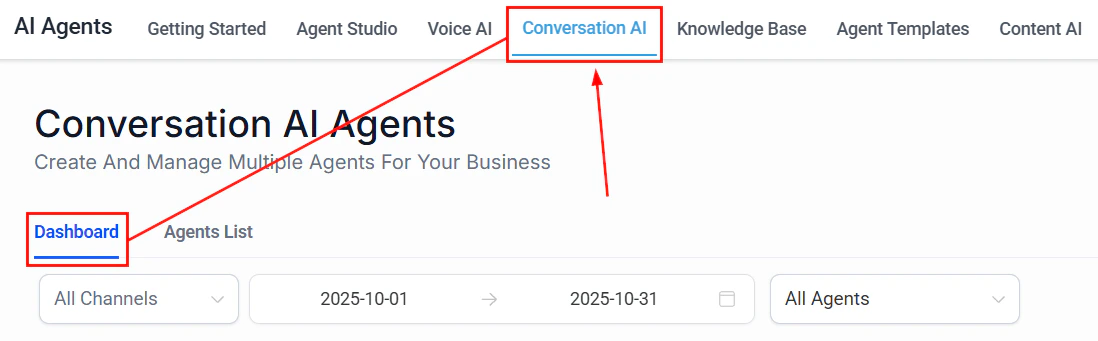
Go to **AI Agents > Conversation AI** and select the bot you want to test.
Look for the **Bot Trial** or **Test** option in your bot's settings. This opens a chat window where you can interact with the bot as if you were a customer.
Type messages as a customer would. Test greetings, questions, appointment requests, edge cases, and escalation triggers.
Evaluate each response for accuracy, tone, helpfulness, and adherence to your prompt's guidelines.
### What to test in trial mode
Run through this checklist before going live:
| Test category | What to try | What to look for |
| ----------------------- | --------------------------------------- | ---------------------------------------------- |
| **Greeting** | Start a new conversation | Warm, on-brand intro that asks how to help |
| **Common questions** | Ask your top 5 FAQs | Accurate answers from the knowledge base |
| **Appointment booking** | Request an appointment | Smooth flow that collects all required info |
| **Edge cases** | Ask something off-topic | Graceful redirect without making up answers |
| **Escalation** | Say "I want to talk to a person" | Immediate handoff with empathetic message |
| **Frustration** | Express anger or dissatisfaction | Empathetic response and escalation offer |
| **Unknown question** | Ask something not in the knowledge base | Honest "I don't know" with handoff offer |
| **Channel behavior** | Test via SMS if applicable | Short, formatted responses appropriate for SMS |
Have someone who has never seen your prompt test the bot. Fresh eyes catch problems that you will miss because you already know the "right" answers.
## Suggestive mode: your safety net
Before switching to Auto-Pilot, run your bot in **Suggestive mode** for at least 48 hours. In this mode, the bot generates responses but waits for your team to approve, edit, or reject them before sending.
This gives you:
* **Real-world data** on how the bot handles actual customer messages
* **A safety net** — no bad responses reach customers
* **Training examples** — every edit you make teaches you what to improve in the prompt
Suggestive mode is available in [Conversation AI settings](/ai-agents/conversation-ai). It is the recommended starting mode for any new or significantly updated prompt.
### What to track during suggestive mode
Keep a simple log of:
1. **Approved as-is** — the response was perfect; no edits needed
2. **Edited before sending** — the response needed changes; note what you changed
3. **Rejected** — the response was wrong or unhelpful; note why
After 48 hours, calculate your approval rate. If fewer than 80% of responses are approved as-is, revise your prompt before switching to Auto-Pilot.
## Systematic testing methodology
Once your bot is live, use a structured testing approach to identify and fix weaknesses.
### Create test scripts
Write a set of test conversations that cover your most important scenarios. Run these scripts after every prompt update to catch regressions.
```text Test script example theme={null}
TEST SCRIPT: Lead Qualification Bot
Test 1 — Happy path (new lead):
User: "Hi, I'm interested in your marketing services."
Expected: Greeting + question about their business/needs
User: "I run a small plumbing company and need more customers."
Expected: Clarifying question about goals or budget
User: "My budget is about $1,000/month."
Expected: Timeline question
User: "I'd like to start next month."
Expected: Contact info collection
User: "John Smith, john@example.com, 555-0123"
Expected: Confirmation of all details + next steps
Test 2 — Objection handling:
User: "Your prices seem really high."
Expected: Acknowledge concern + highlight value + offer
alternatives
Test 3 — Off-topic question:
User: "What's the weather like today?"
Expected: Polite redirect to business-related topics
Test 4 — Escalation trigger:
User: "This is frustrating. I want to talk to a real person."
Expected: Empathetic acknowledgment + immediate handoff
Test 5 — Unknown question:
User: "Do you offer SEO services in Japanese?"
Expected: Honest "I'm not sure" + offer to connect with team
```
Save your test scripts and run them after every prompt change. This prevents regressions — situations where fixing one problem accidentally creates another.
### The test-measure-improve cycle
Follow this cycle continuously:
Run your test scripts and review 10-20 recent real conversations from the [Conversation AI Dashboard](/ai-agents/conversation-ai-dashboard).
Look for patterns:
* Which questions does the bot answer incorrectly?
* Where do customers seem confused or frustrated?
* Which conversations result in unnecessary handoffs?
* Where does the bot go off-script?
Make targeted changes to address the specific issues you found. Change one thing at a time so you can measure the impact.
Run your test scripts again to confirm the fix works and has not broken anything else.
Watch the dashboard metrics for 3-5 days to see if the change improved performance in real conversations.
## Measuring prompt quality
You cannot improve what you do not measure. Track these key metrics to understand how your prompt is performing.
### Resolution rate
The percentage of conversations the bot resolves without human intervention.
* **Target:** 60-80% for most businesses
* **How to measure:** Check the [Conversation AI Dashboard](/ai-agents/conversation-ai-dashboard) for conversations marked as resolved by the bot vs. handed off to a human
* **If too low:** Your prompt may be missing common scenarios, or your escalation rules may be too aggressive
* **If too high:** Make sure the bot is not answering questions it should be escalating (check accuracy)
### Handoff rate
The percentage of conversations that are transferred to a human agent.
* **Target:** 20-40% (some handoffs are expected and healthy)
* **How to measure:** Track handoff events in the dashboard
* **If too high:** The bot cannot handle enough scenarios — add more instructions and examples
* **If too low:** The bot may be over-confident — check if it is answering questions it should escalate
### Response accuracy
How often the bot gives correct, helpful responses.
* **How to measure:** Review a random sample of 20 conversations per week and rate each response as accurate, partially accurate, or inaccurate
* **Target:** 90%+ accuracy rate
* **If below target:** Check your [Knowledge Base](/ai-agents/knowledge-base) for missing or outdated information. Add knowledge boundaries to your prompt.
### Customer satisfaction signals
Look for behavioral signals that indicate satisfaction or dissatisfaction:
* **Positive signals:** Customer says "thank you," continues the conversation, completes the desired action (books appointment, provides contact info)
* **Negative signals:** Customer repeats their question, says "never mind," asks for a human, expresses frustration, abandons the conversation
### Average conversation length
How many messages does a typical conversation take?
* **For appointment booking:** 5-8 messages is typical
* **For FAQ questions:** 2-4 messages is ideal
* **If too long:** The bot may be asking unnecessary questions or not getting to the point
* **If too short:** The bot may be giving incomplete answers or rushing to close
## Using the Conversation AI Dashboard
The [Conversation AI Dashboard](/ai-agents/conversation-ai-dashboard) is your primary tool for monitoring prompt performance. Here is how to use it effectively.
### Daily review (5 minutes)
* Check total conversation volume
* Review handoff rate — any spikes?
* Scan recent conversations flagged as problematic
### Weekly review (30 minutes)
* Read 15-20 random conversations end to end
* Identify the 3 most common questions the bot struggles with
* Note any new question types that are not covered by your prompt
* Check if knowledge base information is current and accurate
### Monthly optimization (2 hours)
* Calculate your key metrics (resolution rate, handoff rate, accuracy)
* Compare to the previous month
* Identify the single biggest area for improvement
* Update the prompt with targeted changes
* Run your test scripts to validate the changes
* Document what you changed and why (prompt versioning)
## A/B testing prompts
When you want to compare two different prompt approaches, set up an A/B test.
### How to A/B test with workflows
Duplicate your existing bot. Update the copy with the change you want to test (for example, a different greeting, a new escalation rule, or a different tone).
Create a workflow that alternates incoming conversations between the two bots. You can use contact-based routing (even/odd contact IDs) or random assignment.
Let both versions handle conversations for at least 7 days to get a meaningful sample size. Aim for at least 50 conversations per version.
Look at resolution rate, handoff rate, and customer satisfaction signals for each version. Which prompt performed better?
Apply the winning prompt to your primary bot. Archive the losing version for reference.
### What to A/B test
Good candidates for A/B testing:
* **Greeting style** — formal vs. casual, long vs. short
* **Response length** — concise vs. detailed
* **Escalation thresholds** — aggressive (hand off early) vs. conservative (try harder)
* **Information collection order** — name first vs. need first
* **Tone** — professional vs. friendly vs. enthusiastic
* **Example quantity** — 2 examples vs. 5 examples in the prompt
Only test one variable at a time. If you change the greeting AND the escalation rules simultaneously, you will not know which change caused the difference in performance.
## The iterative improvement cycle
Prompt optimization is not a project with an end date — it is an ongoing practice. Here is a sustainable cadence:
| Frequency | Activity | Time investment |
| ------------- | -------------------------------------------- | --------------- |
| **Daily** | Glance at dashboard for anomalies | 5 minutes |
| **Weekly** | Read 15-20 conversations, note issues | 30 minutes |
| **Bi-weekly** | Make targeted prompt improvements | 1 hour |
| **Monthly** | Calculate metrics, compare to previous month | 30 minutes |
| **Quarterly** | Full prompt review and potential rewrite | 2-3 hours |
Small, frequent improvements beat large, infrequent rewrites. A 5% improvement in resolution rate every month compounds into a dramatically better bot over time.
## Next steps
Revisit the fundamentals if your metrics suggest foundational issues
Check your prompt against the top 10 mistakes before optimizing further
Apply conditional logic, multi-step prompting, and A/B testing patterns
Access your bot's performance metrics and conversation logs
## Using HoopAI's bot trial mode
Before sending your prompt to real customers, test it thoroughly using HoopAI's built-in testing tools.
### How to access trial mode
Go to **AI Agents > Conversation AI** and select the bot you want to test.
Look for the **Bot Trial** or **Test** option in your bot's settings. This opens a chat window where you can interact with the bot as if you were a customer.
Type messages as a customer would. Test greetings, questions, appointment requests, edge cases, and escalation triggers.
Evaluate each response for accuracy, tone, helpfulness, and adherence to your prompt's guidelines.
### What to test in trial mode
Run through this checklist before going live:
| Test category | What to try | What to look for |
| ----------------------- | --------------------------------------- | ---------------------------------------------- |
| **Greeting** | Start a new conversation | Warm, on-brand intro that asks how to help |
| **Common questions** | Ask your top 5 FAQs | Accurate answers from the knowledge base |
| **Appointment booking** | Request an appointment | Smooth flow that collects all required info |
| **Edge cases** | Ask something off-topic | Graceful redirect without making up answers |
| **Escalation** | Say "I want to talk to a person" | Immediate handoff with empathetic message |
| **Frustration** | Express anger or dissatisfaction | Empathetic response and escalation offer |
| **Unknown question** | Ask something not in the knowledge base | Honest "I don't know" with handoff offer |
| **Channel behavior** | Test via SMS if applicable | Short, formatted responses appropriate for SMS |
Have someone who has never seen your prompt test the bot. Fresh eyes catch problems that you will miss because you already know the "right" answers.
## Suggestive mode: your safety net
Before switching to Auto-Pilot, run your bot in **Suggestive mode** for at least 48 hours. In this mode, the bot generates responses but waits for your team to approve, edit, or reject them before sending.
This gives you:
* **Real-world data** on how the bot handles actual customer messages
* **A safety net** — no bad responses reach customers
* **Training examples** — every edit you make teaches you what to improve in the prompt
Suggestive mode is available in [Conversation AI settings](/ai-agents/conversation-ai). It is the recommended starting mode for any new or significantly updated prompt.
### What to track during suggestive mode
Keep a simple log of:
1. **Approved as-is** — the response was perfect; no edits needed
2. **Edited before sending** — the response needed changes; note what you changed
3. **Rejected** — the response was wrong or unhelpful; note why
After 48 hours, calculate your approval rate. If fewer than 80% of responses are approved as-is, revise your prompt before switching to Auto-Pilot.
## Systematic testing methodology
Once your bot is live, use a structured testing approach to identify and fix weaknesses.
### Create test scripts
Write a set of test conversations that cover your most important scenarios. Run these scripts after every prompt update to catch regressions.
```text Test script example theme={null}
TEST SCRIPT: Lead Qualification Bot
Test 1 — Happy path (new lead):
User: "Hi, I'm interested in your marketing services."
Expected: Greeting + question about their business/needs
User: "I run a small plumbing company and need more customers."
Expected: Clarifying question about goals or budget
User: "My budget is about $1,000/month."
Expected: Timeline question
User: "I'd like to start next month."
Expected: Contact info collection
User: "John Smith, john@example.com, 555-0123"
Expected: Confirmation of all details + next steps
Test 2 — Objection handling:
User: "Your prices seem really high."
Expected: Acknowledge concern + highlight value + offer
alternatives
Test 3 — Off-topic question:
User: "What's the weather like today?"
Expected: Polite redirect to business-related topics
Test 4 — Escalation trigger:
User: "This is frustrating. I want to talk to a real person."
Expected: Empathetic acknowledgment + immediate handoff
Test 5 — Unknown question:
User: "Do you offer SEO services in Japanese?"
Expected: Honest "I'm not sure" + offer to connect with team
```
Save your test scripts and run them after every prompt change. This prevents regressions — situations where fixing one problem accidentally creates another.
### The test-measure-improve cycle
Follow this cycle continuously:
Run your test scripts and review 10-20 recent real conversations from the [Conversation AI Dashboard](/ai-agents/conversation-ai-dashboard).
Look for patterns:
* Which questions does the bot answer incorrectly?
* Where do customers seem confused or frustrated?
* Which conversations result in unnecessary handoffs?
* Where does the bot go off-script?
Make targeted changes to address the specific issues you found. Change one thing at a time so you can measure the impact.
Run your test scripts again to confirm the fix works and has not broken anything else.
Watch the dashboard metrics for 3-5 days to see if the change improved performance in real conversations.
## Measuring prompt quality
You cannot improve what you do not measure. Track these key metrics to understand how your prompt is performing.
### Resolution rate
The percentage of conversations the bot resolves without human intervention.
* **Target:** 60-80% for most businesses
* **How to measure:** Check the [Conversation AI Dashboard](/ai-agents/conversation-ai-dashboard) for conversations marked as resolved by the bot vs. handed off to a human
* **If too low:** Your prompt may be missing common scenarios, or your escalation rules may be too aggressive
* **If too high:** Make sure the bot is not answering questions it should be escalating (check accuracy)
### Handoff rate
The percentage of conversations that are transferred to a human agent.
* **Target:** 20-40% (some handoffs are expected and healthy)
* **How to measure:** Track handoff events in the dashboard
* **If too high:** The bot cannot handle enough scenarios — add more instructions and examples
* **If too low:** The bot may be over-confident — check if it is answering questions it should escalate
### Response accuracy
How often the bot gives correct, helpful responses.
* **How to measure:** Review a random sample of 20 conversations per week and rate each response as accurate, partially accurate, or inaccurate
* **Target:** 90%+ accuracy rate
* **If below target:** Check your [Knowledge Base](/ai-agents/knowledge-base) for missing or outdated information. Add knowledge boundaries to your prompt.
### Customer satisfaction signals
Look for behavioral signals that indicate satisfaction or dissatisfaction:
* **Positive signals:** Customer says "thank you," continues the conversation, completes the desired action (books appointment, provides contact info)
* **Negative signals:** Customer repeats their question, says "never mind," asks for a human, expresses frustration, abandons the conversation
### Average conversation length
How many messages does a typical conversation take?
* **For appointment booking:** 5-8 messages is typical
* **For FAQ questions:** 2-4 messages is ideal
* **If too long:** The bot may be asking unnecessary questions or not getting to the point
* **If too short:** The bot may be giving incomplete answers or rushing to close
## Using the Conversation AI Dashboard
The [Conversation AI Dashboard](/ai-agents/conversation-ai-dashboard) is your primary tool for monitoring prompt performance. Here is how to use it effectively.
### Daily review (5 minutes)
* Check total conversation volume
* Review handoff rate — any spikes?
* Scan recent conversations flagged as problematic
### Weekly review (30 minutes)
* Read 15-20 random conversations end to end
* Identify the 3 most common questions the bot struggles with
* Note any new question types that are not covered by your prompt
* Check if knowledge base information is current and accurate
### Monthly optimization (2 hours)
* Calculate your key metrics (resolution rate, handoff rate, accuracy)
* Compare to the previous month
* Identify the single biggest area for improvement
* Update the prompt with targeted changes
* Run your test scripts to validate the changes
* Document what you changed and why (prompt versioning)
## A/B testing prompts
When you want to compare two different prompt approaches, set up an A/B test.
### How to A/B test with workflows
Duplicate your existing bot. Update the copy with the change you want to test (for example, a different greeting, a new escalation rule, or a different tone).
Create a workflow that alternates incoming conversations between the two bots. You can use contact-based routing (even/odd contact IDs) or random assignment.
Let both versions handle conversations for at least 7 days to get a meaningful sample size. Aim for at least 50 conversations per version.
Look at resolution rate, handoff rate, and customer satisfaction signals for each version. Which prompt performed better?
Apply the winning prompt to your primary bot. Archive the losing version for reference.
### What to A/B test
Good candidates for A/B testing:
* **Greeting style** — formal vs. casual, long vs. short
* **Response length** — concise vs. detailed
* **Escalation thresholds** — aggressive (hand off early) vs. conservative (try harder)
* **Information collection order** — name first vs. need first
* **Tone** — professional vs. friendly vs. enthusiastic
* **Example quantity** — 2 examples vs. 5 examples in the prompt
Only test one variable at a time. If you change the greeting AND the escalation rules simultaneously, you will not know which change caused the difference in performance.
## The iterative improvement cycle
Prompt optimization is not a project with an end date — it is an ongoing practice. Here is a sustainable cadence:
| Frequency | Activity | Time investment |
| ------------- | -------------------------------------------- | --------------- |
| **Daily** | Glance at dashboard for anomalies | 5 minutes |
| **Weekly** | Read 15-20 conversations, note issues | 30 minutes |
| **Bi-weekly** | Make targeted prompt improvements | 1 hour |
| **Monthly** | Calculate metrics, compare to previous month | 30 minutes |
| **Quarterly** | Full prompt review and potential rewrite | 2-3 hours |
Small, frequent improvements beat large, infrequent rewrites. A 5% improvement in resolution rate every month compounds into a dramatically better bot over time.
## Next steps
Revisit the fundamentals if your metrics suggest foundational issues
Check your prompt against the top 10 mistakes before optimizing further
Apply conditional logic, multi-step prompting, and A/B testing patterns
Access your bot's performance metrics and conversation logs