> ## Documentation Index
> Fetch the complete documentation index at: https://help.hoopai.com/llms.txt
> Use this file to discover all available pages before exploring further.
# Flow-Based Builder
> Build structured, decision-tree conversations with the Conversation AI Flow-Based Builder and guided form bots.
The Flow-Based Builder lets you design conversation flows as visual decision trees — ideal for guided forms, qualification bots, and step-by-step onboarding sequences.
Your Conversation AI helps you connect with customers efficiently; however, if you're more used to using the workflow builder than prompting bots, you might feel overwhelmed. If this is your case, by using the Flow-Based Builder, you can use this more familiar builder while retaining the benefits of AI agents. Let's learn how to use it!
### Creating An Agent
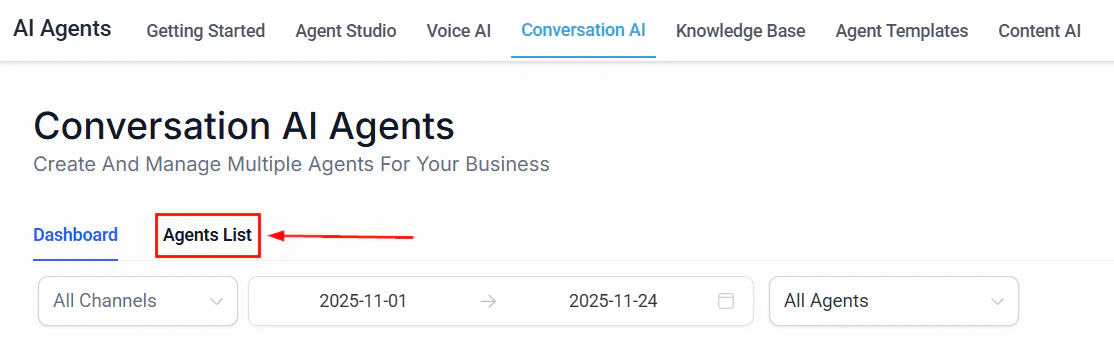
Navigate to the Conversation AI tab inside the AI Agents section and switch to the Agents List Area.
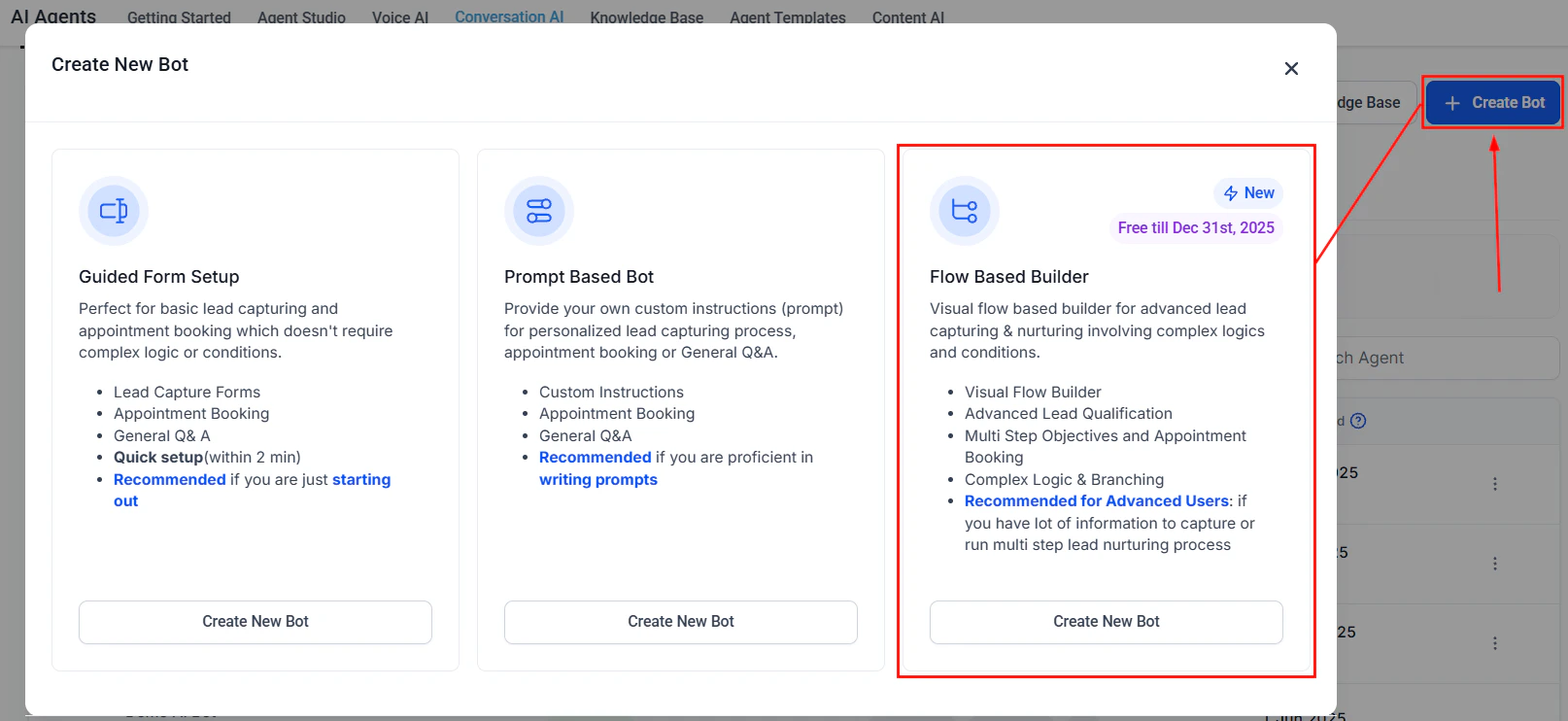
 Click Create Bot and select Flow Builder.
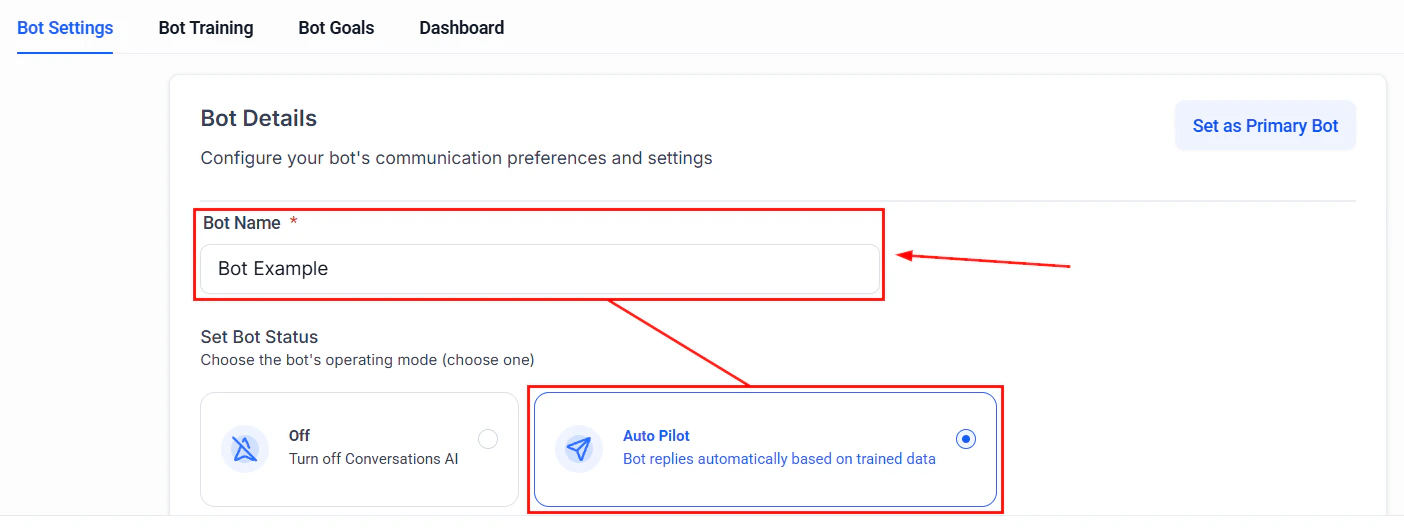
 On the Bot Settings Tab, name the bot and set the bot status to Auto Pilot.
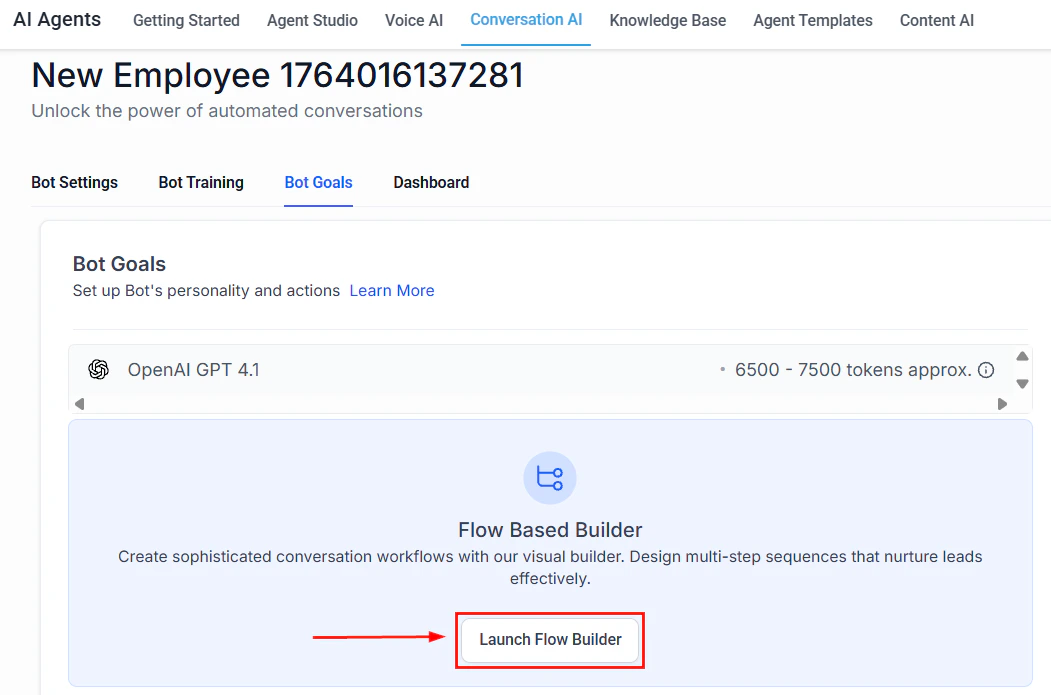
 Switch to Bot Goals and click Launch Flow Builder.
 ### Setting Your Workflow
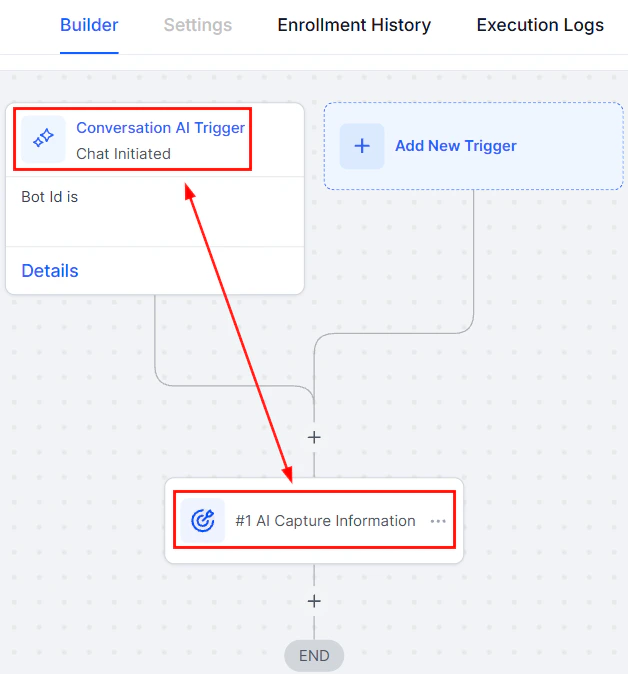
Add AI Actions such as AI Capture, AI Message, and Custom Triggers to design your flow.
### Setting Your Workflow
Add AI Actions such as AI Capture, AI Message, and Custom Triggers to design your flow.
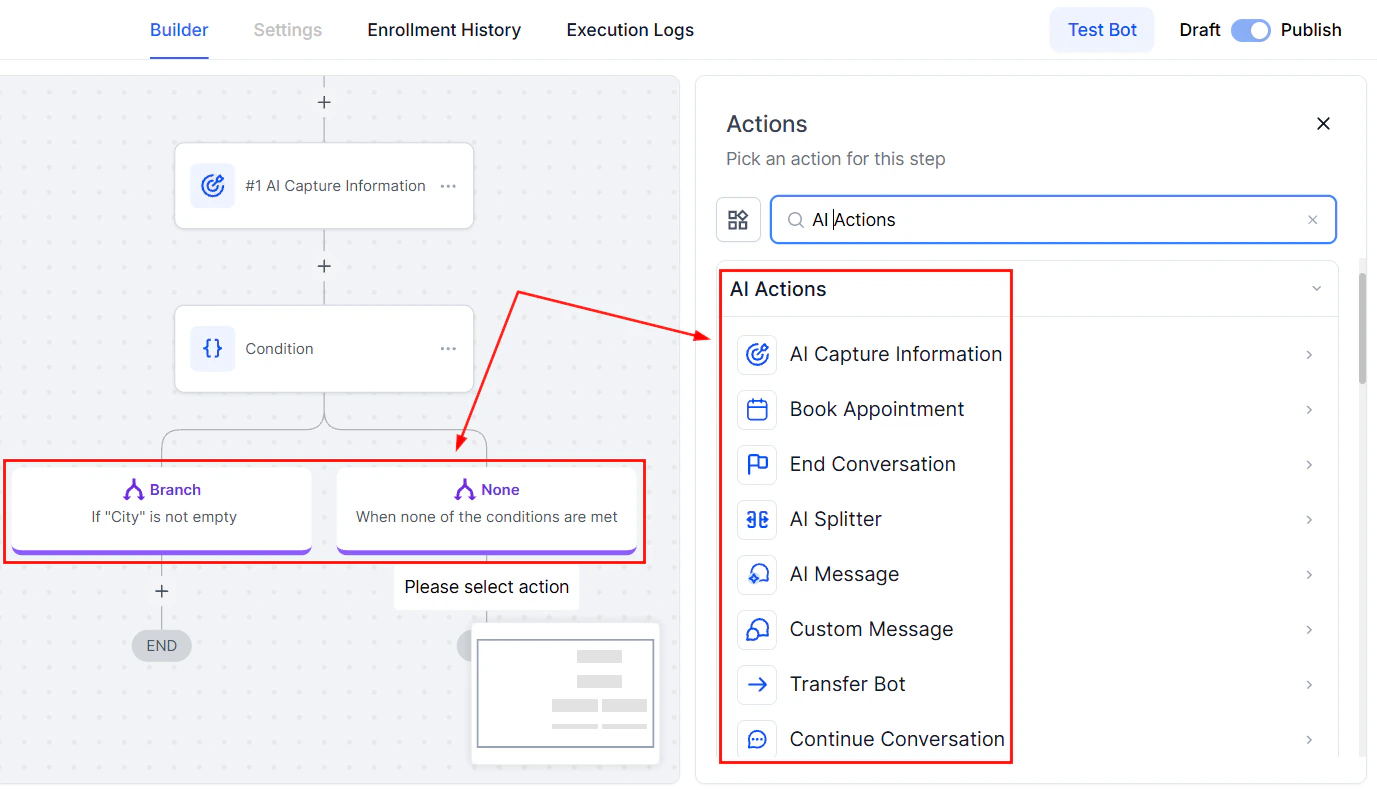
 Build the rest of your workflow as desired, including adding the If/Else action to add conditions and using other AI actions to guide your bot.
 ### Completing Set Up
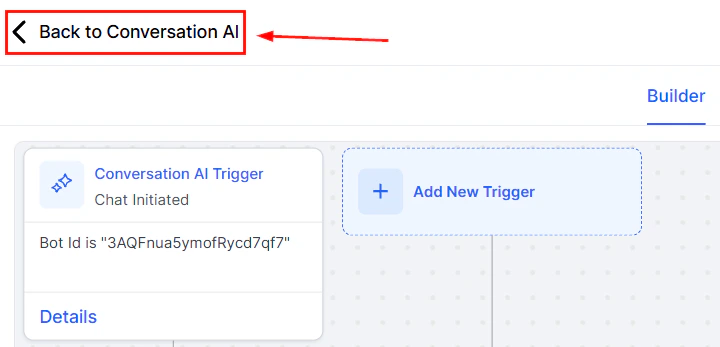
After saving your workflow, click Back to Conversation AI to complete your setup.
### Completing Set Up
After saving your workflow, click Back to Conversation AI to complete your setup.
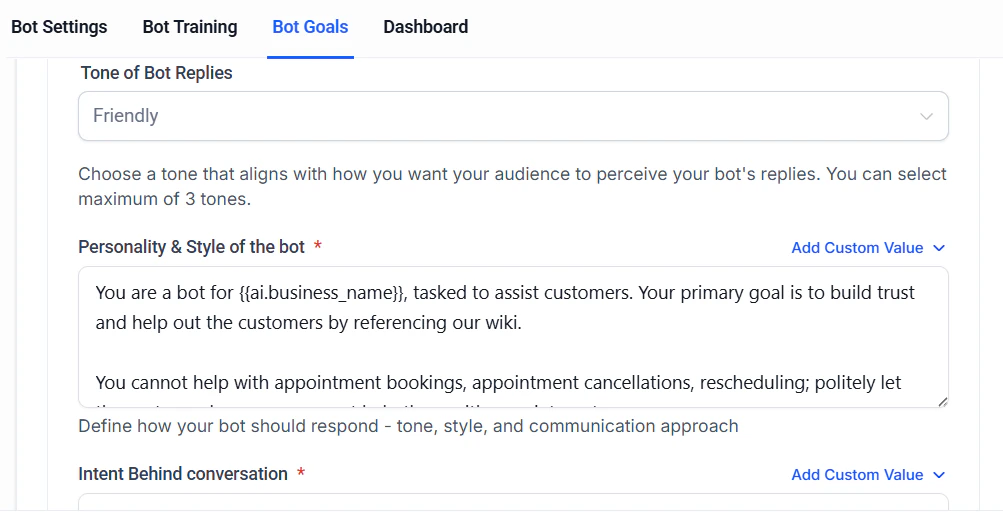
 Configure the bot's tone, personality, and conversation intent.
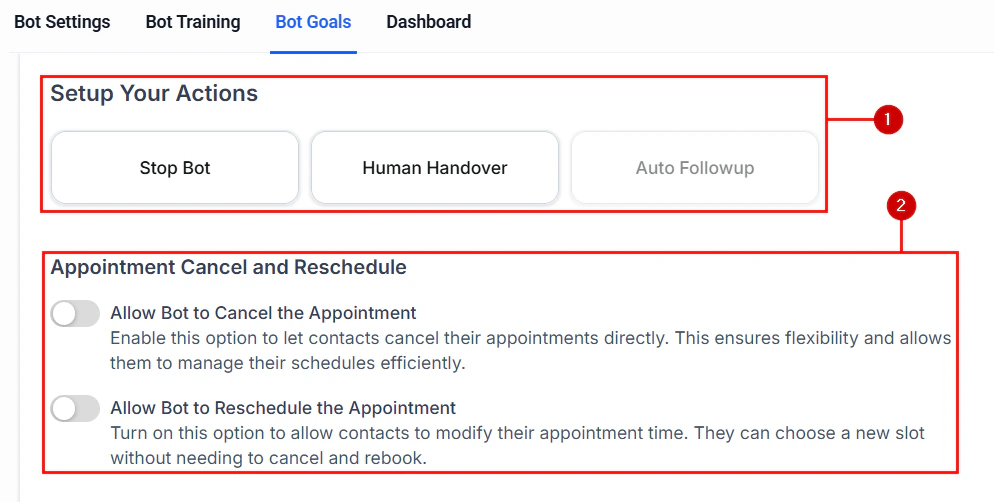
 Set up additional actions (1) and configure the bot's ability to cancel and reschedule appointments (2).
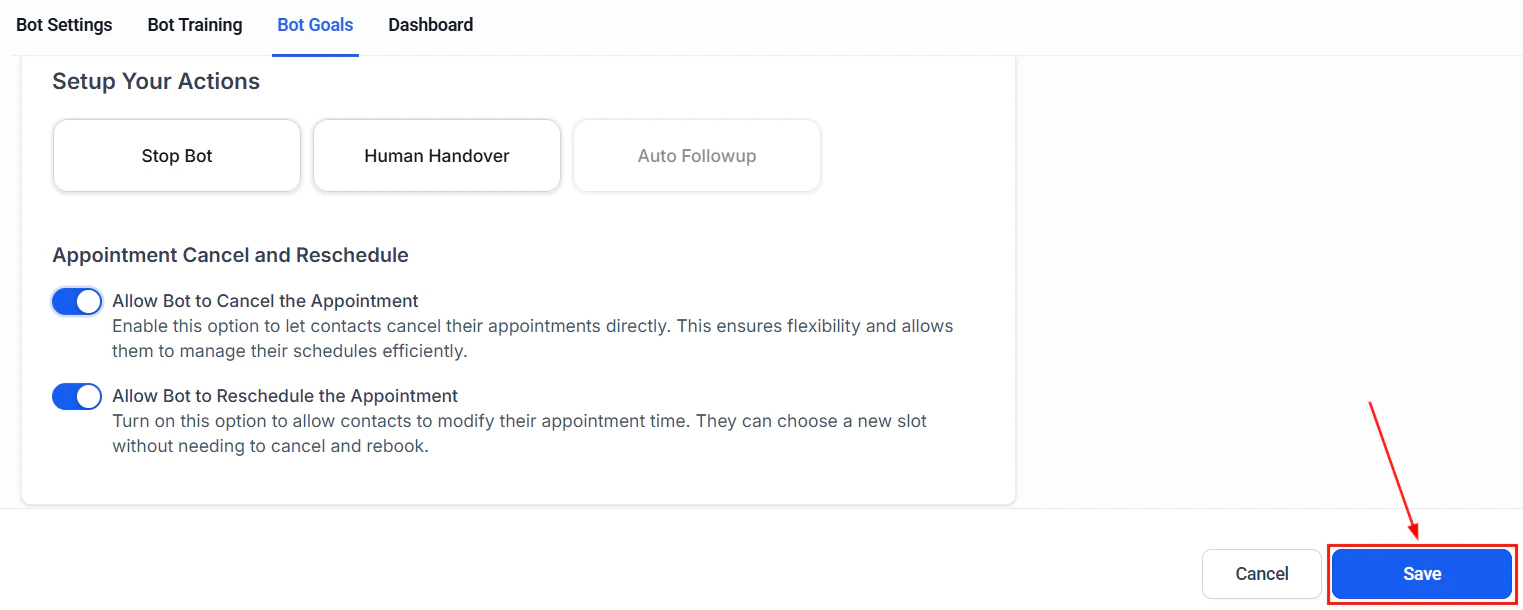
 Save your changes, and you're done!
 There you have it! Use these steps to build bots that think and act like your business, using the intuitive visual design to manage multiple calendars, lead types, and workflows from one interface with deeper logic and tighter integrations. We hope you enjoy it!
***
## Creating a guided form bot
The Guided Form Bot is a simplified bot creation method within Conversation AI. Instead of writing custom prompts, you can complete a guided form that defines the bot's objectives and key behavior. Behind the scenes, the system generates an intelligent, logic-based conversation flow tailored to your needs. Read on to learn how to launch effective AI interactions quickly, without requiring deep technical or conversational design expertise.
### Key Benefits of the Guided Form Bot
* \*\*\*\*No Prompt Writing Required: \*\*\*\*Skip manual scripting and let the system build the conversation for you.
* ****Fast Setup:**** Build a fully functional bot in under 3 minutes.
* ****Smart Responses:**** Logic-based replies customized to your objectives.
* ****Lead Capture & Qualification:**** Collect contact data, schedule calls, and qualify leads with ease.
* ****Reusable Templates:**** Save time by reusing bots across different campaigns.
* ****Seamless Integration:**** Connects easily with workflows, tags, and channels within your account.
## How to Set Up the Guided Form Bot
### Access the Bot Builder
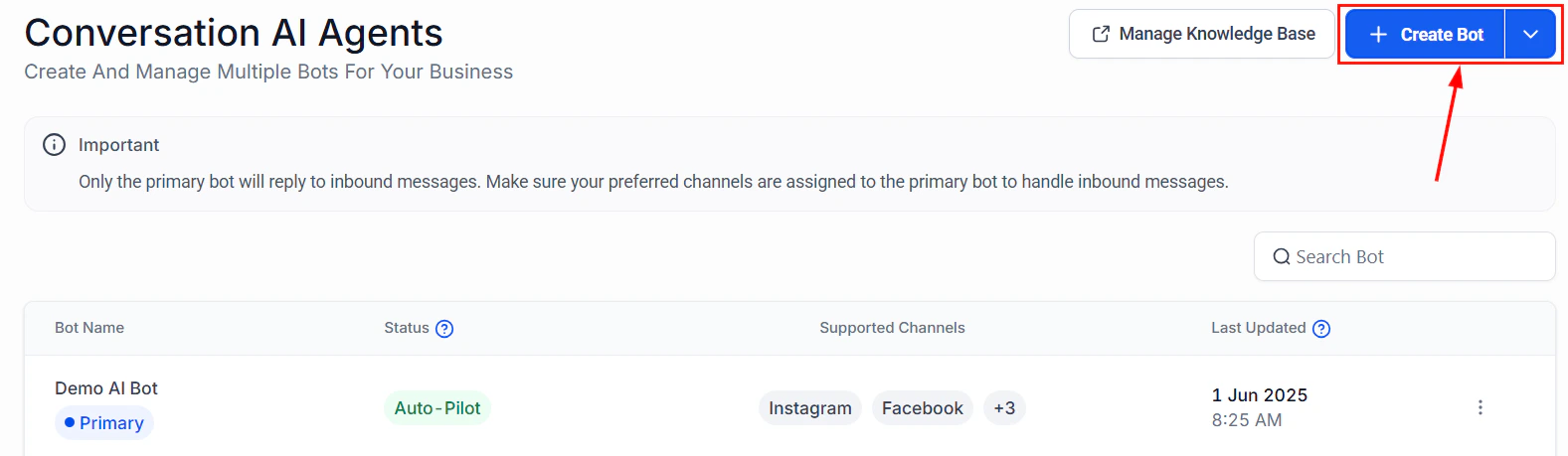
Navigate to Conversation AI from the AI Agents tab or your account settings, then click Create Bot.
There you have it! Use these steps to build bots that think and act like your business, using the intuitive visual design to manage multiple calendars, lead types, and workflows from one interface with deeper logic and tighter integrations. We hope you enjoy it!
***
## Creating a guided form bot
The Guided Form Bot is a simplified bot creation method within Conversation AI. Instead of writing custom prompts, you can complete a guided form that defines the bot's objectives and key behavior. Behind the scenes, the system generates an intelligent, logic-based conversation flow tailored to your needs. Read on to learn how to launch effective AI interactions quickly, without requiring deep technical or conversational design expertise.
### Key Benefits of the Guided Form Bot
* \*\*\*\*No Prompt Writing Required: \*\*\*\*Skip manual scripting and let the system build the conversation for you.
* ****Fast Setup:**** Build a fully functional bot in under 3 minutes.
* ****Smart Responses:**** Logic-based replies customized to your objectives.
* ****Lead Capture & Qualification:**** Collect contact data, schedule calls, and qualify leads with ease.
* ****Reusable Templates:**** Save time by reusing bots across different campaigns.
* ****Seamless Integration:**** Connects easily with workflows, tags, and channels within your account.
## How to Set Up the Guided Form Bot
### Access the Bot Builder
Navigate to Conversation AI from the AI Agents tab or your account settings, then click Create Bot.
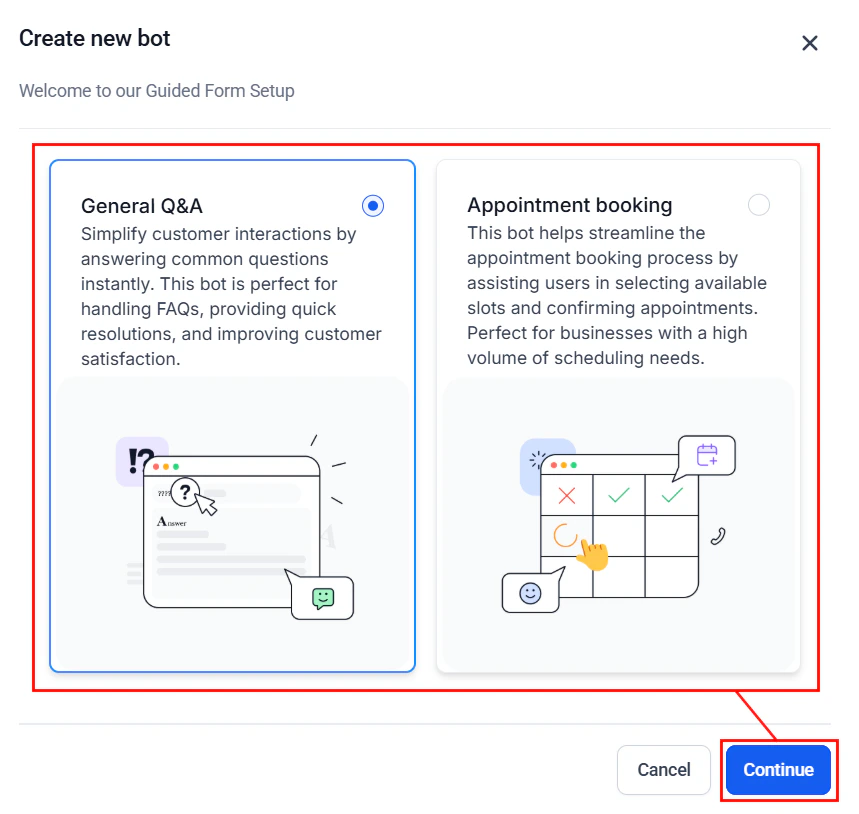
 The Guided Form interface will open by default. From here, select the type of bot you wish to create—either a General Q\&A Bot or an Appointment Booking Bot. For the purposes of this guide, we will proceed with the General Q\&A Bot configuration.
 ### Input Brand Information
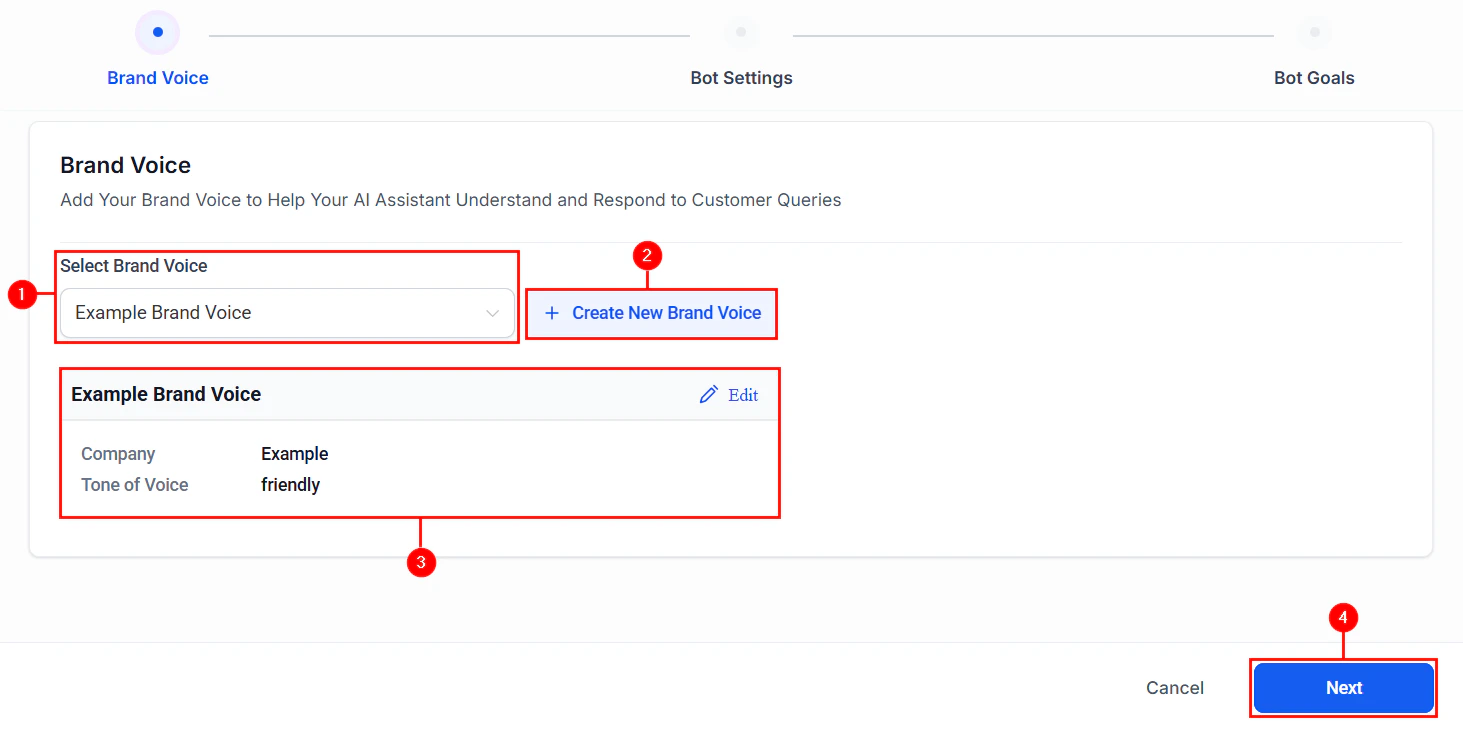
Select an existing Brand Voice from the dropdown menu (1), or create a new one tailored to your needs (2). The Company Name and Tone of Voice will appear in the preview window and can be modified directly within this view (3). Once you've confirmed your selections, click Next to proceed (4).
Supplying brand-specific details helps ensure the AI communicates in a tone and style that aligns with your brand identity.\*\*
### Input Brand Information
Select an existing Brand Voice from the dropdown menu (1), or create a new one tailored to your needs (2). The Company Name and Tone of Voice will appear in the preview window and can be modified directly within this view (3). Once you've confirmed your selections, click Next to proceed (4).
Supplying brand-specific details helps ensure the AI communicates in a tone and style that aligns with your brand identity.\*\*
 ### Configure Basic Bot Settings
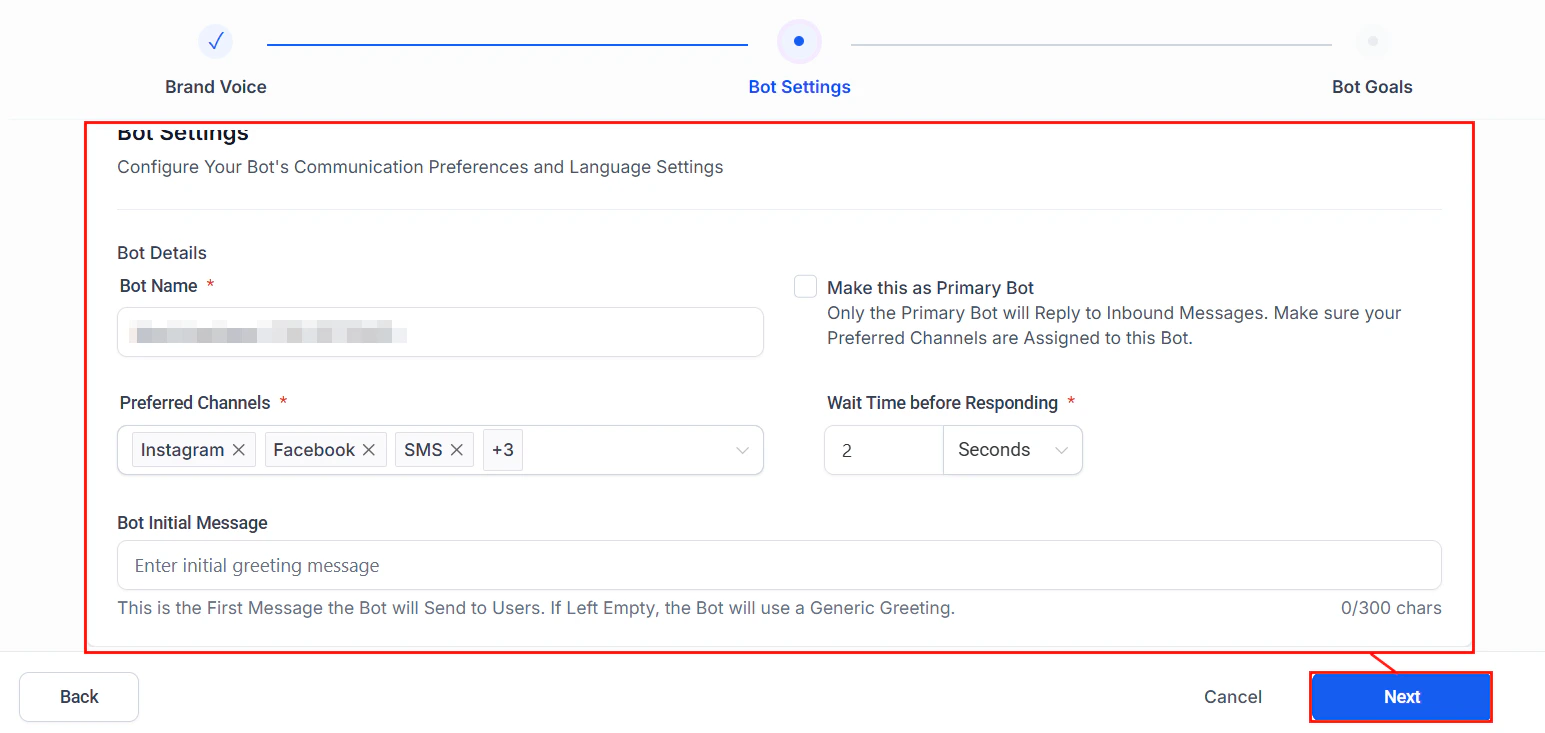
Define how the bot interacts with users:
* **Bot Name**\*\*: Assign a name that reflects your brand or creates a friendly, approachable identity for the bot.
* ****Preferred Channels****: Select the communication channels where the bot will be active (e.g., SMS, WhatsApp, Instagram).
* ****Set as Primary Bot****: Enable this option to designate the bot as the default for handling incoming conversations across selected channels.
* ****Wait Time Before Responding****: Set a delay before the bot replies, to simulate a more natural response cadence.
* ****Initial Message****: Define the first message users will see when the conversation begins; this sets the tone and invites engagement.
Once these fields have been completed, click Next to go to the final step.
### Configure Basic Bot Settings
Define how the bot interacts with users:
* **Bot Name**\*\*: Assign a name that reflects your brand or creates a friendly, approachable identity for the bot.
* ****Preferred Channels****: Select the communication channels where the bot will be active (e.g., SMS, WhatsApp, Instagram).
* ****Set as Primary Bot****: Enable this option to designate the bot as the default for handling incoming conversations across selected channels.
* ****Wait Time Before Responding****: Set a delay before the bot replies, to simulate a more natural response cadence.
* ****Initial Message****: Define the first message users will see when the conversation begins; this sets the tone and invites engagement.
Once these fields have been completed, click Next to go to the final step.
 ### Define Objectives and Questions
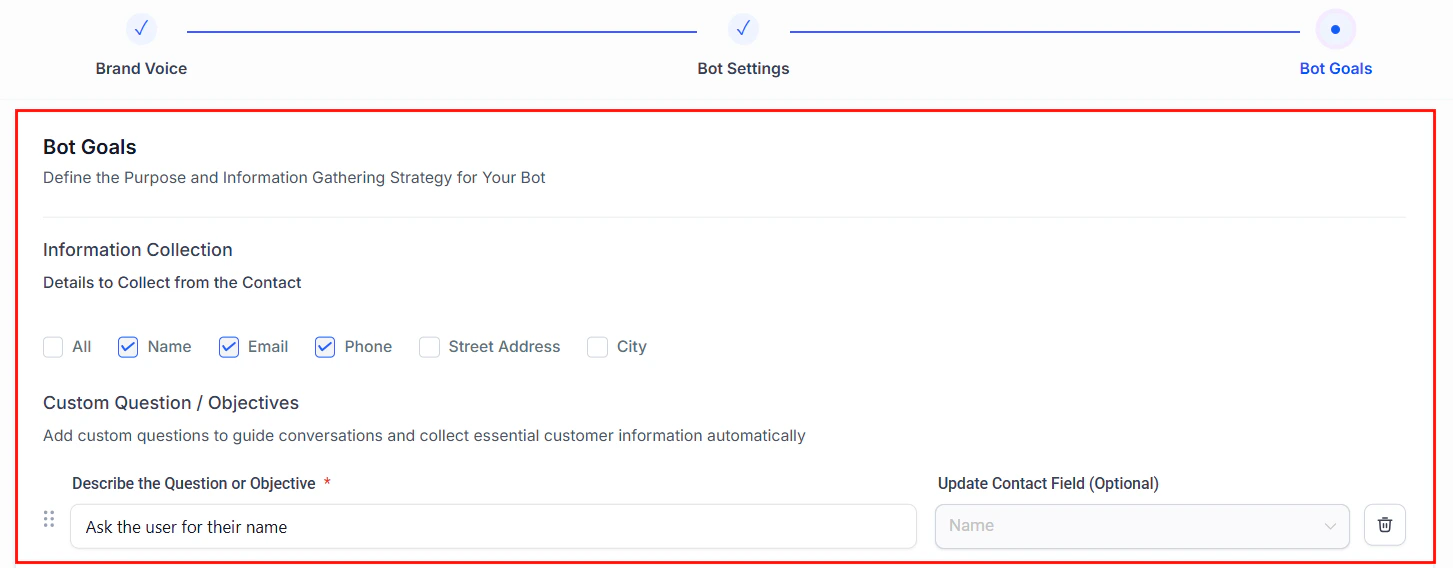
In this step, define the specific objectives you want the bot to achieve. For example, you can add custom questions to collect user information such as name, phone number, or email address—ensuring each response is accurately mapped to the appropriate fields within your CRM.
### Define Objectives and Questions
In this step, define the specific objectives you want the bot to achieve. For example, you can add custom questions to collect user information such as name, phone number, or email address—ensuring each response is accurately mapped to the appropriate fields within your CRM.
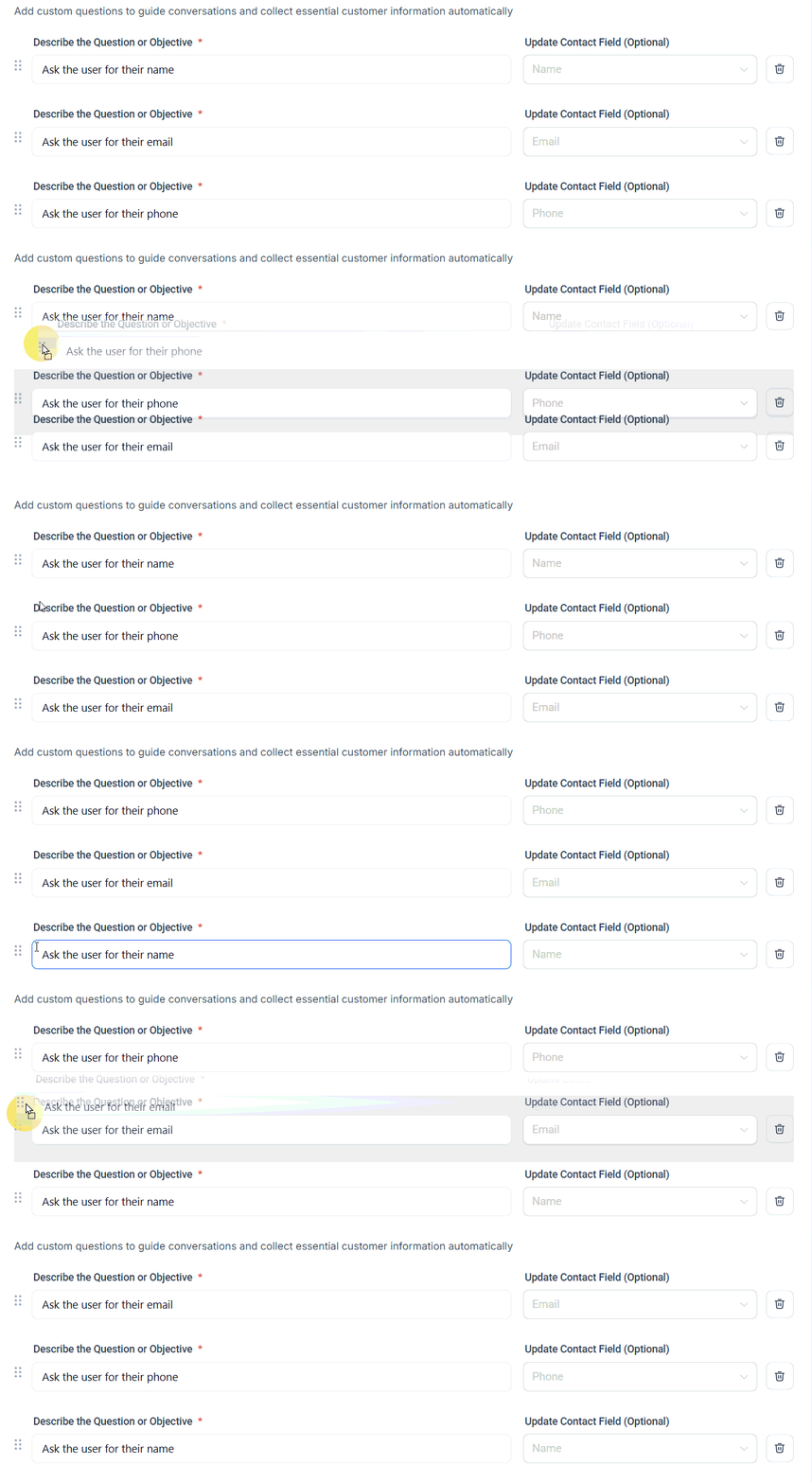
 Rearrange questions using drag-and-drop or delete them by clicking the associated trash can.
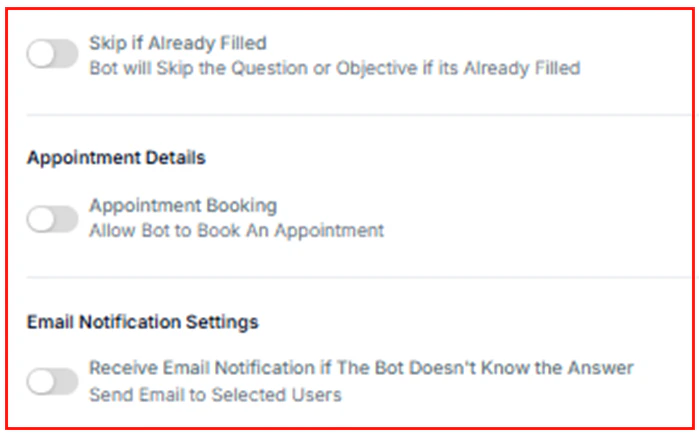
 Additionally, you can enable the Skip if Already Filled option to prevent the bot from requesting information that has already been captured. You may also configure the bot to book appointments on behalf of customers or send an email notification to designated users when it encounters a question it cannot answer.
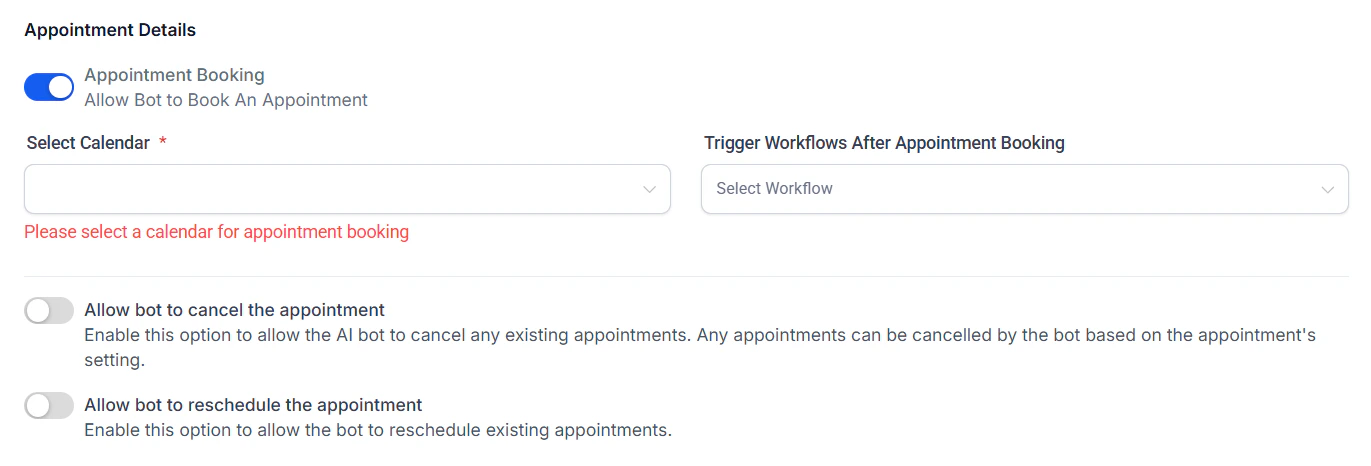
 For Appointment Booking Bots, selecting a calendar is required to manage scheduled bookings. You may also optionally assign a workflow from the dropdown menu to be triggered upon appointment confirmation. Additionally, you can enable options to allow the bot to cancel or reschedule existing appointments based on user requests.
 Confirm all configurations, then click Save to launch your bot!
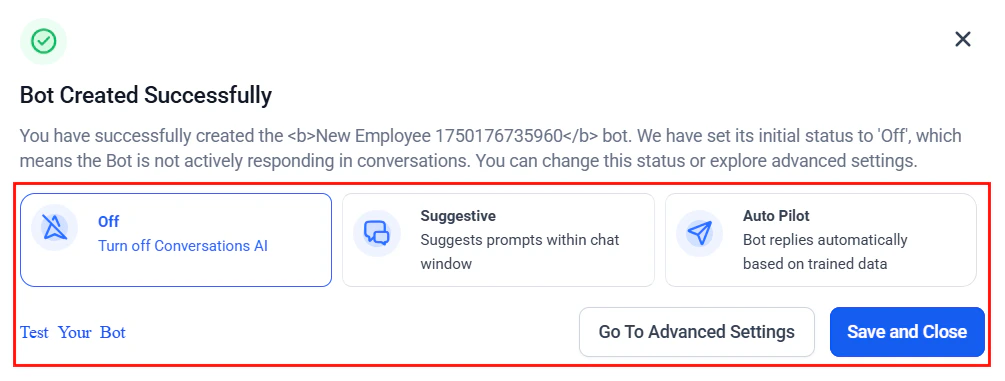
 Once your bot is live configure the behavior type in the popup window and use the preview window to simulate conversations. You can also go to the Advanced Settings to view and manage other bot configurations.
 Additionally, you can monitor engagement by tracking user interactions in the Conversation tab, and integrate the bot with Workflows to automate actions based on user responses. Furthermore, create bot variants tailored to specific use cases such as customer support, lead generation, or event registration to maximize effectiveness across different scenarios.
The Guided Form Bot empowers you to launch intelligent, branded chatbot experiences without technical friction. Whether you're enhancing lead capture, automating replies, or personalizing outreach, this setup method ensures you can deliver impactful conversations—quickly and reliably.
## Frequently Asked Questions
Yes. Use the dropdown next to "Create Bot" to choose either method.
You can configure the bot to retry, skip, or end the conversation.
Yes, as long as the channel is integrated into your account.
Additionally, you can monitor engagement by tracking user interactions in the Conversation tab, and integrate the bot with Workflows to automate actions based on user responses. Furthermore, create bot variants tailored to specific use cases such as customer support, lead generation, or event registration to maximize effectiveness across different scenarios.
The Guided Form Bot empowers you to launch intelligent, branded chatbot experiences without technical friction. Whether you're enhancing lead capture, automating replies, or personalizing outreach, this setup method ensures you can deliver impactful conversations—quickly and reliably.
## Frequently Asked Questions
Yes. Use the dropdown next to "Create Bot" to choose either method.
You can configure the bot to retry, skip, or end the conversation.
Yes, as long as the channel is integrated into your account.